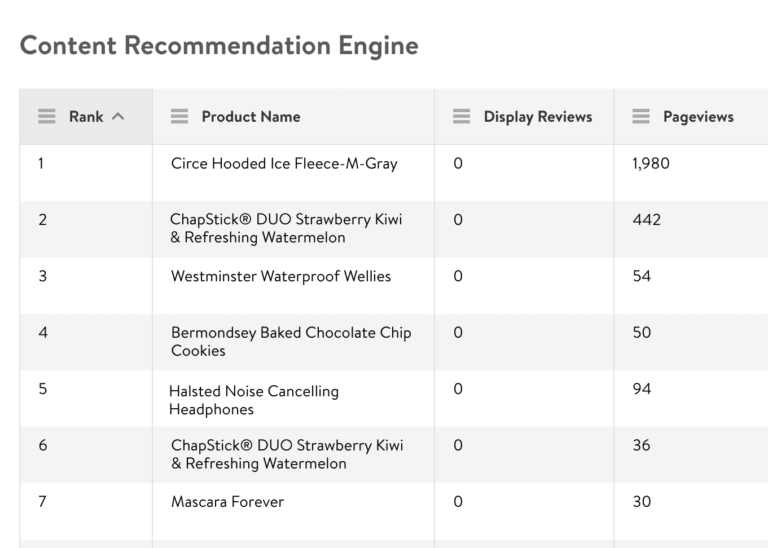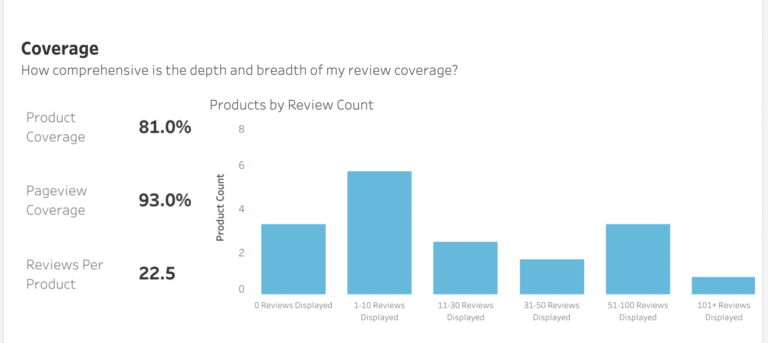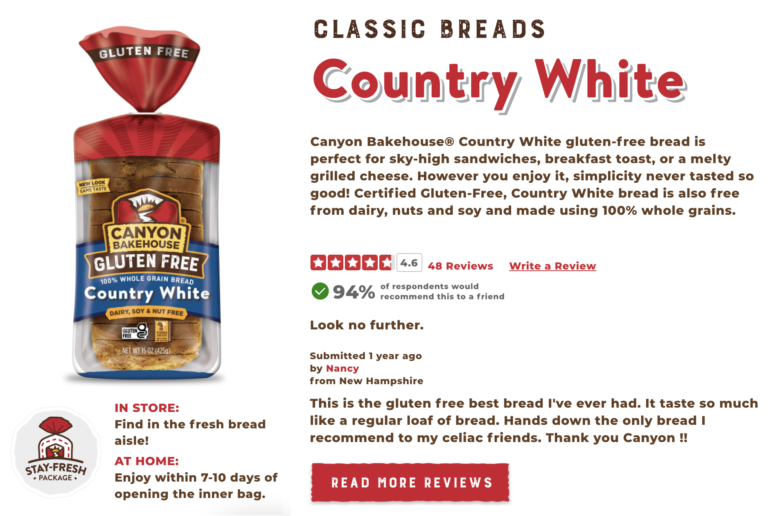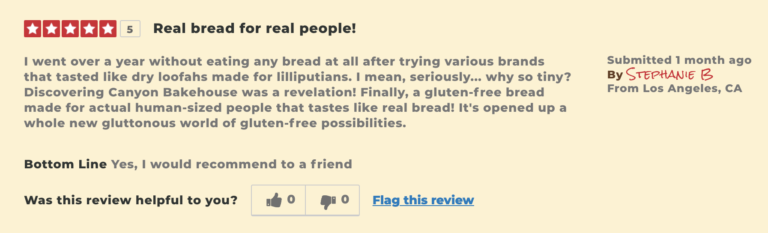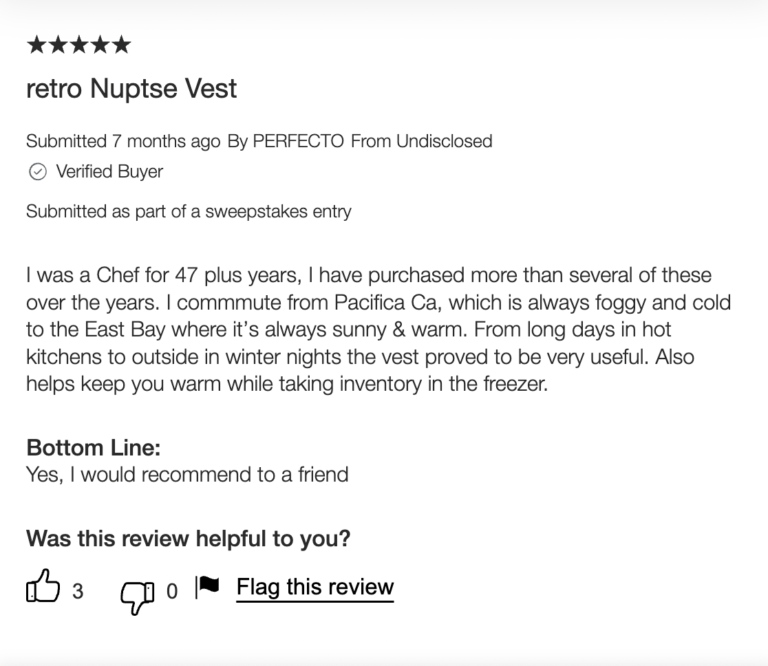
Benchmarks based on existing Ratings and Reviews data from brands selling on Walmart.com.

Walmart is a commerce giant whichever way you slice it – and Walmart.com is an absolutely critical sales channel for many brands. So standing out when competition is so severe is a huge challenge.

Your review footprint on Walmart.com – therefore – can be the difference between winning and losing. We analyzed more than 1M product reviews from 550+ brands on Walmart.com to outline the specific benchmarks you need to know.

Check out the ungated report to find out:

(No form fill required!)
Over the past few years, an unprecedented number of consumers have switched brands or retailers, and nearly 80% of consumers plan to continue exploring their options moving forward.

With customer loyalty at an all-time low, competition is steeper than ever. To thrive in today’s crowded ecommerce environment, brands must have a deep understanding of their target customer, and how well they are meeting their needs.

Fortunately, reviews – when analyzed in the appropriate manner – contain a lot of the information you need to understand and improve your products. Here are the seven top insights you can glean:

1. Discover how customers feel about your products

Let’s start with the most obvious benefit: understanding how your customers feel about your products. You can see the top words and phrases customers use when describing your product, and the associated sentiment. This information is crucial for understanding the voice of your consumer (which has applications throughout your marketing efforts). It can also help you discover the quirks of your products that create positive sentiment. 

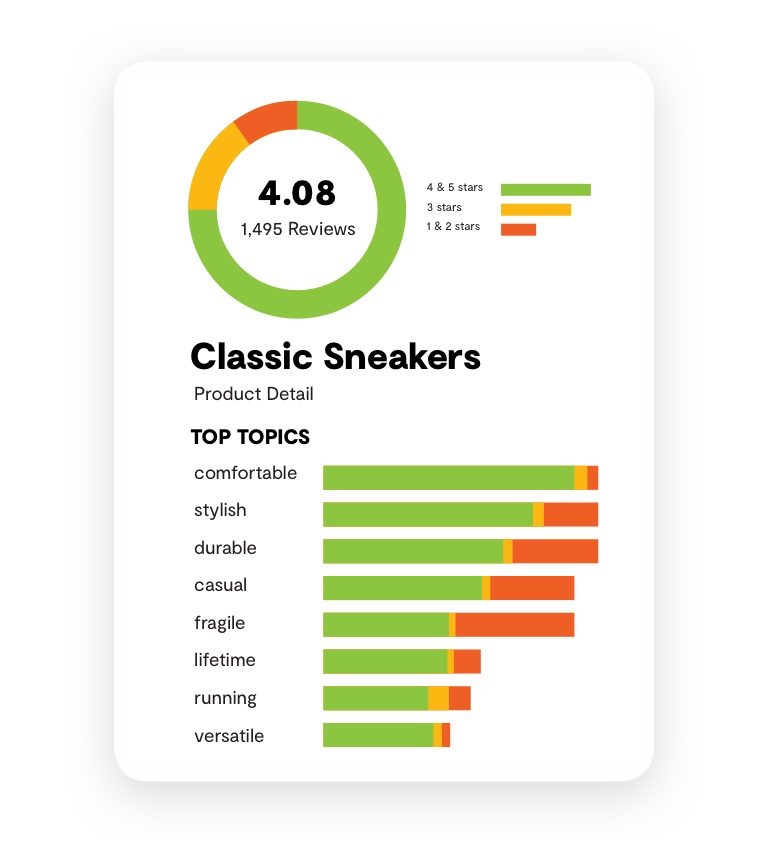
For example, we can see that adjectives like comfortable and versatile are highly associated with positive sentiment for this hypothetical shoe. While words like durable and casual also tend to have positive sentiment, those words also appear in reviews with negative sentiment — suggesting perhaps that consumers may disagree on whether the shoe really is durable, or some may view the casual style as a positive while others view it as a negative.

product pulse insights on sneakers

2. Hone in on the right keywords for SEO and Google advertising

Knowing the words your consumers use can also help you reach them more effectively in the search results. Are you targeting the right keywords in Google Ads, based on how your customers search for products like yours? Does your product description tell the best story for SEO? Product Sentiment Analytics can help you find out. 

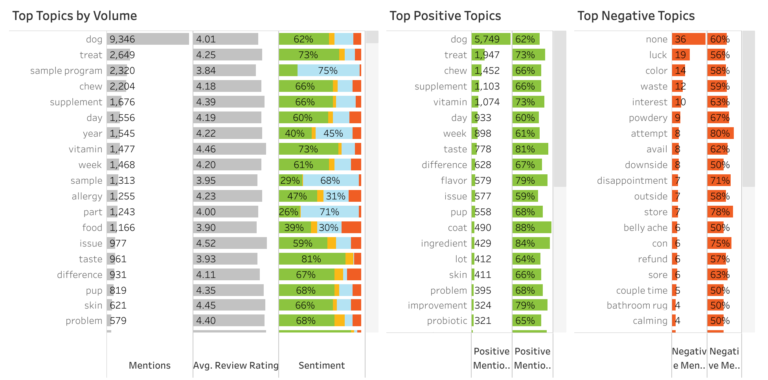
In the example below, we see that customers positively refer to a product as a dog treat, chew, supplement and vitamin, even though the product itself may be described as a supplement. By adding those additional descriptors into the product description — and targeting them in Google Ads — the brand can reach more potential customers.

3. Highlight the products and features your customers like most

In addition to boosting your SEO efforts, review content can point you toward key features you should highlight throughout your marketing. 

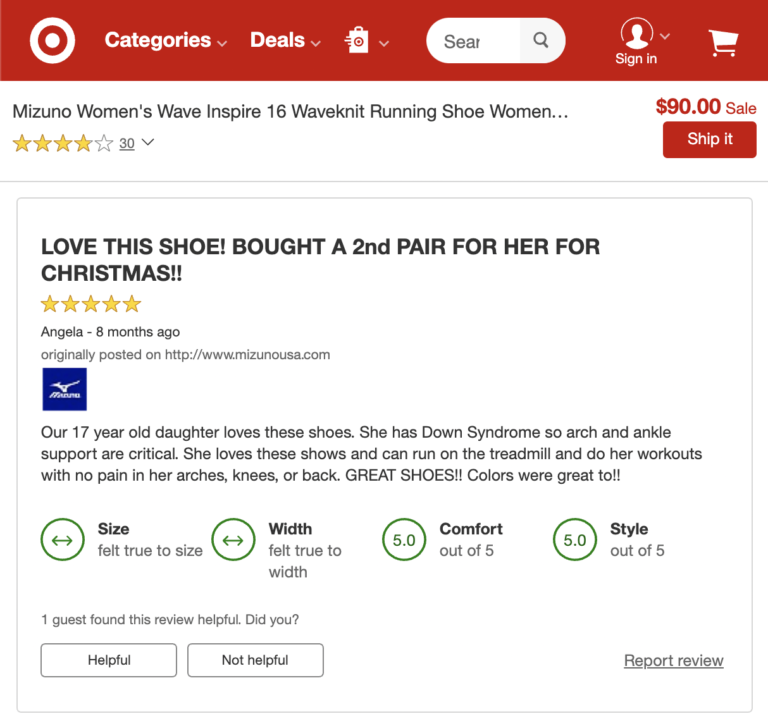
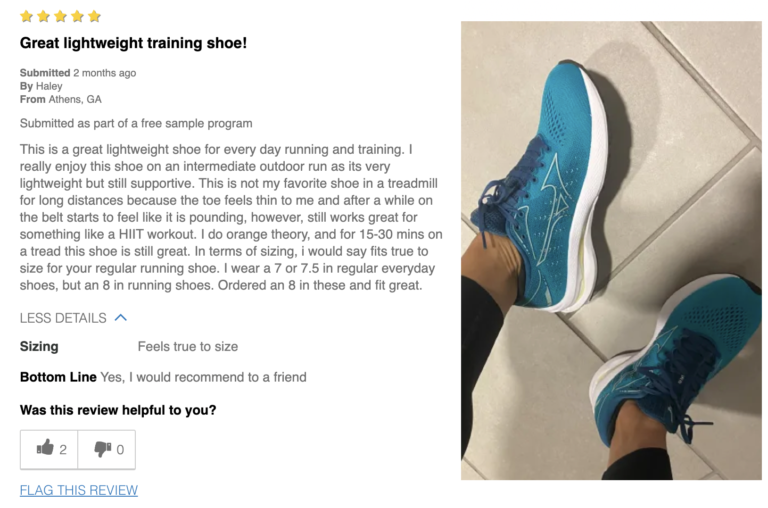
For example, take the review below. If phrases like “arch support” and “treadmill” frequently show up in rave reviews for a pair of shoes, it may be worth incorporating those benefits in your marketing for that product, such as showing a person running on a treadmill in a Facebook post or a YouTube ad.

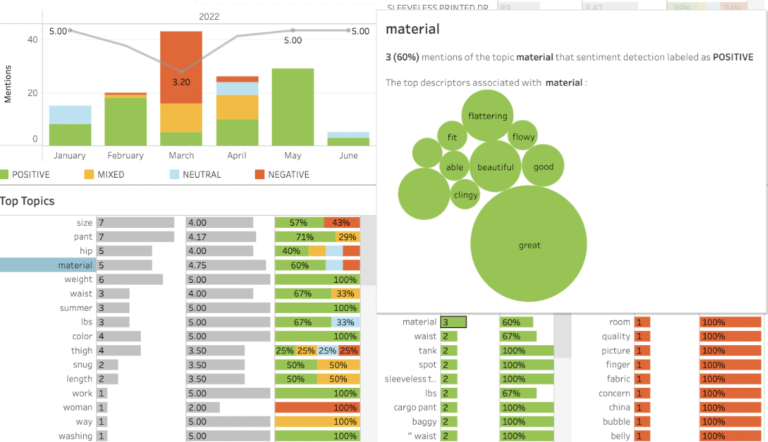
Need more inspiration for how to promote a particular feature customers love about your products? Our Product Sentiment Analytics tool lets you dig even deeper. In the example below, customers generally speak positively about the product’s material.

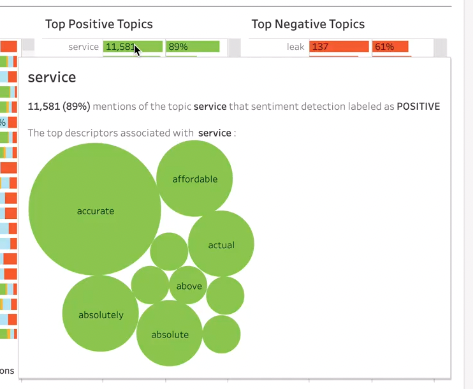
By clicking on the word material, you can see the top descriptors associated with that word. This product has a flattering fit and makes people feel great and beautiful. Those are great points to include in your product description and marketing!

4. Use top descriptors to focus on your next product innovation

Reviews can be treasure troves of product feedback. Mine them, and you’ll find ideas to spark your next product enhancement. 

Going back to our dog treats example, it looks like some consumers have issues with the color and the powdery texture. Those are two insights you can take back to the product development team to see if version 2.0 of the dog treats can better meet your customers’ needs.

5. Identify and resolve issues before they get worse

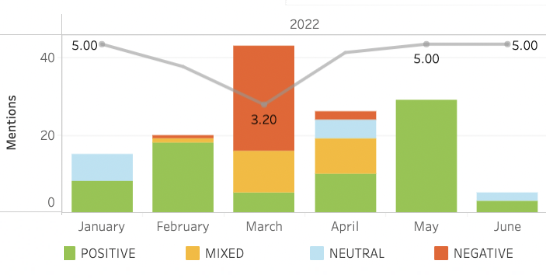
Speaking of customer complaints, negative sentiment can be a veritable “canary in the coal mine” for your brand. A good start: tracking changes in sentiment over time. If you notice dips in sentiment or an increase in negative sentiment, look into it. Did something change with your manufacturing process? 

Are sales for an item lower than expected? It’s possible your customers found a flaw that needs to be addressed. Take a look at the top descriptors associated with negative sentiment to hone in on the issue.

By the same token, you can also use this report to see if sentiment improves after you’ve implemented a product improvement.

6. Launch new products with success

There’s always a bit of guesswork involved when it comes to marketing a new product. Sure, it’s educated guesswork, likely based on user research or what you know works for similar products. But still, you don’t know 100% how a new product will resonate with consumers.

Sampling campaigns are a commonly used tactic to boost review volumes and gain consumer buy-in to new products. Measuring the sentiment of these reviews enables you to adjust your go-to-market strategy to make the subsequent launch more successful, answering questions like:

  • What are our customers’ favorite features about this product?
  • What words and phrases should we use when talking about this product?
  • Are there any issues we should fix before launching the product nationwide?

7. Compare sentiment across products, categories, and brands

Also use review data to compare and contrast customer sentiment across your various brands, categories, and products. 

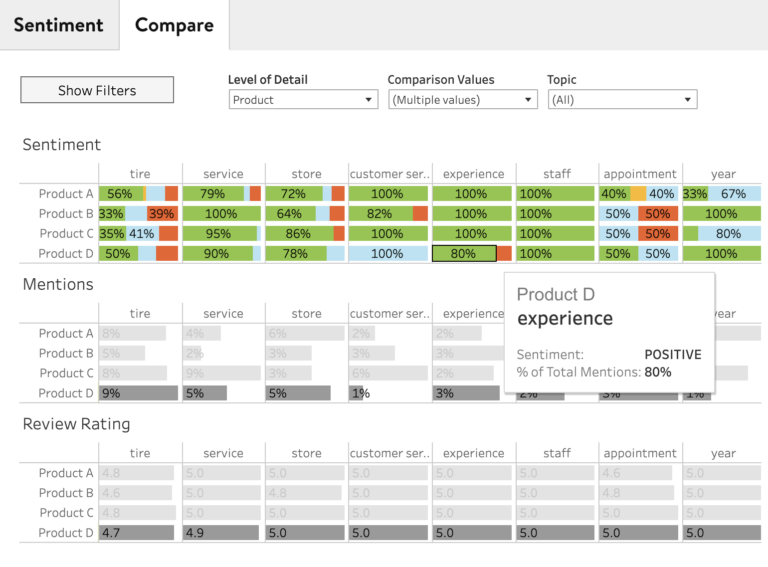
Let’s say your company sells tires. Your newest tire, Product D, seems to be struggling but you’re not sure why. So, you compare it against three of your best-selling tires. In your Product Sentiment Analytics, you notice that Product D has more negative sentiment around experience than your other tire products.

This may signal an area where you may need to make a change. You can investigate further to see whether the reviews that mention a negative experience with Product D are talking about your customer service, the installation experience, or an experience driving out on the road — and make improvements accordingly. 

Improve product performance with Product Sentiment Analytics

Think this insight might be helpful? Product Sentiment Analytics can help you tap into the voice of your customers, optimize your product marketing strategy, and make product improvements that benefit not only your ratings and reviews program, but your bottom line.

If you’re a current PowerReviews customer, great news: you can access all of these metrics in your reporting for free. Not yet a PowerReviews customer? Learn how we can help you do more with UGC.

Savannah Claspell

Savannah is an Enterprise Customer Success Manager, passionate about using data and analytics to empower brands to grow their business. When she isn’t helping brands increase and leverage their UGC you can find her deep in a good book, running, or mountainside skiing.

Ratings and reviews are a key indicator of how consumers feel about your brand and your product. They also have a huge impact on conversion, with shoppers who interact with ratings and reviews converting at more than double the rate of those who don’t. 

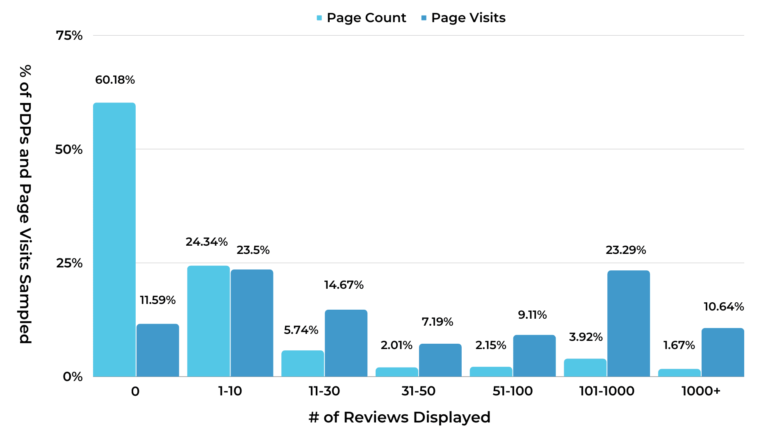
In addition to boosting conversions, user-generated content (UGC) also increases web traffic volumes you drive to your product pages. Our research shows that product detail pages (PDPs) with no reviews account for 60% of all PDPs across the Internet. But these pages only capture 12% of all web traffic. By contrast, PDPs with more than 100 reviews account for 5% of all PDPs. But these pages capture 33% of web traffic.
Factors like review volumes and average rating of course improve traffic volumes. But – in addition – there are some incredibly meaningful nuggets of information you can extract from your review content to further boost SEO and – in turn – eyeballs on your product pages.

Beyond these immediate benefits, analyzing your UGC can also yield valuable insights into how to improve your SEO even further. Insights like:

  • What keywords are we missing from our product pages?
  • How do we add more keyword-rich content to our product pages?
  • How do we improve our rankings on other retailers, like Amazon?

Having the answers to these questions — and taking action on them — can make a huge difference in how you show up in the search engines, and how many shoppers you convert. Fortunately, you can find these answers easily with UGC analytics, so long as you know what to look for. 

Read on as we share seven UGC metrics to watch to improve your web presence, both on your own website and that of your retail partners.

1. Top Review Search Terms

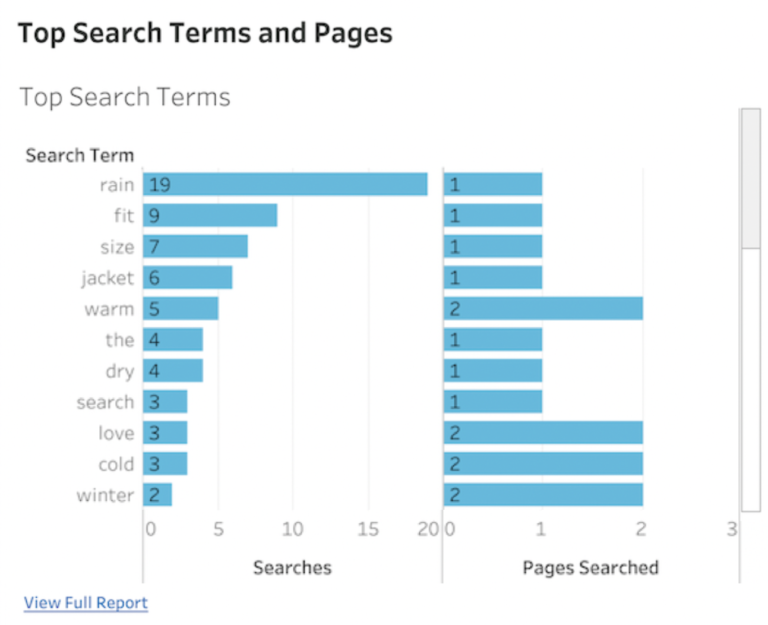
The Review Search Report reveals the most popular search terms consumers are entering into the search box on your Review Display.

These search terms represent key details that shoppers want to know — some of which may currently be missing from your product description. Adding this information to your product display pages can help shoppers find the information they’re looking for faster. These search terms may spark ideas for product improvement as well.

Regularly review the top search terms and ensure you’re addressing these keywords throughout your product display page to improve your rankings in Google

2. Products With Zero or Few Reviews

These are products with either no reviews or a low review count.

Adding just one review to a product page with zero reviews can lift conversion by 52.2%. Increase that to more than ten reviews, and the conversion rate lifts by 102.9%. Plus - as we already outlined above -  Google searchers are considerably less likely to click on a search result that has zero reviews. Pages that have zero or few reviews not only have a tougher time converting customers, but ranking well in Google and catching shopper attention on retailer sites.

Products with zero or few reviews are prime candidates for a dedicated review generation initiative.

3. Review Coverage

Review coverage describes how many of your product pages have at least 1 review. The closer this is to 100%, the better.

80% of consumers say they’re less likely to buy a given product if it has no reviews. The amount of content on a product page can heavily influence not only the trust a customer has in the product and their likelihood to convert, but also the search engine ranking of the page.

Generate new reviews consistently with a post-purchase email campaigns. As new reviews come in, keep an eye on the top search terms to see what words you can add to your page to grab Google’s attention.

4. Review Sentiment

Sentiment describes how consumers feel about your products, be it positive or negative.

By diving into review sentiment analysis, you can gain insights into what's most important to your customers, and what they love or hate about your products. With that information on hand, you can take action to improve sentiment, conversions, and more. 

Consider how people talk about your product to determine the language you should include in product descriptions. For example, features associated with positive sentiment may deserve a more prominent spot in your product description and highlights. On the flip side, if shoppers frequently complain about a particular feature, that may be an opportunity for a product improvement.

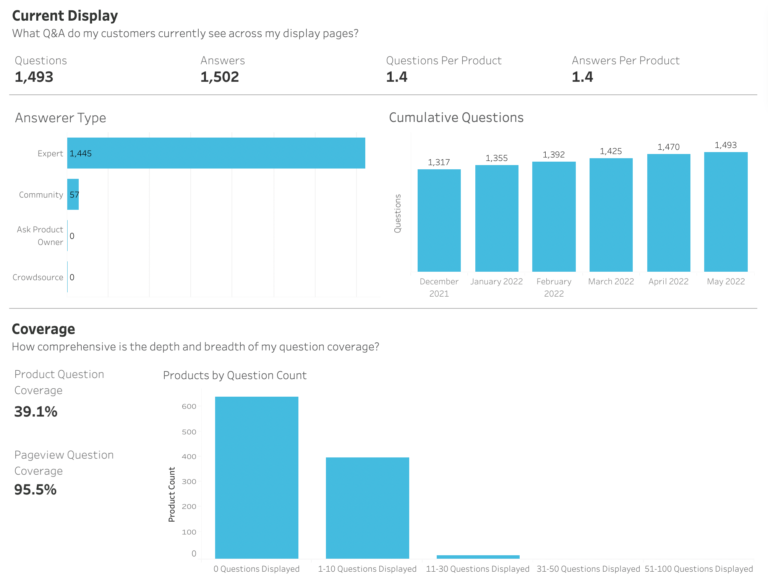
5. Q&A Coverage

Q&A coverage describes the amount of Questions & Answers content you have across your site and on each of your product pages.

With a stunning 194.2% lift in conversion among visitors who interact with it, Q&A is the most powerful form of UGC. Q&A can answer questions that aren’t covered in your product description, or that perhaps you didn’t realize your customers were asking. Plus, more Q&A means more keyword-rich content for Google on your product pages, which can help boost your visibility in the search engines.

Users aren’t the only people who can submit Q&A; brands can, too. Launch all new products with at least a few seed questions to fill out this space, encourage interaction, and provide more content to Google.

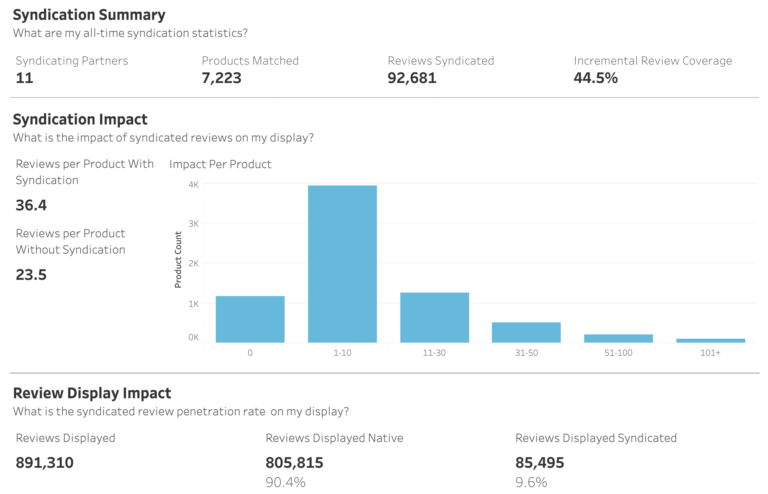
6. Syndication Performance

Syndication performance provides an overview of the review content you share to your retail partners, and the impact those syndicated reviews have on specific partners’ websites. 

Syndicating your reviews helps to lift conversions for your products on retail partner websites. It also improves the rankings of those product pages in the search results, improving overall visibility for your brand.

By reviewing your syndication performance, you can see which partners are struggling with review coverage, and spin up a dedicated sampling or sweepstakes campaign to generate more reviews for that partner.

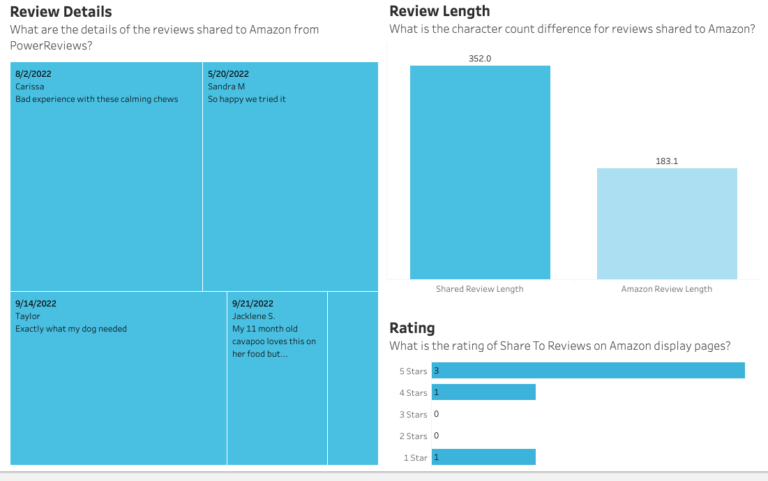
7. Share to Amazon Report

At PowerReviews, shoppers can publish the reviews they submit to your site to Amazon with the click of a button. This report shows key metrics related to your Amazon reviews, including the total number of Amazon reviews for your products and the percentage of reviews shared from your site to Amazon, so you can understand how many customers are using this feature.

Taking a look at the Review Length and Review details within the report can show you the quality of reviews you collect on your own site versus organically on Amazon. Review length is something consumers care about, with nearly 70% regularly seeking out longer, more detailed reviews.

If your Amazon reviews tend to be shorter than the ones collected on your own website, enabling the Share to Amazon feature can improve your presence on Amazon. 

Improve your web presence with UGC analytics

Analyzing your UGC can not only improve your native review collection, but also lead to improved rankings in the search engines — and the increased traffic and conversions that come along with it. Improve your brand presence, both on and off your website, with UGC analytics.

If you’re a current PowerReviews customer, great news: you can access all of these metrics in your reporting for free. Not yet a PowerReviews customer? Learn how we can help you do more with UGC.

Anna Van Orman

Anna is a Corporate Customer Success Manager who enjoys working with her clients to help them collect and utilize quality User Generated Content and grow their brands. Outside of work she likes to spend time with her dog Ranch, and enjoy exploring Chicago.

There’s a saying that change is the only constant in life. It may be cliche. But it rings true, especially for brands and retailers.

Styles change. Technology evolves. Customers’ needs, values, priorities, and expectations are always in flux. It can be hard to keep up! 

Brands and retailers must constantly innovate to keep pace with these changes and continue to meet consumers’ ever-evolving needs and expectations. One key way brands and retailers innovate is by releasing new product offerings on a regular basis. According to Clayton Christensen, former Harvard Business School professor, 30,000 new consumer products are launched each year. 

But developing a great product doesn’t guarantee it’ll fly off the shelves and be wildly successful. Per that same professor, up to 95% of new products fail.

Pretty disheartening, huh? But it’s not all gloom and doom for brands and retailers. We promise.

Of course, there are myriad factors that contribute to the success (or failure) of a new product. Some of those factors are out of your control. But a lot of others are in your control. 

In fact, we have identified four key best practices for launching any new product. These are intended to provide you with the focus necessary to drive meaningful impact. By adopting these proven practices, you’ll set yourself up for the most successful product launch possible.

Best Practice #1: Collect Reviews with Product Sampling

Research tells us nearly all consumers read reviews at least sometimes when shopping online. And 57% do so when shopping in brick-and-mortar stores. 

Sure, a consumer may be less likely to check reviews when purchasing habitual products, such as their go-to toothpaste, cereal or mascara. But if they’re considering a new product, they’ll seek out reviews. And if they come up short, they’re likely to pass. A recent survey found that 80% of consumers are less likely to purchase a product if it doesn’t have any reviews. 92% of Gen Z shoppers say this is the case.

And the interaction numbers back this up. A solid review footprint = more traffic to your product pages and higher conversion rates among that traffic.

As such, it’s essential to launch new products with reviews already in place. But how can you get reviews for products you haven’t yet launched? Through product sampling.

How Product Sampling Works

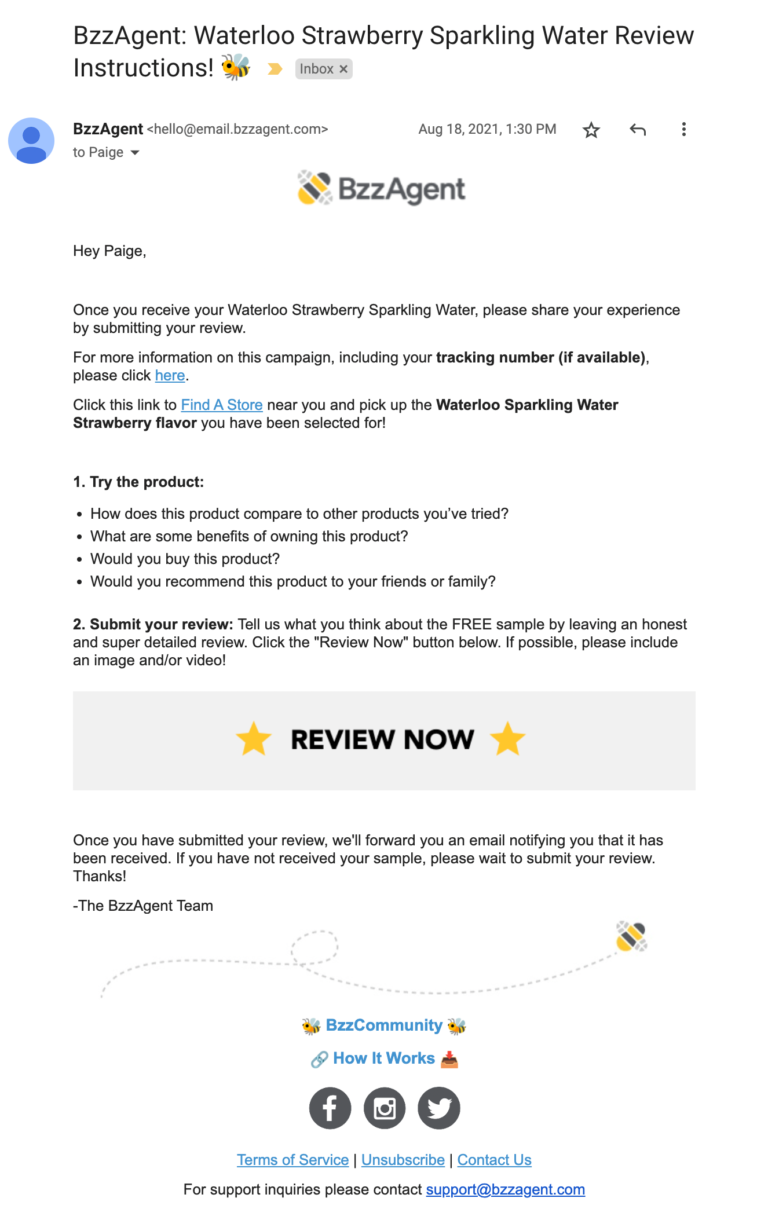
Product sampling involves sending out free samples of a product, and then asking for reviews from those who received a sample. The reviews are then displayed on your product page when you launch your new product. 

Product sampling is a great option if you’re launching a new product on your own direct-to-consumer site.

However, you should also consider product sampling if you’re launching a new product that’ll be available on a retailer’s site.

Retailer-only campaigns work similarly. But instead of displaying reviews on your own dot com, the content is displayed on your retail partners’ sites – boosting shopper confidence there. 

Product Sampling Works Across all Product Categories

Product sampling is really simple – especially if you work with the right sampling partner. But it’s also a really effective way to collect a large volume of high quality content – fast. 

At PowerReviews, we see an average submission rate of 85% on our product sampling campaigns. That means you can expect to generate about 8.5 reviews for every 10 products you send. Some of our customers have even higher submission rates.

And the reviews that result from the campaign are high quality. In fact, reviews that result from PowerReviews sampling campaigns are an average of 29% longer than those generated from other sampling programs. 

When you hear the phrase “product sampling,” you might think of low cost consumer packaged goods, like toothpaste or shampoo. But the reality is, product sampling can be effective across a wide range of product categories.

Here at PowerReviews, we’ve planned and executed pre-launch product sampling campaigns for products ranging from makeup and sparkling water to strollers and mattresses – and everything in between. 

Time Your Product Sampling Campaign Right

It’s important to time your sampling campaign right. A best practice is to launch your sampling campaign at least 10 weeks ahead of your planned product launch. That way, you have enough time to identify your sampling audience, send out samples, and request reviews. Again, the right sampling partner will do all the heavy lifting for you. 

Once your campaign has wrapped, you’ll have plenty of reviews to display on your product page on the day you launch your new product. This content will boost shoppers’ confidence – and increase their likelihood of giving your new product a try.

Collect Visual Content, Too

Chances are, you’ve taken beautiful photos and videos that showcase your new product in the best light. This content is important; but increasingly, consumers want to see photos and videos from others like them. 

A survey found that over three-quarters (77%) of consumers always or regularly look for visual content from other shoppers who have purchased a product. And a third of Gen Z shoppers won’t buy a product if there are no user-generated photos or videos available for it. 

If user-generated visual content is important to you (and it should be), consider collecting it as part of your product sampling campaign. Those who sampled your new offering should be able to easily upload a photo or video of the product in action right from the review submission form. 

Analyze Review Data to Enhance Products

A key benefit of product sampling is that it allows you to display a high volume of quality reviews as soon as you launch the product. This content increases the likelihood a consumer will purchase your new product.

But another benefit is that reviews generated during a pre-launch product sampling campaign provide you with a ton of data. You’ll get rich insight into what consumers love about your new product – and things that aren’t so great. Then, you can share these insights with your product teams to fuel product enhancements – either before launching the product or later on down the road. 

Best Practice #2: Perfect Your PDPs

A consumer’s path to purchase might start from any number of places. Perhaps they’re actively searching for a solution to a need – and start the search on Google. Or maybe a social media ad catches their eye while mindlessly scrolling.

Getting the shopper to click through is the first step. Now, the next challenge is to get them to convert. 

The product details page (PDP) for your new product can either make or break the sale. So it’s important to get it right.

A Mobile-First Design

According to Oberlo, more than half (53.74% to be exact) of web visits are from a mobile device. What’s more, per Insider Intelligence, mobile commerce (aka mcommerce) is expected to account for more than 44% of total retail ecommerce sales in the US by 2025. 

It’s imperative to ensure mobile shoppers have a great experience on your product pages and can easily find and consume all the information they need to make an informed purchase decision. If your PDPs aren’t mobile-first, you’re going to lose customers. 

Comprehensive Product Information

Online shoppers don’t have the luxury of seeing and touching a product prior to purchase. Instead, they rely on the product information on a PDP to fill the gaps. 

Be sure the PDP for your new product features plenty of product details, including:

In addition, be sure this information is organized in a way that’s easy for shoppers to consume.

A Winning Review Display

Reviews have become the most important factor when consumers are making purchase decisions. So it’s really important to showcase this content on the PDPs of your newly launched products. 

For starters, feature the average star rating and number of reviews “above the fold” on your PDPs. 77% of consumers consider the average star rating when reading reviews, and 75% consider the quantity. Seeing this content front and center will entice more shoppers to explore your new product.

However, it’s important to remember that 88% of shoppers always or regularly look beyond basic summary information to read the actual content of reviews. But they don’t want to read through every single review that’s available. Instead, they want to quickly hone in on the content that’s most relevant to them.

Make sure visitors to your PDPs can easily sort and filter reviews by factors including recency, star rating, helpfulness, and inclusion of visual content. In addition, be sure those reading reviews can filter content by specific factors that make sense for your brand. 

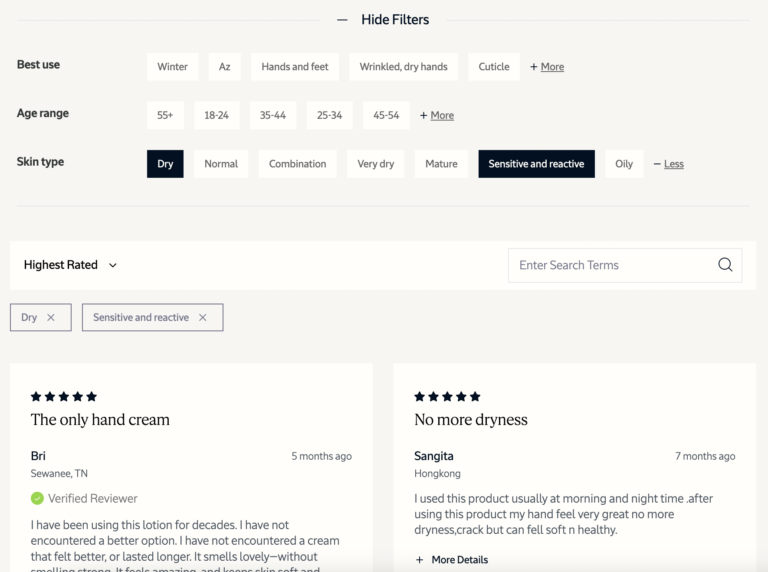
For example, if you’re a beauty brand, it makes sense to allow consumers to filter reviews by factors including skin type, skin concern, and age. If you’re an apparel brand, filtering options such as height and weight make sense. You can capture this information directly within the review submission form.

Finally, consumers value reviews because this content is written by others like them. So be sure to disclose who wrote reviews. For example, remember those reviews you generated from your pre-launch sampling campaign? Be sure to add a badge so future shoppers can easily see when a reviewer received a free sample. 

In addition, add a “verified shopper” badge when you know the reviewer bought the product in question. Research tells us 69% of shoppers say such a badge positively impacts how they perceive that review. 

Best Practice #3: Leverage Email Marketing as a Core Channel

There are plenty of tools out there that promise to get your products in front of more consumers in more places. But email remains one of the most effective.

According to HubSpot research, 77% of marketing pros have seen an increase in email engagement over the past year. What’s more, the ROI of email remains high. Per Litmus, marketers see a $36 return for every $1 spent on email marketing. 

Spread the Word with Email Campaigns

Plan and develop email campaigns to get the word out about your new product. Our own research found 36% of consumers are more likely to click through a marketing email if there’s information about a newly launched product. 

In addition, consider incorporating star ratings and excerpts from reviews you generated in your sampling campaigns into your email campaigns. Why? Because the presence of positive ratings and reviews in marketing emails increases the likelihood of click through for almost half (46%) of shoppers. 

Here’s a look at some other components that can help increase clickthrough in your email campaigns. 

Email Marketing Components That Increase Click Through
When you receive a MARKETING EMAIL from a brand or retailer, which of the following increases the likelihood that you will click through?
Price discounts or sales promotions
85%
Products that jump out to you
49%
Positive ratings and reviews
46%
Newly launched products
36%
Compelling images or videos of the product
30%
The brand promoted
22%
Celebrity or influencer endorsements
6%

Give Loyal Customers a First Look

Blanketing your entire email list with the same, generic  promotional email isn’t effective. Instead, segment appropriately. 

For example, make a list of your loyalty program members and frequent shoppers. These are the folks who should be the first to know about your new product. Send a targeted email that lets them know they’re seeing the product before everyone else. This feeling of exclusivity will entice them to learn more and ideally, convert. 

As an added bonus, those who get an early look at your new product are more likely to write a review after they’ve made a purchase. Our research on reviewer motives found that 85% of consumers are more likely to submit a review if they received a product before it’s sold to the general public. 

Best Practice #4: Promote on Social

These days, just about anyone with a mobile phone uses social media. According to the Pew Research Center, about seven in ten Americans use some kind of social media site. 

Consumers use social media to keep up with family and friends. But they also turn to social media sites like Instagram to get inspired and discover new products. A Statista study found that 77% of social media users indicate these channels help them get ideas about brands and products they’d never thought about before. And 71% say social media has inspired them to shop, even when they weren’t looking to do so. 

Clearly, social media is an important channel to incorporate into your product launch plan. 

Promote Your Product through Organic and Paid Posts and Stories

Be sure to promote your new products via your own social media channels. For example, create organic posts and stories on Instagram announcing the new product. Or, run paid promotions to increase your reach. Our research found that 34% of consumers are more likely to click on a social media post or ad from a brand or retailer if it has information about a newly launched product.

Incorporating star ratings and review excerpts for your new product can also catch the attention of more social media users. 47% of consumers say the presence of positive ratings and reviews in social media posts or ads increase their likelihood of clicking through.

Tap Into Influencers

Leveraging influencers can be a great way to get your new product in front of new audiences on social media. If there are influencers you already work with, send them samples of your new offering – and ask them to spread the word among their followers. 

In addition, encourage your happy customers to share photos and videos on Instagram by tagging your brand and using your hashtag. Again, this extends your reach.

What’s more, you can curate this visual content from social media – and then display it on your own product pages.

Go Forth and Launch Your New Product

Consumers may love your brand’s offerings today. But their preferences and expectations are constantly evolving. You’ve got to continuously innovate to keep up. One key way to do that is to develop and launch new products on a regular basis.

Creating a great product is the first step. But it doesn’t guarantee success. By following the four, proven best practices in this guide, you’ll set yourself up for a successful product launch.

How to get shoppers from start to finish –browsing to conversion.

Like a game of chutes and ladders, the modern customer journey is full of twists, turns and multiple channels. Below are some quick tips for brands based on our recent customer journey survey of ~13,000 US consumers.

Brand site lacks review coverage.
 
86% of shoppers won’t purchase products online without reading reviews.
 
Lack of customer pictures and videos.
 
49% consider customer-generated imagery when viewing a product page.
 
Infusing digital marketing with promotions, as well as ratings and reviews content.
 
76% of customers click on ads with discounts and promotions, and 47% click on ones showcasing positive reviews.
 
Having review coverage across retailers.
 
89% of shoppers begin their product search on Google, 88% on Amazon.
 

When it comes to UGC, there are a lot of industry benchmarks out there — from what’s considered an ideal star rating to the number of reviews customers expect to see (in fact, we extensively cover those benchmarks here).

Knowing the industry benchmarks is an essential first step. To take your UGC strategy even further, however, you need insights into your particular niche. What other brands are your customers considering? How do consumers feel about their products in comparison to yours? Do your competitors have more reviews than you, or higher ratings?

To boil it down: how exactly do you compare on the digital shelf – be this on search engines, retail channels and so on – to your competitors?

Having the answers to these questions — and taking action on them — is the only way to truly stand out. Fortunately, customer product reviews contain the information to help you find these answers.

Read on as we share seven key metrics to watch to better understand your competitor’s product performance and brand health.

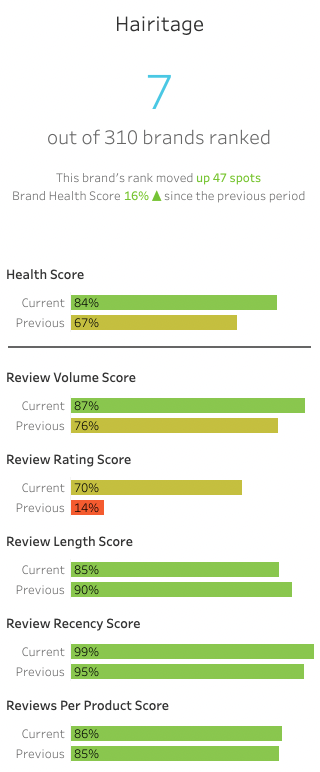
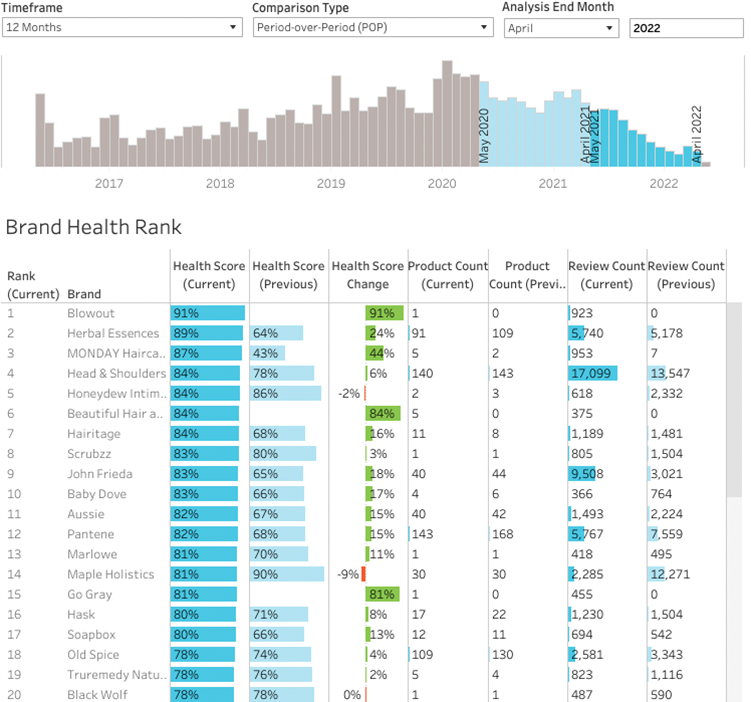
1. Brand Health Score

This provides an overall score of Brand Health, out of 100, based on five weighted factors: review volume, review rating, review length, review recency, and reviews per product.

Knowing your Brand Health Score gives you a quick, bird’s-eye view of the review footprint of your brand.

To improve your Brand Health Score, increase review collection across the board, paying special attention to products with fewer reviews and lower ratings. Implement a review meter and prompt questions to encourage people to write longer reviews. 

2. Brand Health Rank

This report shows you where your brand ranks among your competition, based on Brand Health Score. You can also see how your Brand Health has changed over time.

Understanding how your brand ranks among your competition can help you pinpoint where and how your competitors are outperforming you. You can see if they have increased review collection, for instance, or improved their star ratings.

Research the competitors who are ranking above you. Consider them a source of inspiration for improving your own UGC strategy. How are they collecting and displaying reviews? What tactics can you adopt to take them on and ultimately usurp them?

3. Review Count

This is the total number of reviews a brand has across all of its products.

Review volume is a key consideration for consumers, and can be the deciding factor in whether a consumer purchases from you or a competitor. If two products have the same star rating, 64% of consumers say that they are more likely to purchase the product with more reviews. 

In the Brand Health Rank report, you can see how many reviews you have compared to your competitors. Run a sweepstakes or sampling campaign to generate new reviews quickly and beat out the competition.

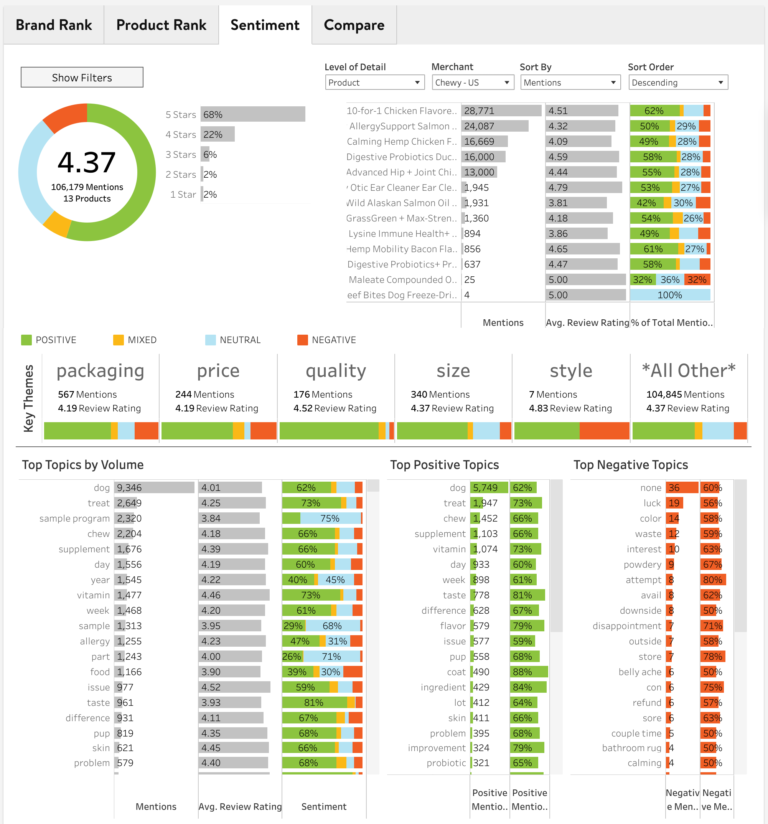
4. Key Themes

These shows you the number of mentions, review rating, and sentiment around custom themes important to your business, such as packaging or price.

This type of sentiment analysis shows you at a glance how customers feel about important aspects of your brand, such as product quality or price. You can analyze key themes for your brand as well as your competitors, giving you insights into areas you can improve and opportunities to stand out.

If you notice a high number of negative reviews related to a theme, dig into the reviews to understand what your customers are complaining about, and take action to remedy those complaints.

Alternatively, you may notice all of your competitors share negative sentiment in a particular area, such as packaging. If you develop and launch a next-level packaging experience, that could become a key differentiator for your brand.

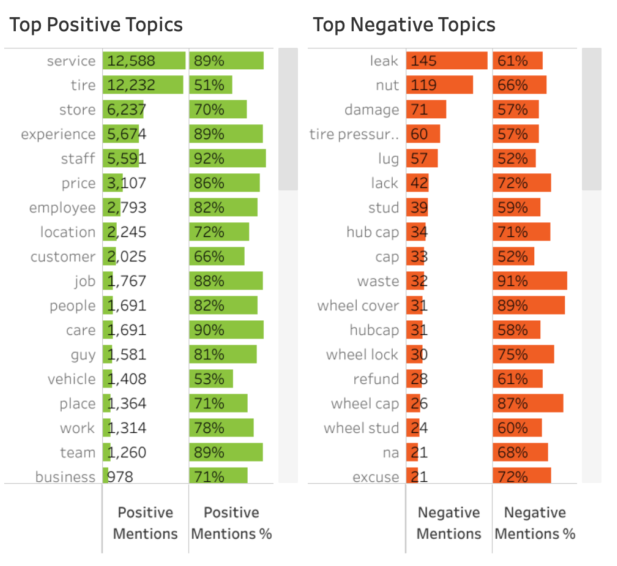
5. Top Topics

These are the top words people use in their reviews around a specific topic, organized by positive vs. negative sentiment.

When you have a lot of reviews, it can be challenging to review them all in depth. The Top Topics Report does the heavy lifting for you, enabling you to zero in on the top words people are using in their reviews in relation to a specific topic, such as customer service, price, or size. You can view the Top Topics for your brand as well as your competitors, providing insight into what they are doing well or not so well.

Review your Top Negative Topics to understand what you need to prioritize fixing first. Then, review your competitors who rate positively around those topics, or look at your Top Positive Topics, to brainstorm ideas for a solution.

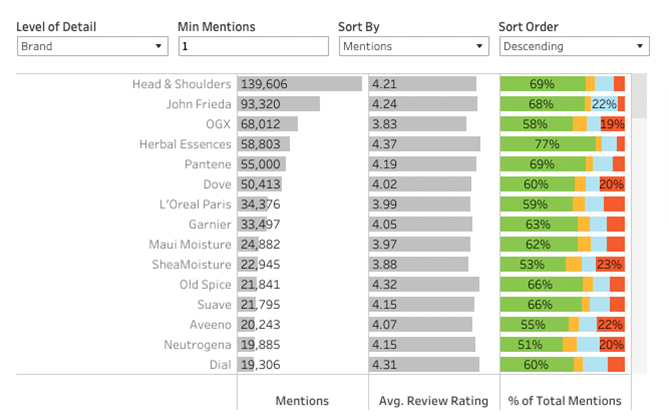
6. Average Review Rating

This is the average star rating among all the reviews for a product or brand.

By reviewing your competitor’s average star rating — or by dialing down to their average star rating by product — you can get a sense of how consumers feel about your product compared to the competition.

To improve or maintain a positive review rating, regularly request reviews via a post-purchase email campaign. To improve a negative rating, review the common issues and work to address them. Then, once you’ve implemented improvements, spin up new reviews with a sweepstakes or sampling campaign.

7. Product Sentiment by Retailer

The Retailer Product Sentiment report offers all the above competitor analytics — review count, star ratings, and sentiment — on a retailer-by-retailer basis. It's focused on  UPC/SKU as opposed to category to provide the most meaningful product comparisons.

This report reveals how your customers really feel about your brand and products, on any marketplace where your products are sold online. With this report at your disposal, you can uncover why a product isn’t selling as well on a particular retailer, or what attributes of your products drive negative reviews.

Brands can also use this report to build a story at a retailer around why a certain product may bring in more incremental revenue to the category based on consumer sentiment.

Watch out for red flags (negative sentiment) around key topics or themes. Address those issues, and then run a dedicated review campaign for that retailer to improve your star rating.

This report can also be a useful tool when building your product development or marketing strategy. For example, the Key Themes section shows where more positive and negative sentiment is being bucketed. Your marketing and sales teams can then use this information to guide which product features they choose to focus on, based on how their sentiment compares at the retailer level.

Stay ahead of the competition with brand health analytics

With Brand Health Benchmarking, you can quickly compare your performance with your competitors, unlocking insights and opportunities that enable you to push ahead and win big. 

If you’re a current PowerReviews customer, great news: you can access all of these metrics using our platform. Not yet a PowerReviews customer? Learn how we can help you do more with UGC.

Savannah Claspell

Savannah is an Enterprise Customer Success Manager, passionate about using data and analytics to empower brands to grow their business. When she isn’t helping brands increase and leverage their UGC you can find her deep in a good book, running, or mountainside skiing.

Bracket buying - the practice of buying multiple sizes, styles or versions of a product with the intention of returning all but one - has been a common side effect of free returns many brands and retailers offer for online purchases
The cost of returns
Of apparel and shoes purchased online are returned
0 %
Projected cumulative value of returns last year (equates to 17% of all purchases, 11% increase from prev year)
$ 0 B
Percent of returns that can be sold at full price
0 %
The WSJ and CNBC among others have reported that the free returns are soon to be a thing of the past. But the problem is consumers - and especially high income shoppers - love them…
Free returns are critical
of consumers say that free returns are a critical consideration when shopping online (second only to free shipping)
0 %
of consumers with household income of over $100,000 say that free returns are a critical consideration when shopping online
0 %
of shoppers say they never return online purchases
0 %
Overwhelmingly, shoppers say that having access to user-generated content — including reviews, Q&A, and images and video — would have made them less likely to return a product.
UGC: A retailer’s answer to lower return rates
Say reading ratings and reviews make them less likely to return online purchases
0 %
Say reading user-generated questions and answers make them less likely to return online purchases
0 %
Say viewing user-generated imagery and videos make them less likely to return online purchases
0 %
Better, more detailed reviews lead to more informed buyer decisions, meaning fewer returns
How often do consumers read entire reviews?
A given review might include many details, including a title, written commentary, demographic information of the reviewer, and visual content – among other things. Which of these details do shoppers value most?
What information consumers value when reading reviews
A picture/image of the product from someone who has used it
65%
Longer, more descriptive reviews
59%
Stories and accounts that relate to and are consistent with how you intend to use the product
57%
Aggregated pros and cons pulled from all the reviews submitted
54%
“Most positive review” vs “most negative review” pulled from all reviews submitted
45%
The tag/badge signifying how the reviewer obtained the product
42%
A video of the product from someone who has used it
36%
Demographic profile information
19%
Longer, more descriptive title
17%

The quantity of reviews available for a given product matters to shoppers.

But what number should you aim for, and how does review volume impact conversion?

Reviews drive more shoppers to your site

Drive more traffic to your product pages by increasing review volume.
Analysis based on an illustrative sample of 8,841,414 Product Display Pages (PDPs) - which accounts for 27,702,856,033 page visits in total. Review volume data correct as at August 11, 2022.

No reviews = no good

If there are no ratings and reviews for a product, who would be less likely to buy it?
Overall
80%
Boomers
70%
Gen X
78%
Millennials
86%
Gen Z
90%

More reviews = more buyer confidence

Is review volume more important to shoppers when purchasing from a new-to-them brand or product?
Overall
71%
Boomers
61%
Gen X
68%
Millennials
76%
Gen Z
84%

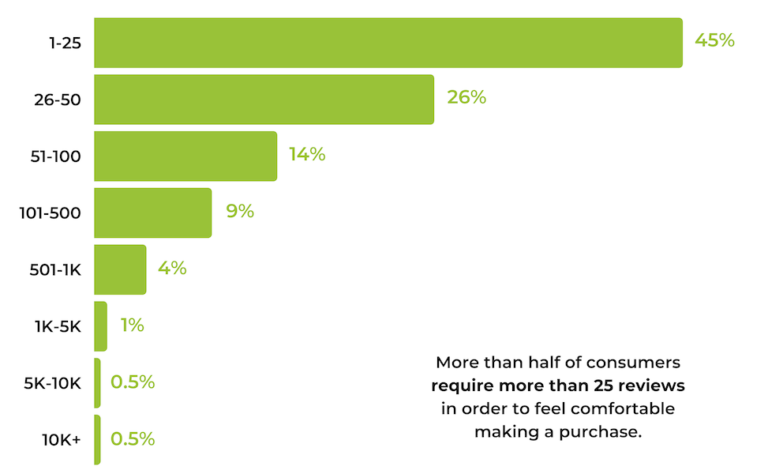
25 reviews per product is the bare minimum

More than half of customers require 25+ reviews to feel comfortable making a purchase.
Minimum Review Volumes Required To Make a Purchase
What is the MINIMUM number of reviews a product needs to have for you to feel comfortable purchasing it?

Consumers have high expectations–meeting them pays off

Conversion lift relative to number of reviews displayed
Conversion Lift Relative to Number of Reviews Displayed
0 Reviews Displayed
0%
1-100 Reviews Displayed
76.7%
101-250 Reviews Displayed
143.2%
251-500 Reviews Displayed
166.4%
501-1000 Reviews Displayed
172.1%
1001-5000 Reviews Displayed
224.7%
5000+ Reviews Displayed
292.6%
Bottom line: Review volume is one of the top factors shoppers consider when reading reviews, second only to star rating. There’s no magic number, but typically the more reviews the merrier.
Three ways you can increase review quantity without sacrificing quality:
PRIORITIZE
Make it a priority to collect a high volume of reviews for the products in your catalog, and if you are a brand, leverage syndication networks to share natively collected reviews with retail partners.
NO PRODUCTS LEFT BEHIND
To avoid launching a product without reviews, run a pre-launch product sampling campaign which involves distributing samples prior to launch, and then asking consumers to share their feedback by writing a review.
GET CREATIVE
While email is the most common review collection method, there are others. Asking for reviews via text message and on store receipts are two such examples. Are you maximizing your opportunities to ask for reviews?
Contents

The Road to Higher Quality Reviews Starts at the Collection Form

Consumers consider a ton of different factors when making purchase decisions. But today, ratings and reviews are critical. In fact, ratings and reviews are even more important than things like price and free shipping

Consumers consult reviews whether they’re shopping online, in-store, or a combination of the two. This content boosts their confidence – and makes them more likely to convert. Those who interact with ratings and reviews convert at a rate that’s more than 108% higher than average

What’s more, ratings and reviews empower consumers to find the products and services that fit their unique needs and use cases. This leads to happy, more satisfied customers – and fewer returns for brands and retailers. 

One thing’s for sure: ratings and reviews are a win-win for brands, retailers and consumers. 

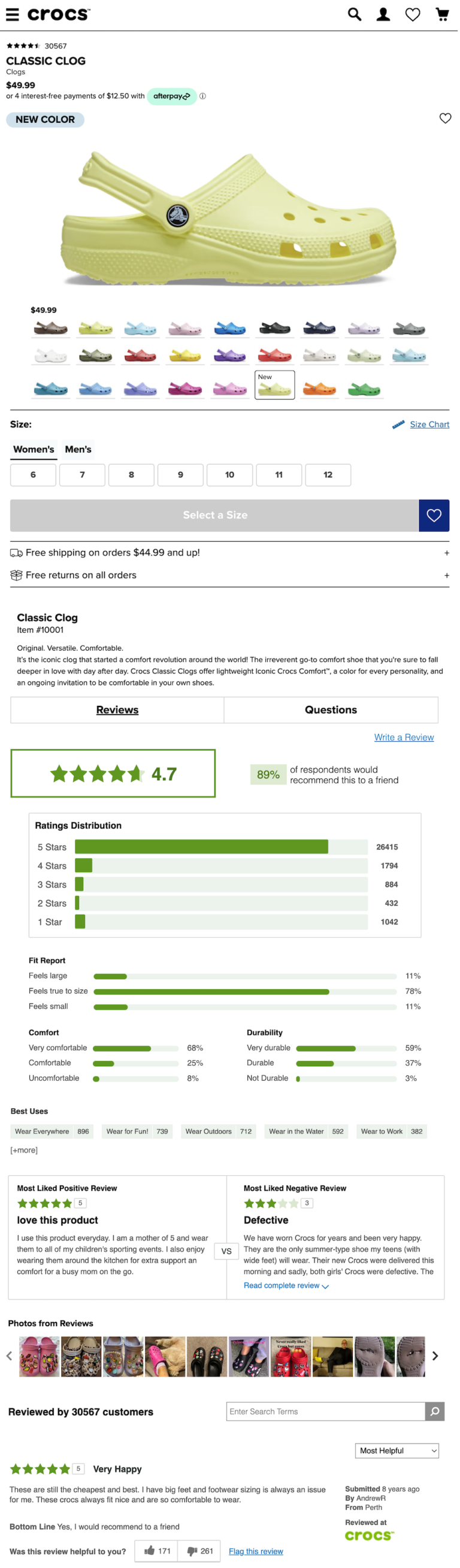
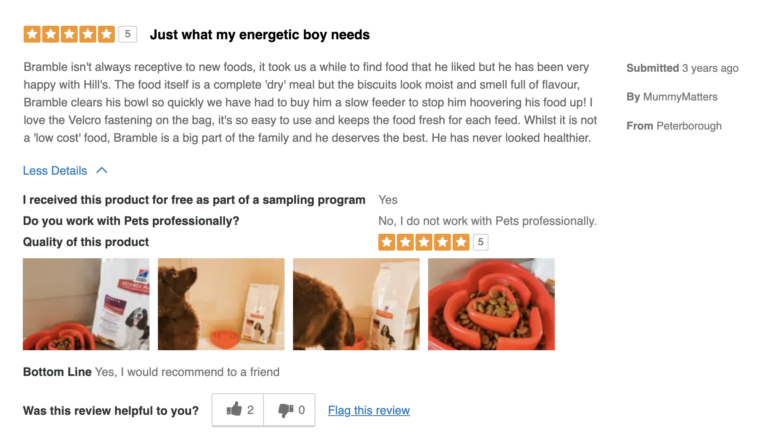
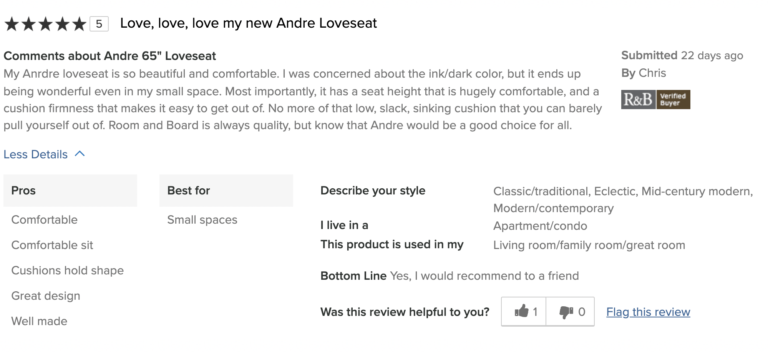
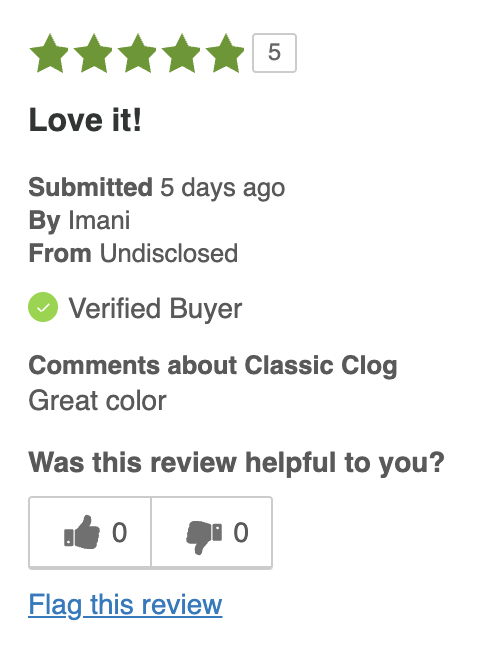
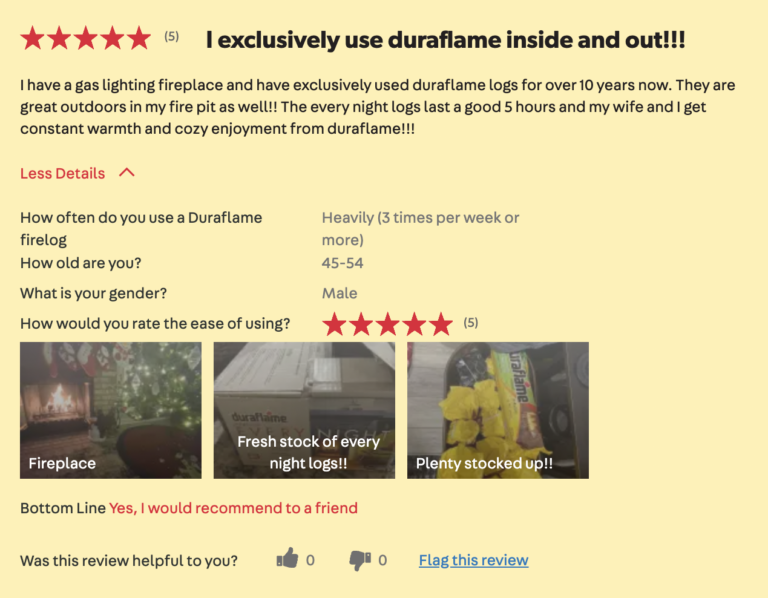
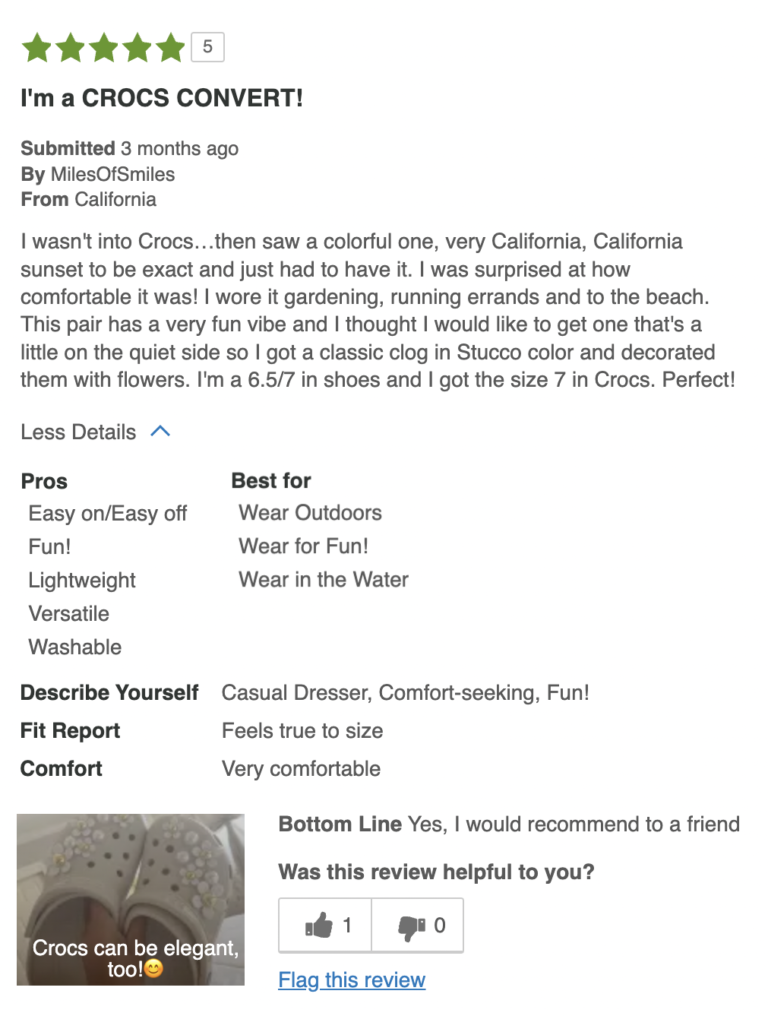
But not all reviews pack the same punch. To illustrate this point, take a look at these two five-star reviews for the same pair of shoes.

The first review lets us know the consumer liked the shoes. But the second review provides rich detail about why the shopper loved the shoes – and does a better job helping future shoppers. 

But what can brands and retailers do to start collecting more of that second type of review? In other words, rich, detailed reviews that boost conversion and fuel informed purchase decisions?

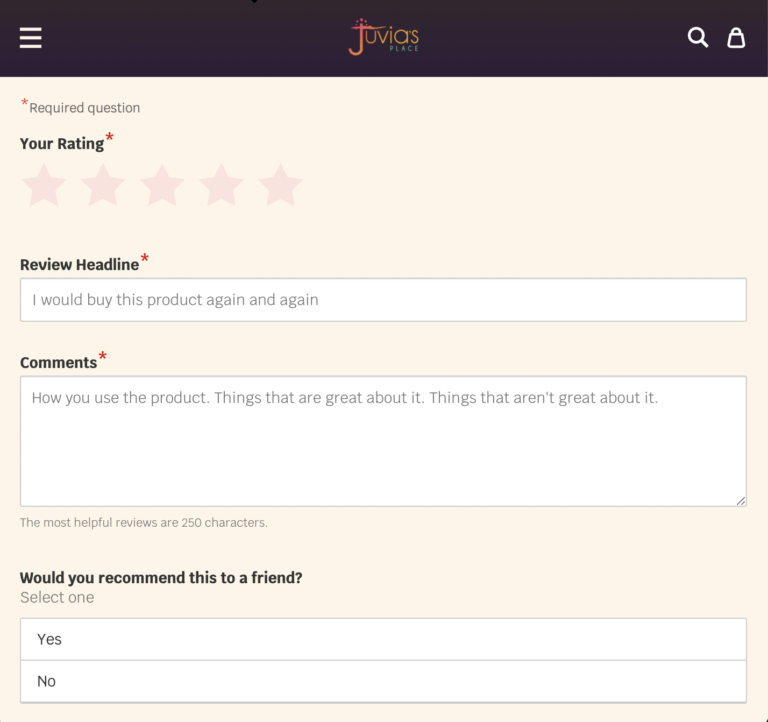
Optimizing your write-a-review form is key.

What is a Review Collection Form?

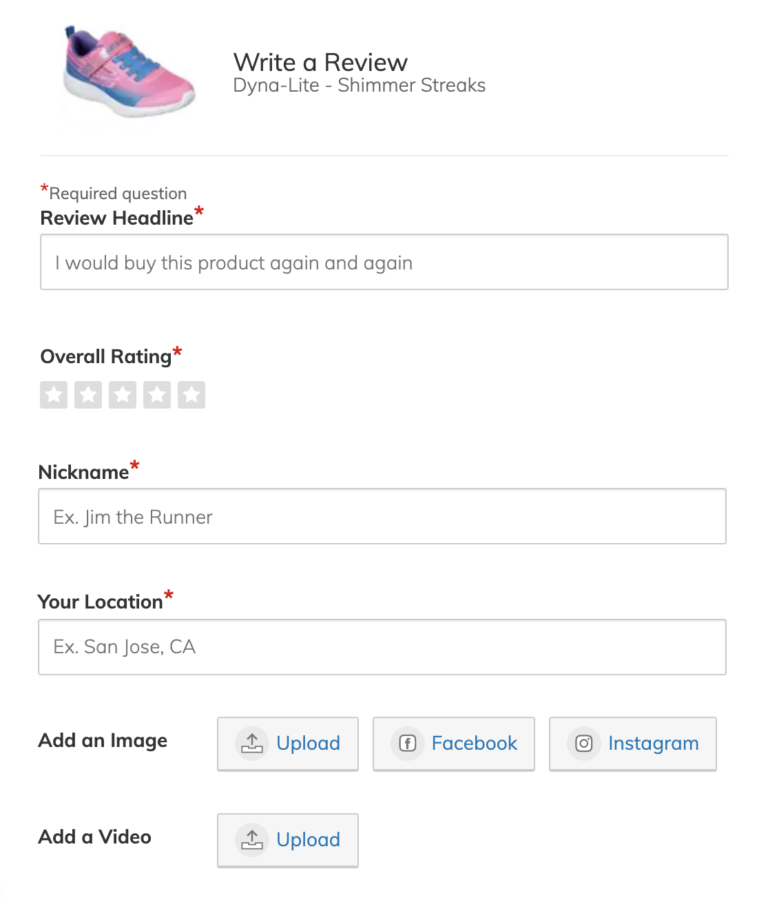
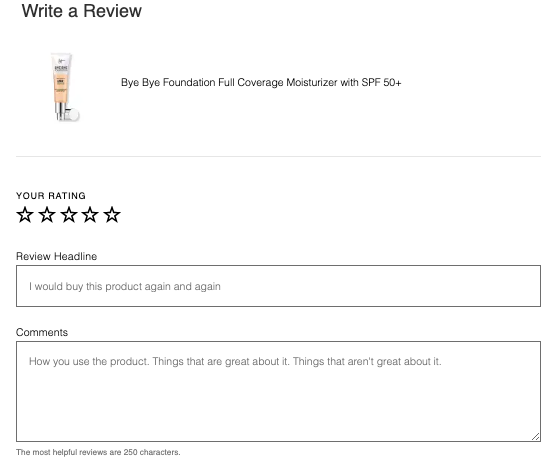
As the name suggests, a write-a-review form (at PowerReviews we call it the “Write-a-Review” – or WAR for short – form) is the form a consumer uses to write and submit a review. 

They might reach this form by clicking on a post purchase email or text message. Or, they may navigate it on their own by clicking the “write a review” button on a product page.

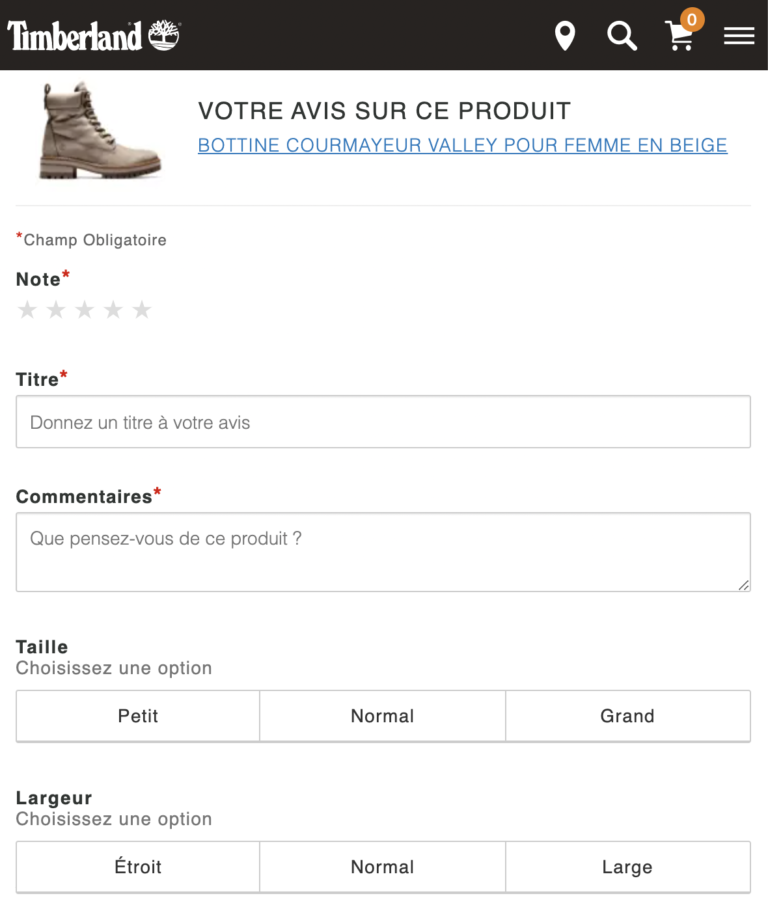
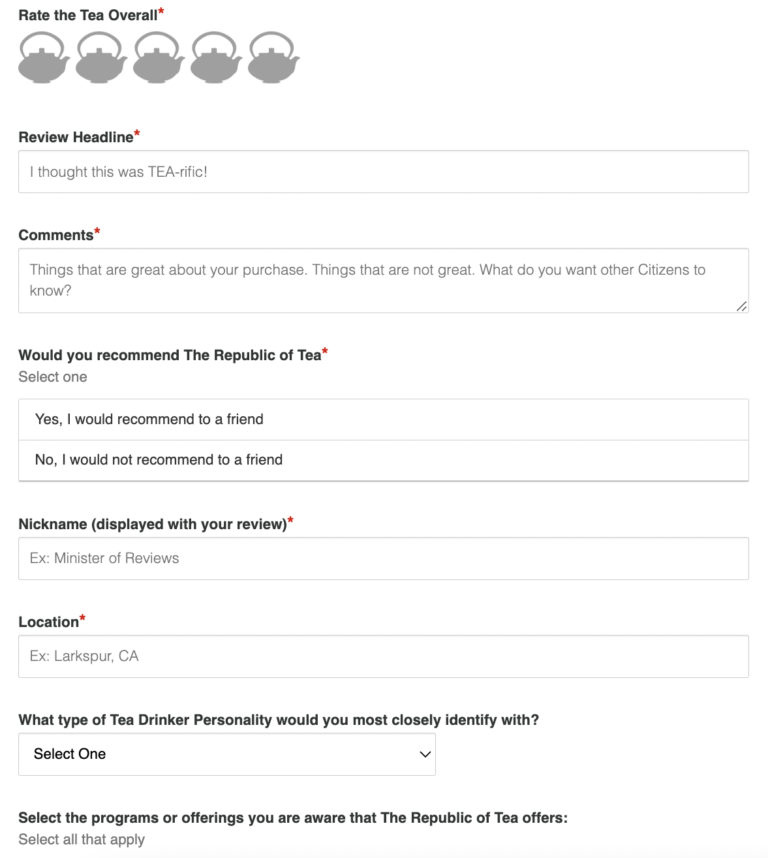
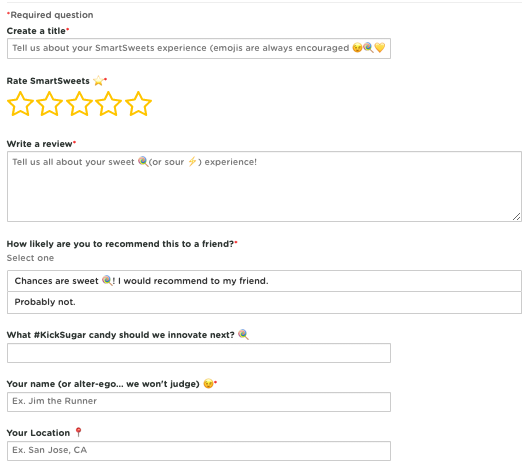
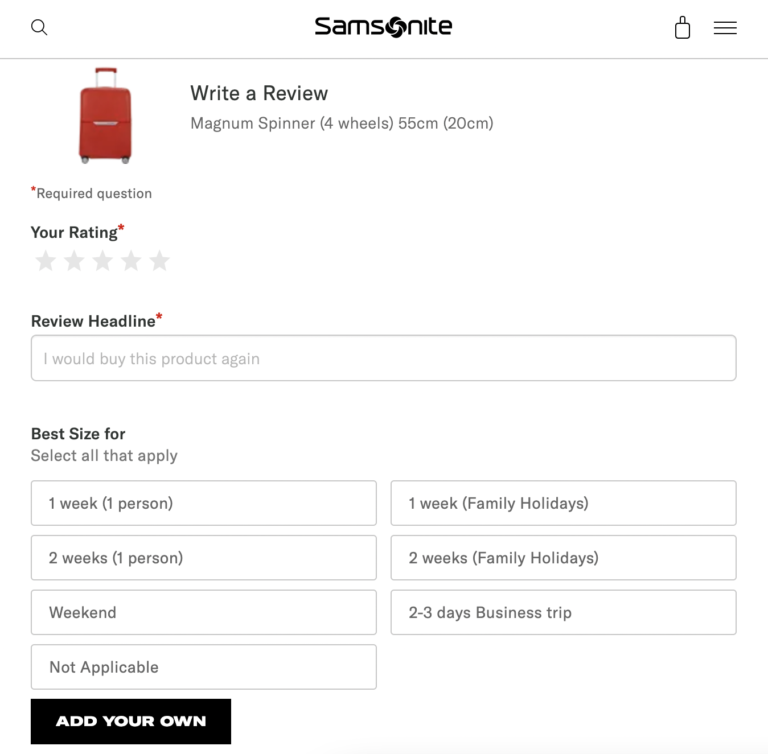
Review Collection forms vary – a lot. Some only require a consumer to indicate a star rating, while others include many other required and optional fields. While all this information can be extremely valuable in its own right, we know consumers look for more.

In fact, research highlights how 99% of shoppers look beyond basic summary information at the top of product pages to read the actual review content. And – digging deeper – 58% say a star rating alone isn’t as valuable as a star rating with an accompanying review.

So building your Review Collection form in line with these consumer preferences is a must if you want to maximize the impact of your UGC on traffic and conversions. Ultimately your entire Ratings and Reviews program will only be as good as the data and information you collect. 

Because – at the risk of stating the obvious – you can only display the content on your site and specifically on your product pages that you capture in the first place.

Just about all ratings and reviews providers offer an “out of the box” Review Collection form. But be sure to ask your provider if there are opportunities to customize your Review Collection form to suit your unique needs. Doing so can help you generate better quality reviews – and enable you to realize all the benefits outlined above. 

What to Include in Your Review Collection Form

Optimizing your Review Collection form is key to increasing review quality. But what exactly should you include in yours?

There’s no easy answer. It really depends on your industry and what works for your brand.

The first step is to determine the types of information that will be useful to consumers considering your products. This is data you’ll want to incorporate into your review display, so you’ll want to include questions that address it in your Review Collection form. In addition, consider data you’ll leverage internally to improve products, experiences, or internal operations. 

That said, there are common elements across the most effective Review Collection forms. In this guide, we’ll explore the elements you’ll want to consider when building (or optimizing) your Review Collection form, based on our experience helping more than 1,000 brands and retailers collect and display high quality reviews. 

Remember: best practices (especially those for your industry) are a great place to start. Then, you can measure and optimize from there to get the best results.

The Basics

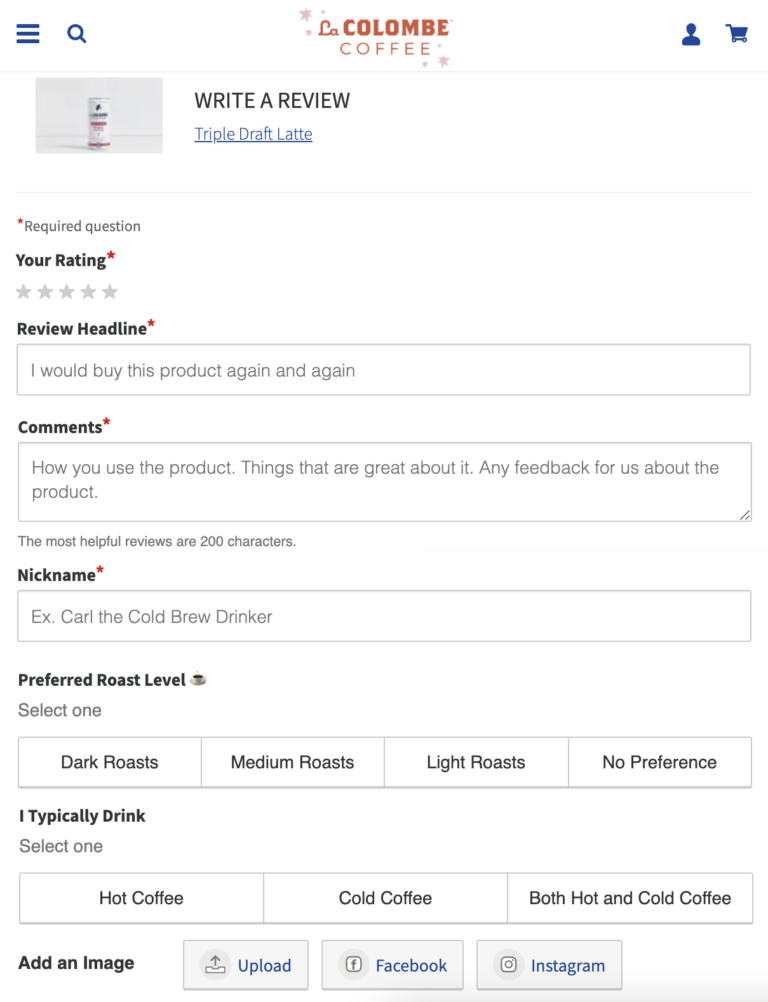
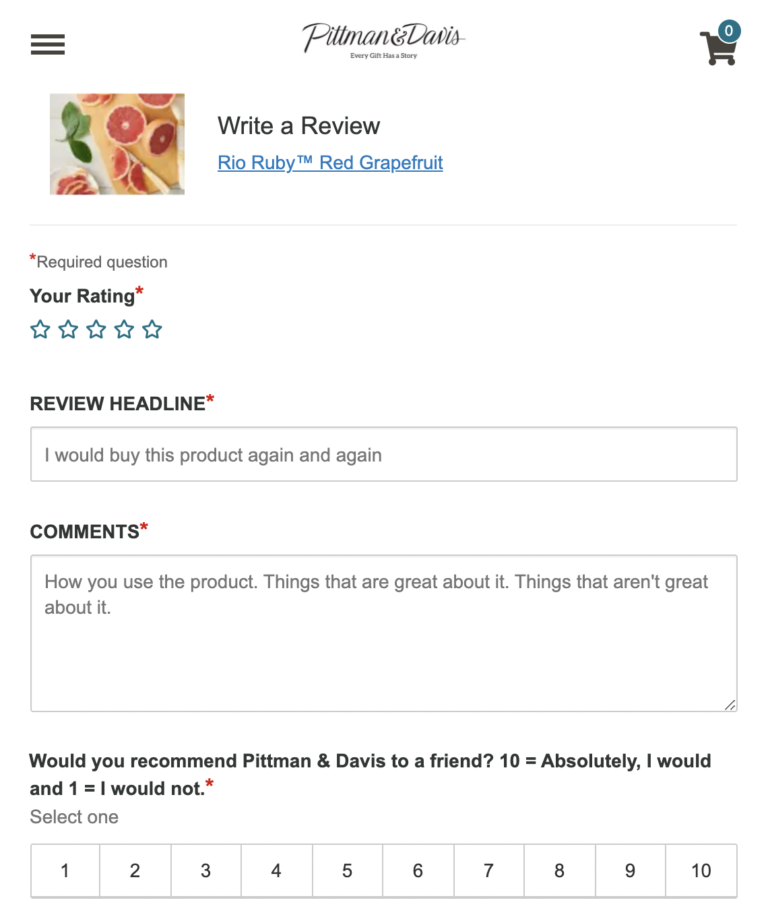
When it comes to Review Collection forms, there are five basic questions to include. Think of these questions as the foundation from which all Review Collection forms are built. They’re must-haves.

At the end of the day, it’s up to you to determine which of these fields are required and which (if any) are optional. However, it’s best practice to make all five fields required. This is especially true for brands that syndicate their review content to retailers. That’s because all five are required for syndication.

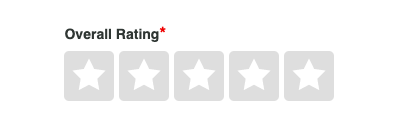
1. Rating

The star rating a shopper assigns to a product, on a scale of one to five.

Star ratings are really important to shoppers; 77% say they consider the average star rating when reading reviews. So it’s important to collect them in your Review Collection form 

Typically, a product’s average star rating is displayed at the top of the product page – alongside the number of reviews for the given product. This review snippet helps the shopper determine whether to explore the product further or look for other options.

2. Headline

The headline of a review is kind of like the title of a book. It helps shoppers determine whether they want to read the review itself.

At PowerReviews, we require a specific headline when a shopper submits a review. Be sure this is a field you include in your Review Collection form.

Other vendors allow brands and retailers to instead publish the first few words and/or characters of the review in its place. We don’t recommend this because the headline acts as the customer’s opening thought/recommendation on which they can elaborate on as they write their review. 

And then when the review is published, it’s also super informative in determining whether shoppers decide to read the review or not.

3. Comments

There’s no getting away from it: comments are the review. They provide the “why” behind the star rating. They offer reviewers the opportunity to share their specific sentiment(s) on the product under consideration.

Shoppers scrutinize this content to identify answers to questions on more intricate details that ultimately determine whether they buy or not. For brands and retailers, they also offer deep insight on customer sentiment specific to that product.

It’s important to collect this written commentary within your Review Collection form. In fact, we feel very strongly that this should be a required field on all Review Collection forms. Research tells us nearly all shoppers look beyond the basic summary information in a review to read the actual content at least sometimes.

That’s because comments provide context for star ratings – and can allow future shoppers to find reviews that speak to their specific needs, concerns, and use cases. 

Later on, we’ll share some best practices for encouraging shoppers to provide longer, more detailed commentary in this field. 

4. Nickname

A nickname is how a reviewer is identified and is typically displayed with the review to reinforce that it was written by a real person.

Because the bottom line is: Consumers value reviews because it’s content written by others like them, without any motive. Displaying the nickname adds a human element to the review.

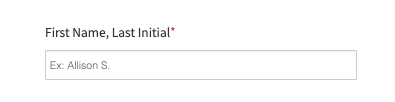
As such, the nickname is a foundational field to include in your Review Collection form. Some brands request the first name and last initial – and others allow more freedom. It’s really up to you to determine what’s in line with your brand.

Worthy of note: PowerReviews enables you to change these headlines to be whatever you want. However, there is a balance to be struck: we are very careful to ensure the privacy of your customers and recommend not capturing a reviewer’s full name for this reason. With that being said, our sophisticated moderation techniques mean PII is extracted from a review before it’s published.

5. Location

Location is another important, basic element to include in your Review Collection form. Again, this information helps convey to future shoppers that this is a real review written by a real person. 

In addition, geographical location can be helpful for shoppers looking for relevant content. This is especially true for certain product categories. For example, consider a Chicago-based consumer shopping for winter boots. They’re likely to value reviews written by other Midwesterners, as they experience a similar winter climate. 

Review Meter

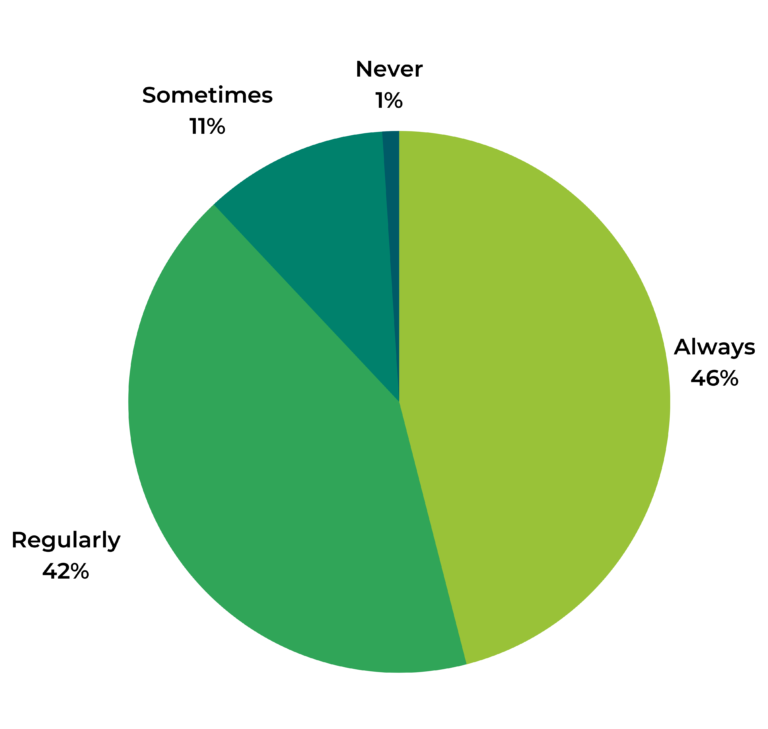
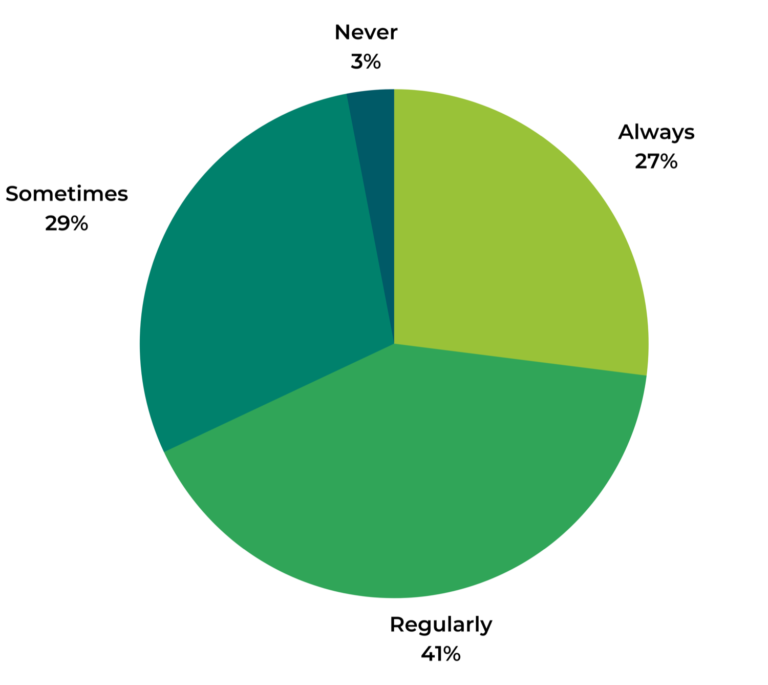
Remember when we said longer, more detailed reviews are more helpful to shoppers? Well, it’s a claim backed by data. A survey found that just about all (97%) of consumers seek out longer, more detailed reviews at least sometimes. And 68% say they do so always or on the regular.

Consumers Seek Out Long, Detailed Reviews
When you read reviews, how often do you actively seek out reviews that are longer in length and contain more detail?

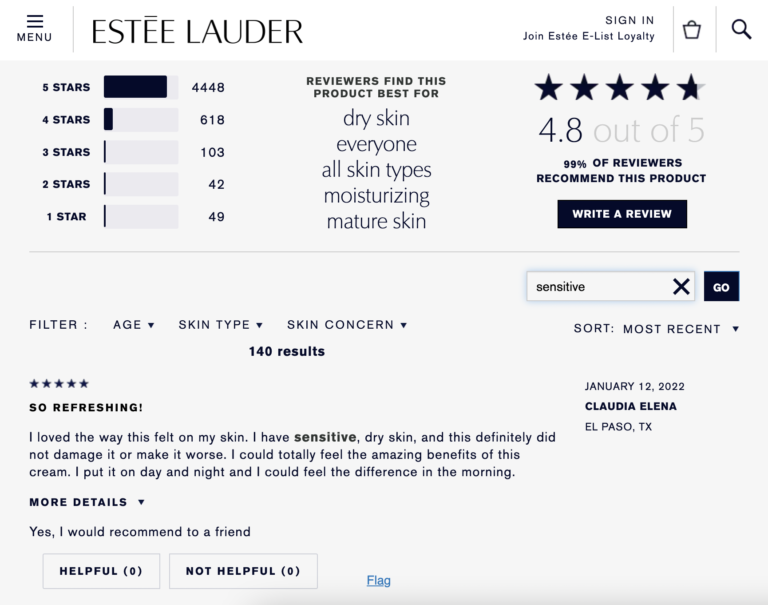
When reviewers provide a lot of keyword-rich details, future shoppers are more likely to find content that’s relevant to them. For example, a consumer with sensitive skin might seek out reviews for a cosmetic that specifically speaks to how it works for those with sensitive skin. 

Including a review meter in your Review Collection form can help you generate more of those long, detailed reviews that fuel great purchase decisions. 

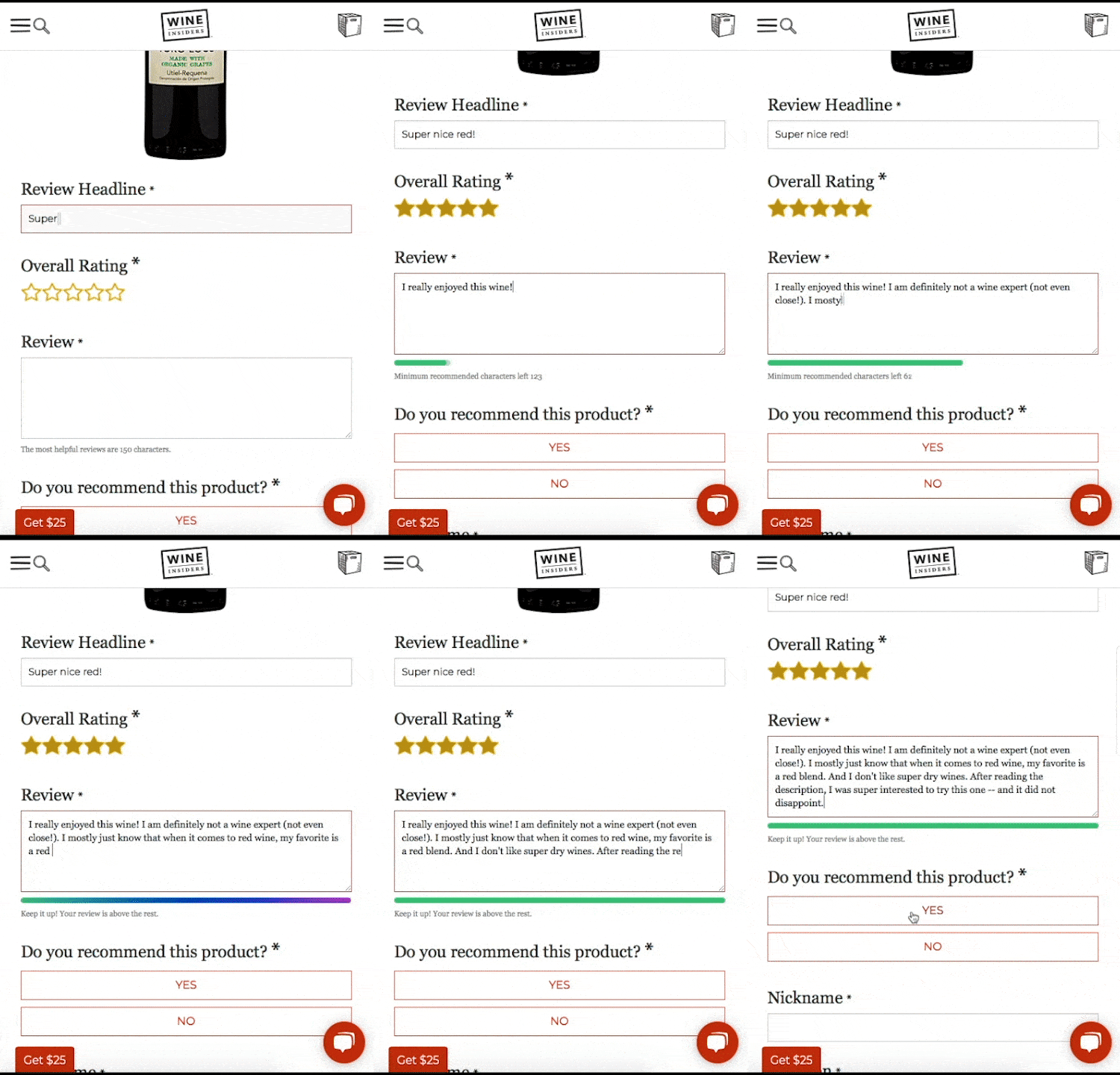
Essentially, a review meter is an interactive character count that appears below the comments box in the Review Collection form. As the reviewer types, that little green bar grows. When the review reaches the ideal length (you choose what that is), the meter lights up to let the shopper know they’ve written a great review – and to keep going if they’d like. It’s super satisfying to the customer – and a powerful way to generate longer reviews. 

Helper Text

Writer’s block is a thing – for novelists and review writers alike. A consumer may be willing to write a review. But faced with that big blank comments box, they just don’t know what the heck to write. 

The result? They abandon the process altogether. Or, they write a super short, less-than-helpful review. 

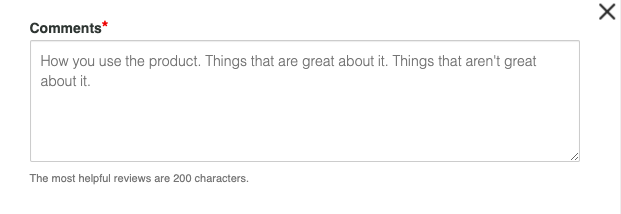
One simple way to get the creative juices flowing (and get shoppers to write longer, more detailed reviews) is to include some helper text in the comments field. This text serves as writing prompts for the reviewer.

For example, the comments field of this Review Collection form for a skincare product asks the shopper to consider:

With PowerReviews, this can be completely customized. Maybe feedback from your customers highlights a desire for specific information about a specific feature of your product. With this text, you can capture more of this detail in your reviews.

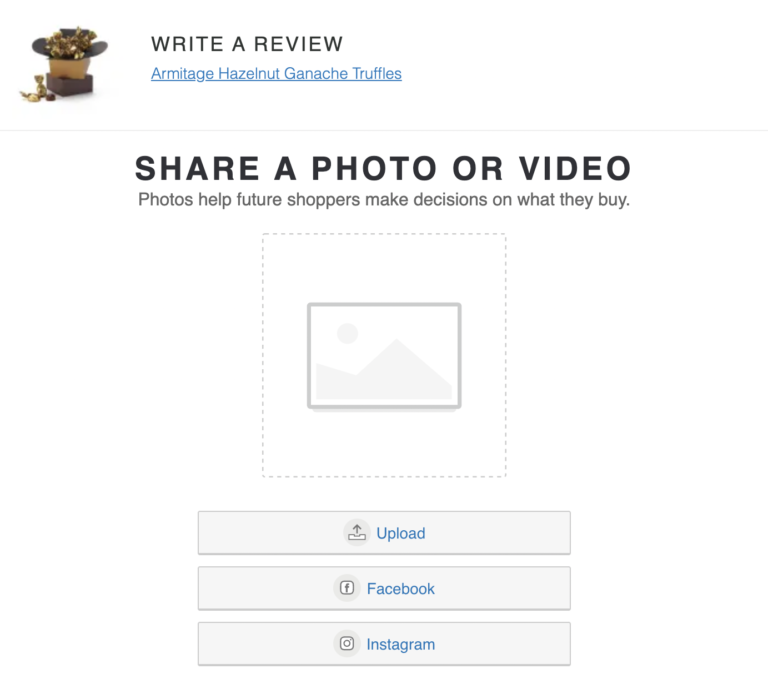
Native Image and Video Collection

When consumers shop online (which they’re doing a lot lately), they don’t have the benefit of seeing and touching a product in person. Visual content, including photos and videos, helps bridge the gap. 

Brand-provided photos and videos are helpful to shoppers. But increasingly, they want to see content from others like them. A survey found that 77% of consumers always or regularly seek out photos or videos from others who have purchased a given product.

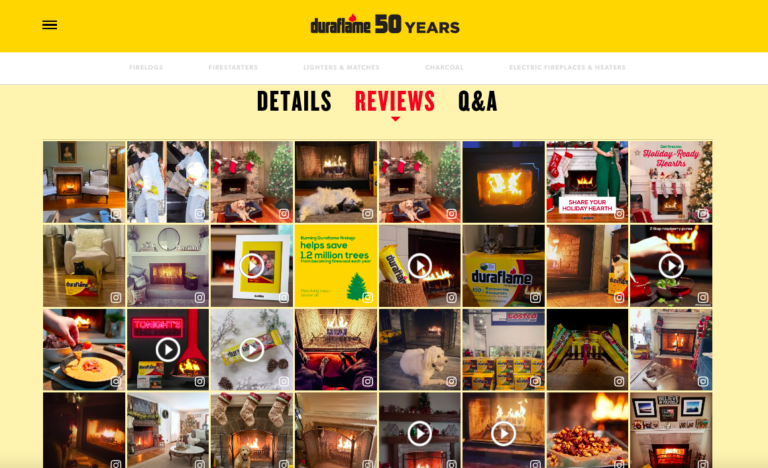
As such, customer-centric brands make it a priority to prominently showcase user-generated visual content on their product pages. A common way to do this is to feature a visual gallery with shopper-submitted photos and videos.

Brands who prioritize user-generated imagery reap some big benefits. Site visitors who interact with user-generated imagery on a product page convert at a rate that’s more than 106% higher than average!

But in order to display this content, you must first collect it. The best way to do this is through the Review Collection form.

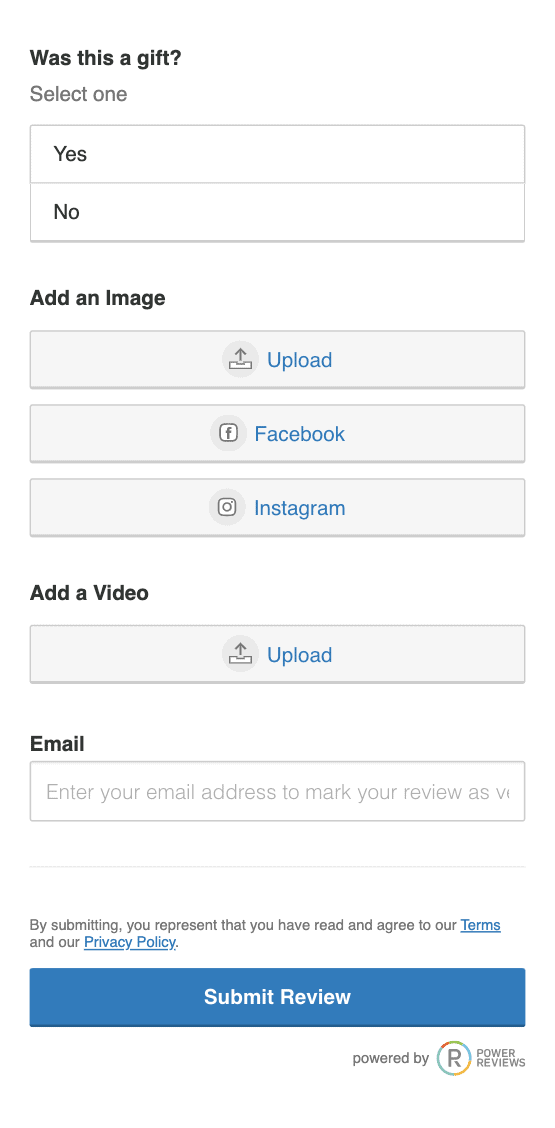
If user-generated content is a priority for you (hint: it should be), then be sure to add a field to your Review Collection form that allows reviewers to easily submit it. Allow them to submit the media natively – or from their social media accounts.

The Bottom Line

A review might be a few words long – or a few paragraphs. But at the end of the day, what the reader really wants to know is whether or not the reviewer recommends the product in question.

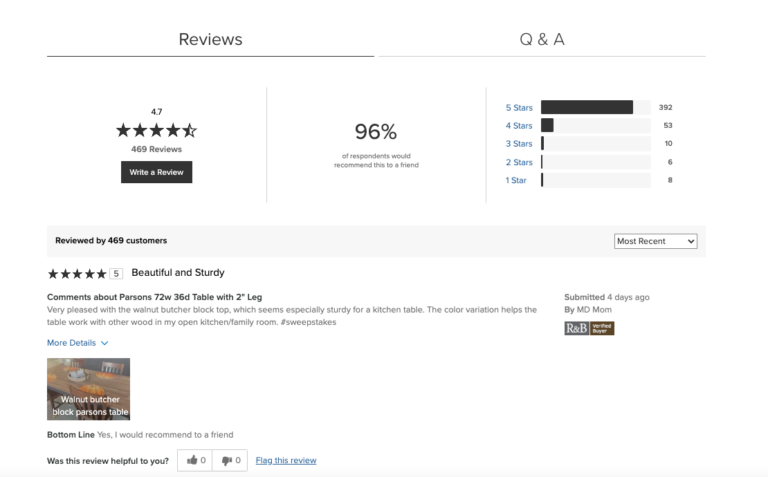
Many brands and retailers get this. It’s why they feature the percentage of reviewers that recommend a product at the top of their review display.

Where do brands and retailers get this aggregated data? You guessed it: their Review Collection form. 

So, be sure to include a section in your Review Collection form that asks whether the reviewer would or would not recommend the product in question to a friend. Future shoppers are sure to factor in this information when deciding whether or not to explore the product.

Customized Questions

Up to this point, we’ve focused on key elements of Review Collection forms that are important across all product categories. For example, asking for a star rating or review comments is key – whether you’re selling jewelry or mattresses.

However, each industry and business is unique. That’s why it often makes sense to include additional questions on your Review Collection form.

How many questions should you add? The short answer is, it depends. Here at PowerReviews, we generally recommend adding between two and five additional questions. This allows you to gather the insights that matter to your business and customers, without overwhelming them (by the same token, the form can also be set not to include any additional questions if that is your preference).

So, what additional questions should you add to your Review Collection? Again, there’s no easy answer. You have to consider what data you (or your future customers) will actually use. Consider what data will fuel your review display, and what data you can leverage internally to inform product and customer experience optimizations. 

In addition, your ratings and reviews provider should have expertise in your business and your industry. So be sure to ask for their guidance in terms of question quantity, as well as what questions to ask. 

Remember: you never want to add questions simply for the sake of adding them. If a Review Collection form is too long (even if a lot of the fields are optional), you’re likely to see a high abandonment rate.

With all that said, here are a few types of questions you may want to consider adding to your Review Collection form.

1. Subratings

The star rating is a key component of a review. However, it requires customers to assign a single number to their overall experience with a product. 

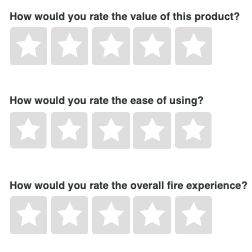
Sometimes, brands and retailers want to get more granular feedback about various elements of a given product, including quality, value, durability, and comfort. They do this by adding subratings fields to their Review Collection form.

Displaying this feedback can help future shoppers better assess the product’s attributes. What’s more, this data provides businesses with insights about what shoppers like (and don’t like). Brands and retailers can use this data to fuel product improvements. 

2. Size/Fit Questions

A survey found that 89% of apparel and footwear shoppers consider size and fit when considering an apparel or footwear purchase. But these factors are tough to assess when shopping online. 

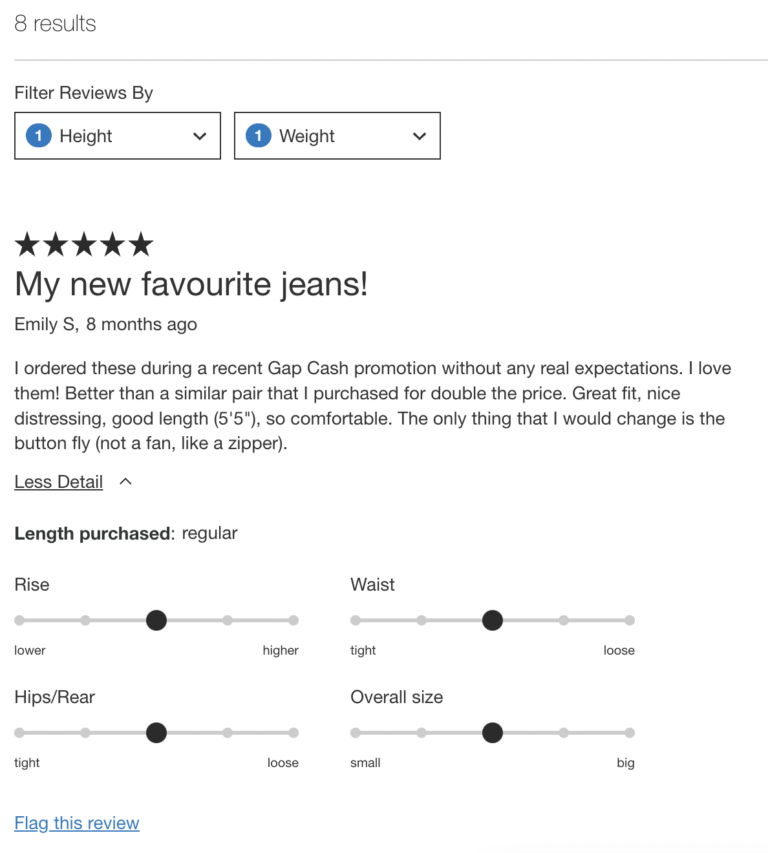
Of course, tools like size charts help. However, many apparel brands and retailers also provide aggregated, customer-provided size and fit feedback within the review display.

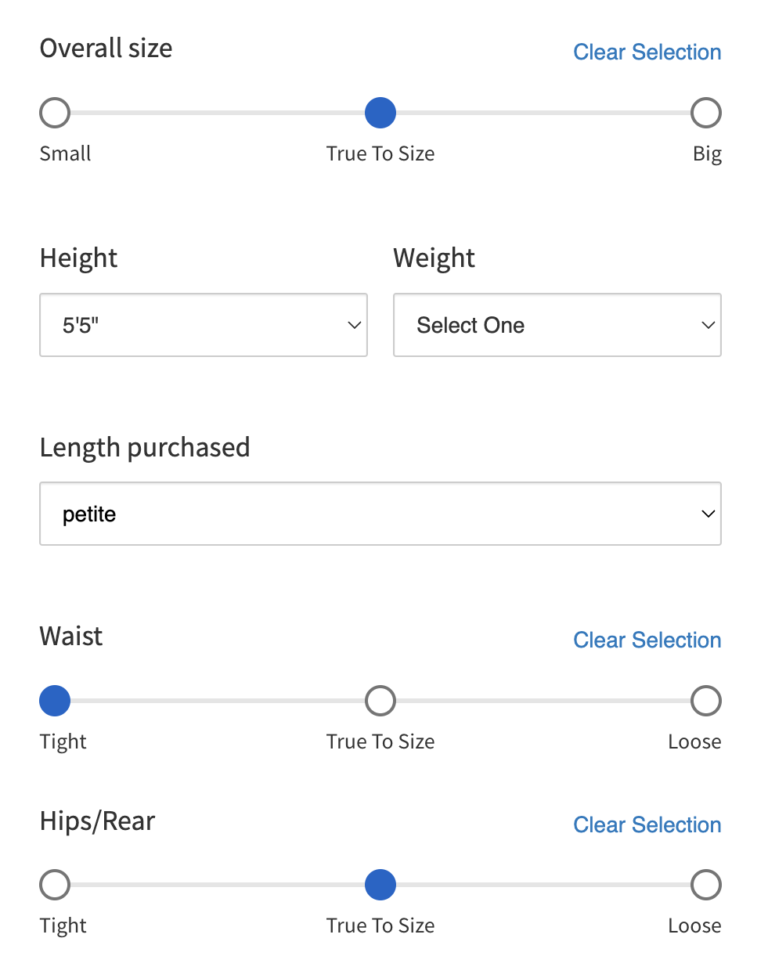
If you’re a brand or retailer that sells apparel and footwear, collecting size and fit information within the Review Collection form is a must. The size and fit information you’ll want to collect depends on the type of product. For example, an apparel brand may opt to collect overall fit and sleeve length feedback for tops and jackets, and waist fit for pants.  

Displaying this information helps shoppers make better purchase decisions. What’s more, it can dramatically reduce returns, as size and fit issues are a top reason apparel is returned.

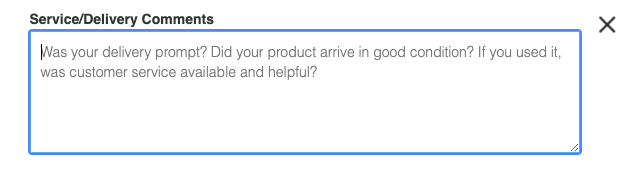
3. Service & Delivery Comments

Typically, product reviews focus on the product itself. However, some brands and retailers also want to collect feedback on other aspects of the customer experience – including service and delivery. This makes sense, as the experiences a customer has with a brand can be just as important as the product.  As such, optimizing experiences can increase both conversion and retention.

If you’re looking to collect feedback on service and delivery, consider adding a service/delivery comments field to your Review Collection form. But remember: only collect this data if you plan to act on the insights it yields. 

4. Tag-Based Questions

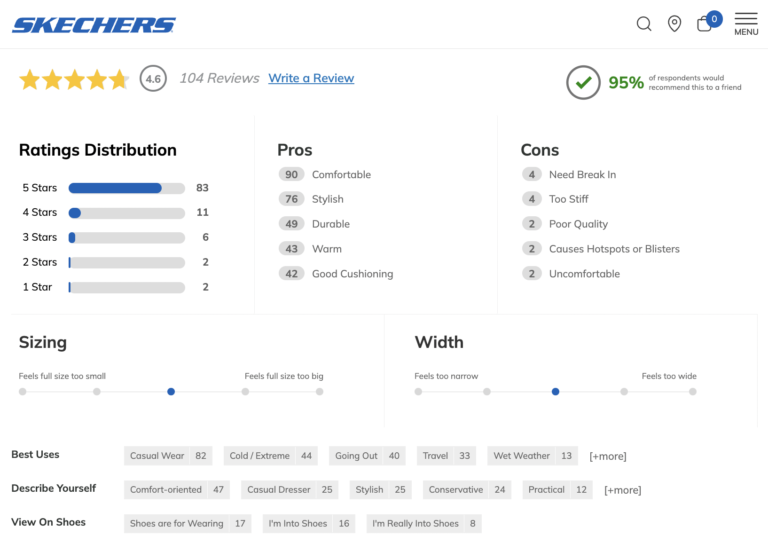
Some brands and retailers build interactive review snapshots that provide an overview of all reviews written for a particular product. For example, consumers landing on this product page can quickly determine the product’s pros, cons, and best uses – among other things. Shoppers can then click on any of these elements to hone in on reviews that speak to these specific factors. And research tells us that visitors who filter by these “tags” convert at a rate that’s more than 78% higher than average. 

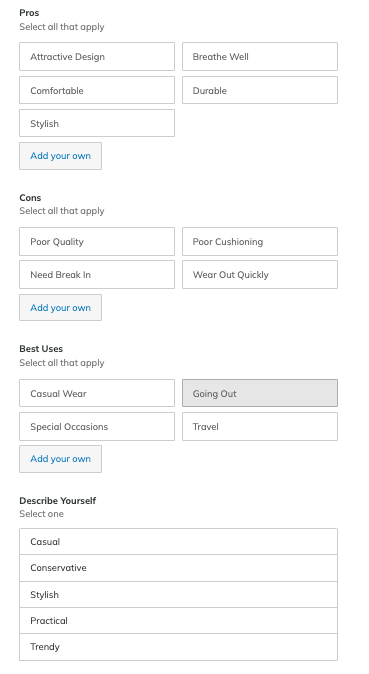
In order to display this aggregated information for your shoppers, you’ve got to collect it in your Review Collection form. Typically, reviewers are provided with a selection of answers for each question. For example, pre-populated pros for a pair of shoes might include attractive design, comfortable, stylish, breathe well, and durable. The reviewer can also add their own.

A further benefit of including pros and cons in this way is that they can help get a customer’s thoughts/juices flowing. As a best practice, these are typically served up before the review comment. This plants thoughts on the topics they may choose to cover subsequently. For example: if they regard “comfortable” as a pro, they might choose to elaborate on why in their review comment.

5. Merchant Specific Questions

There are certain tag-based questions – such as pros, cons, and best uses – that can be used in Review Collection forms across just about any product category. However, there may be other questions you may want to include in your Review Collection form that are specific to your brand. 

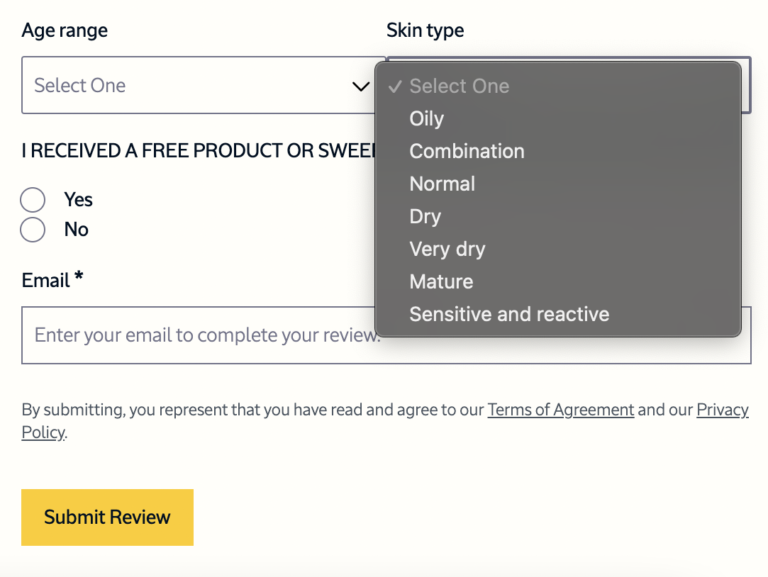
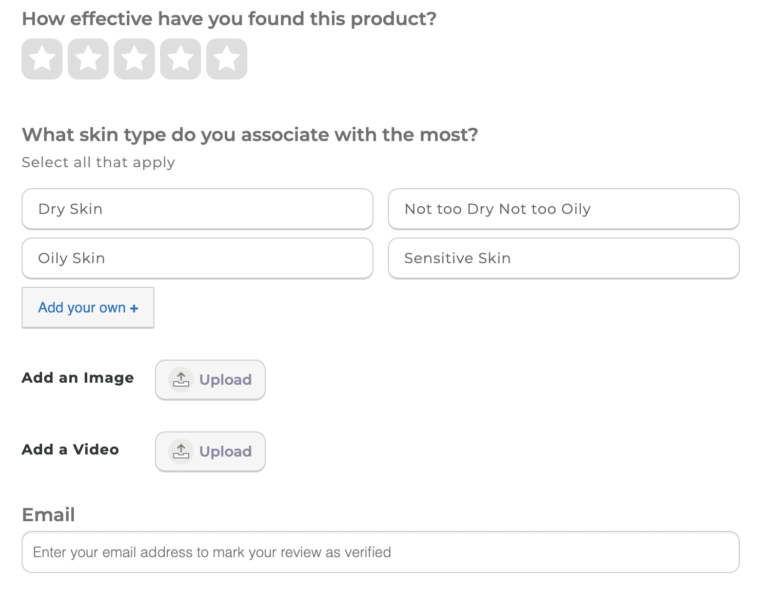
For example, a skincare company might opt to include questions about the reviewer’s skin type and skin concerns. That way, the brand can add a feature to their display allowing shoppers to easily find content written by others with similar skin types and concerns. 

How do you figure out which merchant-specific questions to ask in your Review Collection form? Consider what information would be most helpful to shoppers trying to decide if your product is the right fit for them.

For shoppers, the ability to filter only on reviews that directly address a personally relevant problem or concern specific to them is very powerful. 

As an example, think about skincare products: the capability to filter on reviews by users with oily skin is extremely helpful for shoppers with this skin type. In doing so, they are only served reviews who meet this specific criteria.

6. Email Opt In

There are some instances where it makes sense to collect data in your Review Collection form that won’t be included in your review display – but will be leveraged internally. For example, you may want to include a newsletter opt-in form to your Review Collection. It’s a great way to grow your email list, with little effort. 

7. Ask Questions Specific to the Product

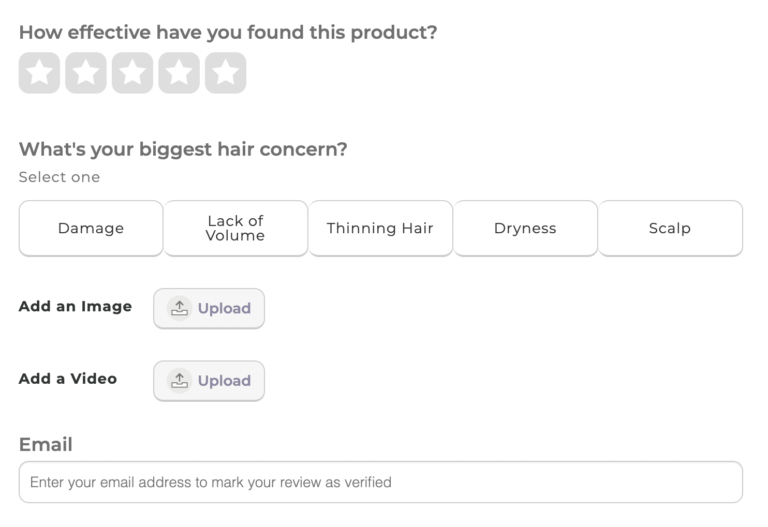
If you are a brand that sells different categories of products, you should definitely consider structuring your review collection form in line with this. In the below example, the brand has different forms for its skincare and hair care products. This makes total sense: buyers have completely different concerns when shopping for these items.

In these particular examples, the brand asks specific questions about hair and skin type. Incorporating this information in the review display is extremely informative in a highly personally relevant way for shoppers as they consider purchasing these products.

At PowerReviews, we make segmenting Review Collection forms by category like this straightforward.

When it Comes to Review Collection Forms, One Size DOESN’T Fit All

Displaying a high volume of high quality reviews is a proven way to increase traffic and conversion. Optimizing your write-a-review form is key to increasing both review quality and quantity.

But remember: there’s no one-size-fits all Review Collection form. In fact, a form that performs well for one brand may fall flat for another. And while a review provider’s out-of-the-box form is a great start, it should be customized to fit the needs of your business. 

Consider what data is important for both your brand and your shoppers. Then, tap into your ratings and reviews provider to get best practices for your industry.  At PowerReviews, we work with more than 1,000 brands and retailers on optimizing review collection methodologies for both volume and quality. Whether you are a customer of ours or not, we would be delighted to offer up this expertise and/or provide guidance on how best to structure your Review Collection forms in order to achieve your overall goals. 

Once you’ve created your initial Review Collection form, don’t put it on autopilot. Instead, measure your performance continuously – and look for opportunities for optimization. If you work with the right ratings and reviews provider, these data-based optimizations shouldn’t require a lot of effort on your part.

For example, our solution comes complete with backend consumer interaction analytics to enable you to see which information collected within your reviews drives conversions. Continue to optimize based on what the data tells you to increase the impact of your reviews program.