


How to build your UGC program and strategy
Reviews are incredibly impactful when it comes to influencing purchasing decisions. More than 99.9% of consumers say they read reviews when shopping online, and over half (57%) do so when shopping in-store. When a shopper interacts with ratings and reviews on a product page, there’s a 120.3% lift in conversion.
With all the benefits reviews have to offer, savvy brands and retailers rightly prioritize review collection in their marketing efforts. But, sometimes, in the rush to collect more reviews, brands and retailers forget the most visible result of those review collection efforts: the Review Display.
Review collection is a hugely important part of any UGC strategy. However, for those reviews to pay off, it’s important that brands and retailers also consider how they are displaying those reviews to maximum impact. Below, we review ten review display metrics that can provide key insights into your customers’ shopping behavior, and what you can be doing to increase their chances of conversion when they arrive on your product page.
The review snippet is the star rating and review count displayed at the top of a product page, which customers can click to be taken down to the full Review Display.
There is a 164.3% conversion lift among consumers who click the review snippet, up from a 129.4% lift in 2020.
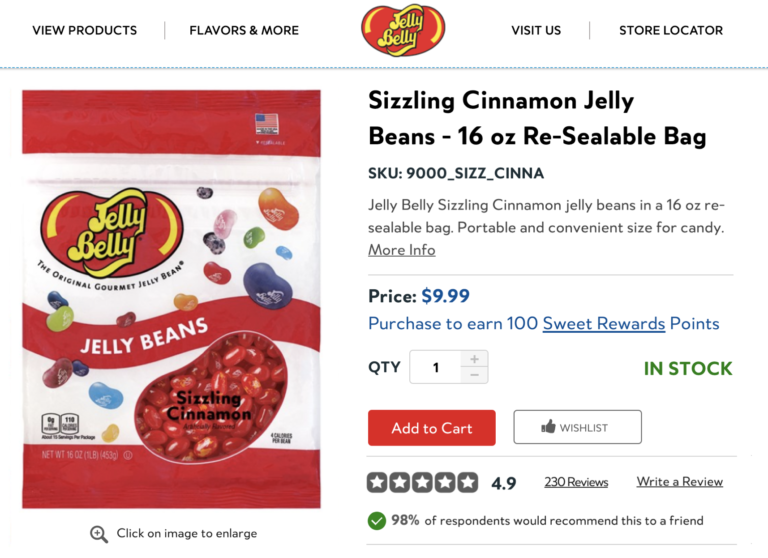
Ensure that your review snippet is located above the fold, at the top of the product page. This prominent positioning ensures that those who want to explore your reviews can do so quickly. Also ensure your review snippet stands out, with brightly colored stars and a clear star rating.
Review interactors are the people who interact with your Review Display, such as by clicking to read a review, sorting the reviews, or taking some other action.
People who interact with reviews convert at a rate 128% higher than those who don’t — in other words, simply interacting with reviews can boost conversion, regardless of the content. However, watching your review interactor conversion rate can also help you spot key trends. For example, if your review interactor conversion rate starts trending downwards, that may signal an opportunity to improve a product description, implement new product features, or otherwise take action to ensure your products are meeting customer expectations.
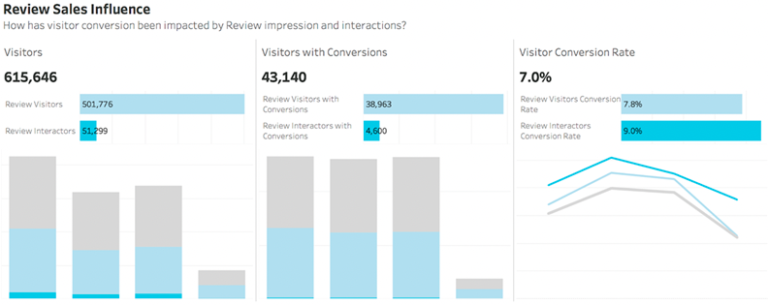
Design your Review Display so that it invites interaction. Encourage customers to vote whether a review is helpful or not. Add clickable filters for common tags (such as pros, cons, or best use case). Include a search bar so they can search for specific keywords.
This is the average rating for a product, based on all the reviews it has received.
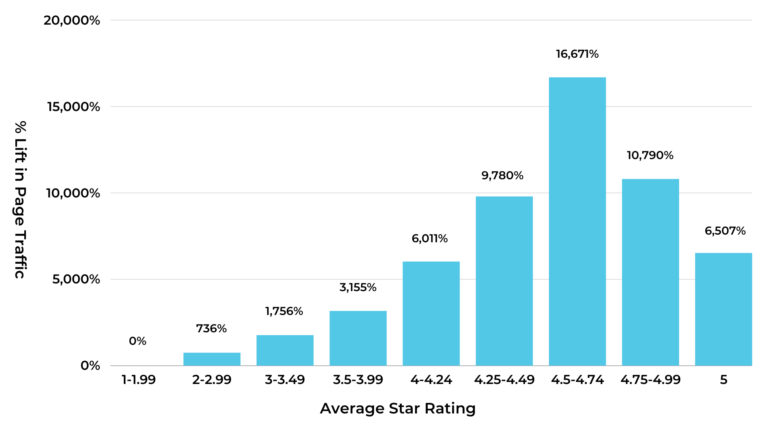
Products with ratings between 4.75 and 4.99 stars tend to have the highest conversion rates. Consumers are suspicious of products with perfect 5-star ratings, which convert at about the same rate as products with 3.0 – 3.49 stars.
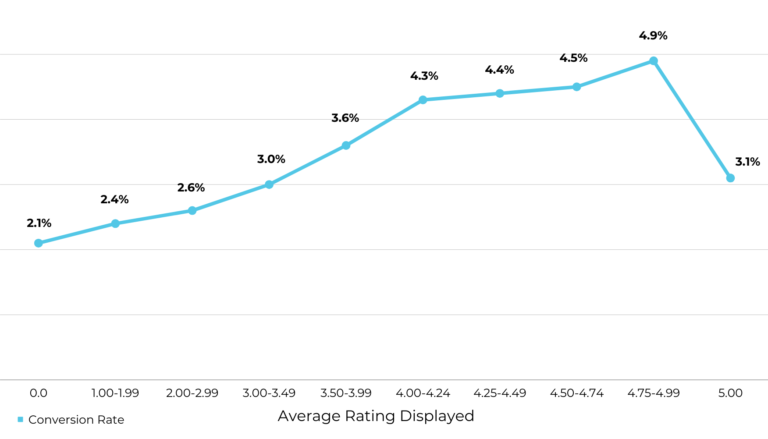
Regularly requesting ratings and reviews via post-purchase emails is the best way to maintain a positive rating. To improve a low star rating, listen to the feedback your customers provide in their reviews. Once you’ve made improvements, generate new positive reviews quickly through a sweepstakes or sampling campaign.
This describes the average number of reviews you have per product.
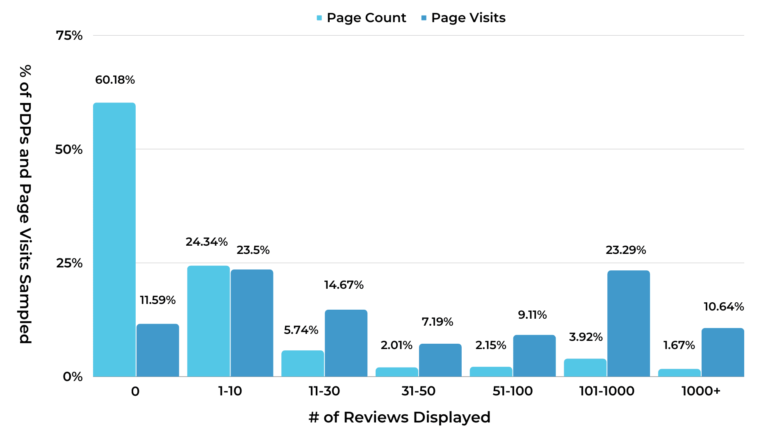
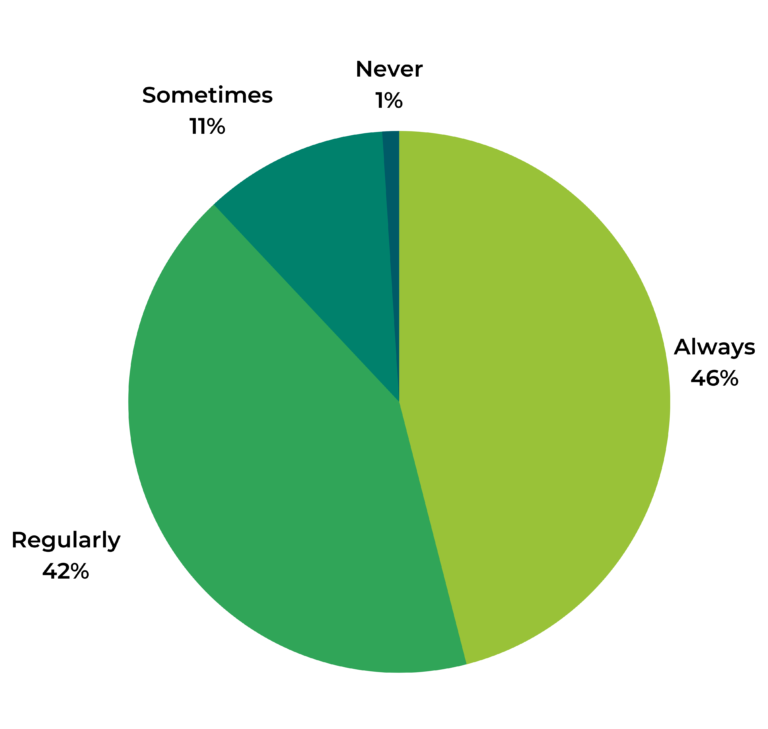
Review volume is important to consumers, with 79% of consumers “always” or “regularly” considering it when reading reviews. And, the more reviews a product has, the higher the conversion lift it experiences. In an ideal world, 65% of consumers would like a product to have more than 50 reviews, including 43% who think it should have over 100.
When shoppers visit your website, you want them to encounter a review count that makes them feel confident buying your product. Put review collection on auto-pilot with a post-purchase email campaign. Optimize your emails by allowing customers to review multiple products at once, from the body of the email, and always send at least two review requests.
Helpful voting allows a shopper to mark a review as helpful or not, usually with a thumbs up or down sign.
Our research shows that helpful voting is the type of review interaction that has the largest impact on conversion. There’s a 414.3% lift in conversion among visitors who click the thumbs up icon. By monitoring which reviews your shopper finds more or less helpful, you can discover new opportunities to improve your product page. Shoppers may respond positively to product photos from real customers, inspiring you to add a UGC image gallery on your product page. Or, you may find that the most helpful review answers a common question you failed to address in your product description.
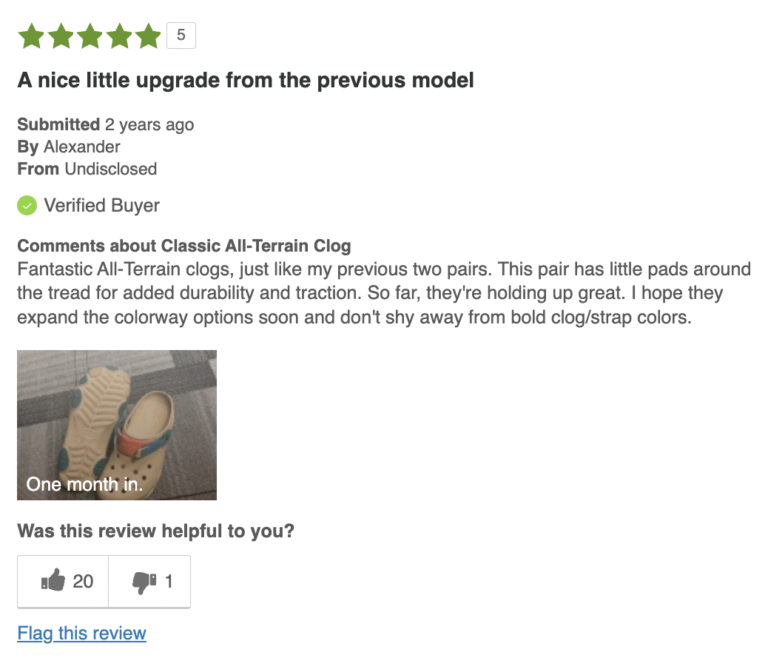
If you don’t already have helpful voting enabled on your product reviews, start by enabling it. Then, check in on the most and least helpful reviews. What are your customers reacting to?
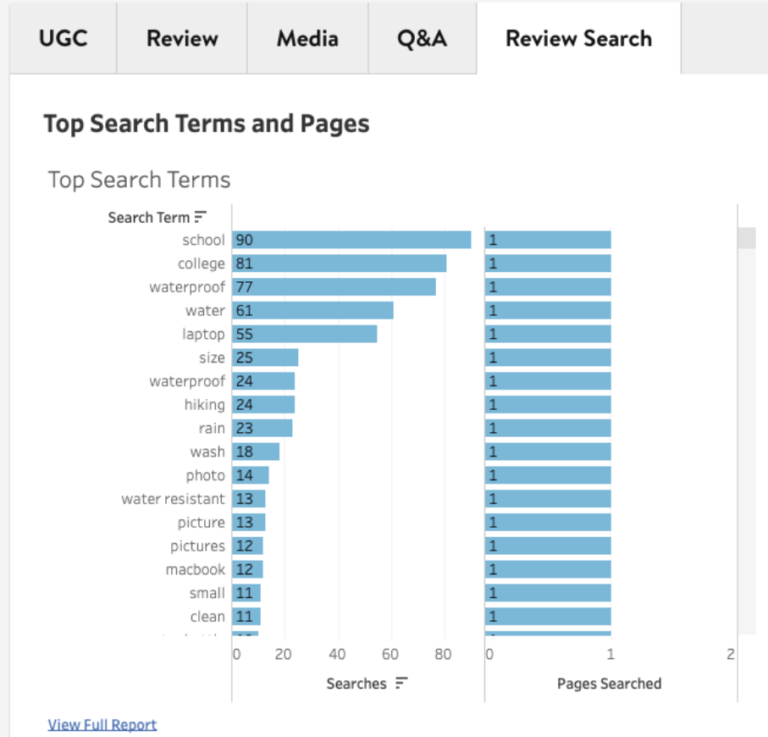
Many brands and retailers offer a review search function on their Review Display, so customers can hone in on exactly the reviews they’re interested in. Your top search terms include the most common keywords your customers look up when searching through your reviews.
There is a 260.7% lift in conversion among visitors who interact with the review search feature.
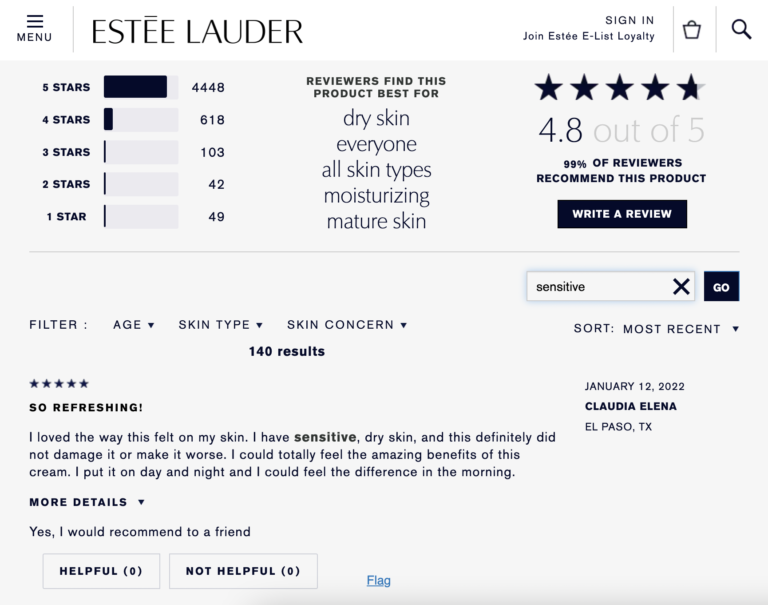
Regularly reviewing your top search terms helps you stay in touch with your customers’ top pain points, which you can use to improve your product marketing. For example, you may find that customers are looking for a specific use case related to a product, such as whether a backpack can fit a “macbook” or “laptop,” that you haven’t addressed in the rest of the product page.
Star filters describe how many people click to filter your reviews by a specific rating, such as 5 stars, while filter tags describe how many people click on specific filters you’ve set for a product, such as “feels true to size.”
Clicking on either of these filters increases the conversion lift of shoppers — by 89.3% in the case of filter stars and 78.6% in the case of filter tags — making them essential elements to include in your Review Display.
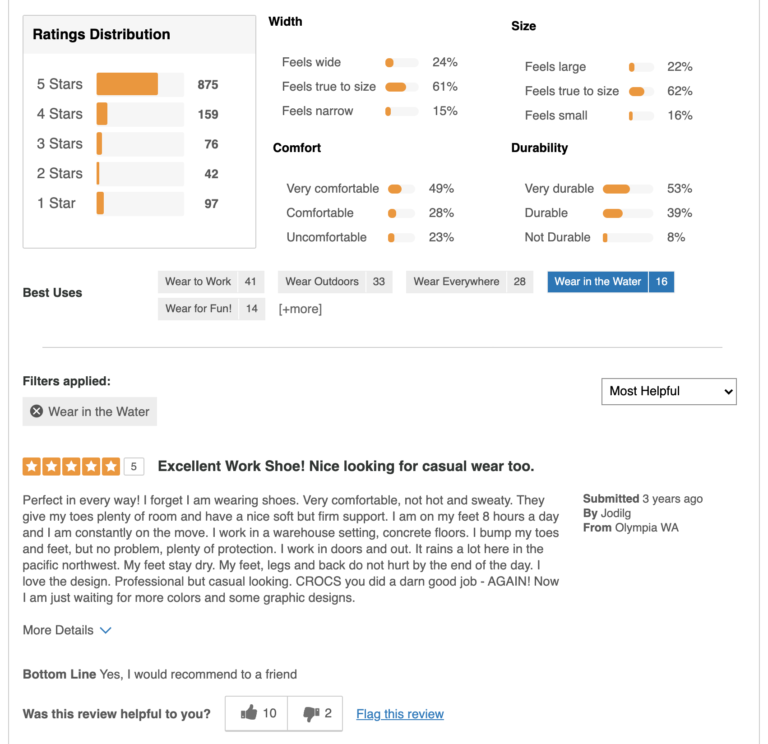
Keep an eye on which filters are clicked most often. Be open to experimenting with new filters to ensure you are making your Review Display as helpful as possible. For example, you may want to update some of your pros, cons, or best use cases with some of the top search terms you find in your review reporting.
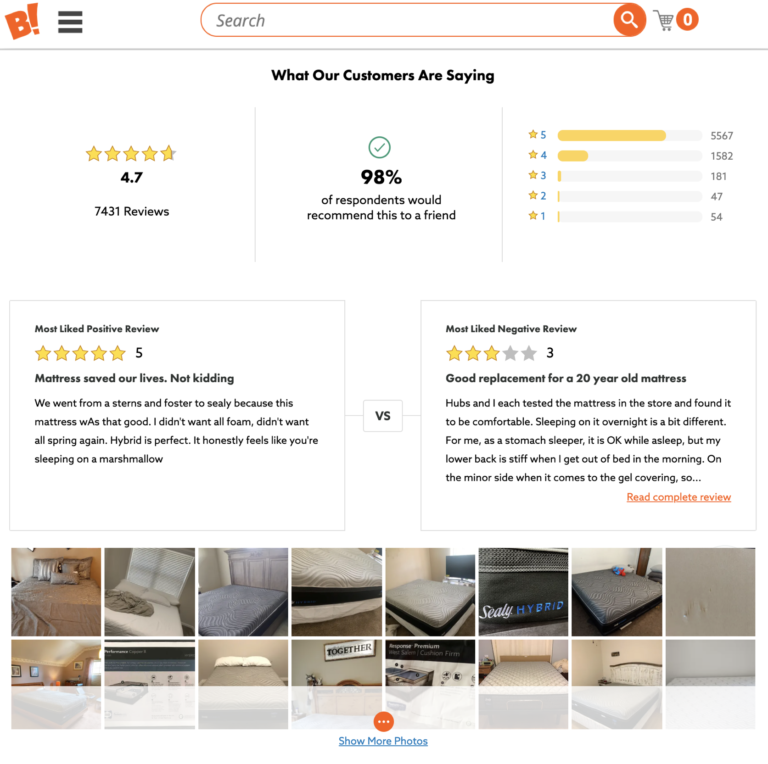
Some brands and retailers display a product’s most liked positive review alongside its most liked negative review one, in what we call a review face-off.
Displaying your most liked positive and negative reviews at the top of your Review Display helps shoppers quickly determine the best case and worst case scenarios of a given product. When shoppers click to read the entirety of either of these reviews — positive or negative — the product experiences a conversion lift between 114.3% to 128.6%.
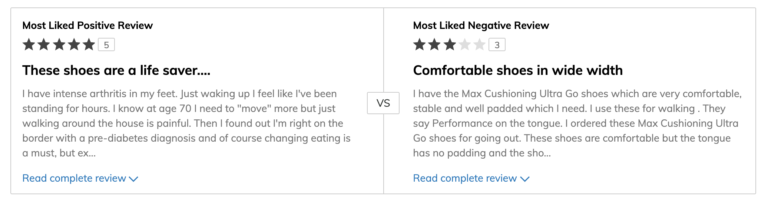
Because these two reviews enjoy such a prominent position on your product page, it’s a good idea to be aware of their content. Plus, both offer insights into the kind of information your shoppers find to be most relevant when making a purchase decision, which may inspire other areas of your product marketing.
This describes how often people click on your review dropdown menu to sort your reviews by sorting options you select, such as Most Recent, Most Helpful, or Top Rated.
There is a 114.3% lift in conversion among shoppers who click to sort reviews, so it’s worthwhile to have this feature enabled. Our research shows that the three types of review sorting behavior that have the highest impact on conversion are Most Recent, Highest Rated, and Most Helpful.
It’s good to keep an eye on your customers’ preferred sorting behavior. Based on what you find, you may change the default sort option to the one they select most often. Alternatively, you may find ways to make those other types of reviews more easily accessible, such as including a filter tag for reviews containing images.
Merchant Specific Questions, or MSQs, describe the optional questions many brands and retailers add to their review form. These can range from questions about size and fit to demographic information.
Seeing which of these questions are more popular with your customers — and their corresponding star rating — can inform your product marketing efforts.
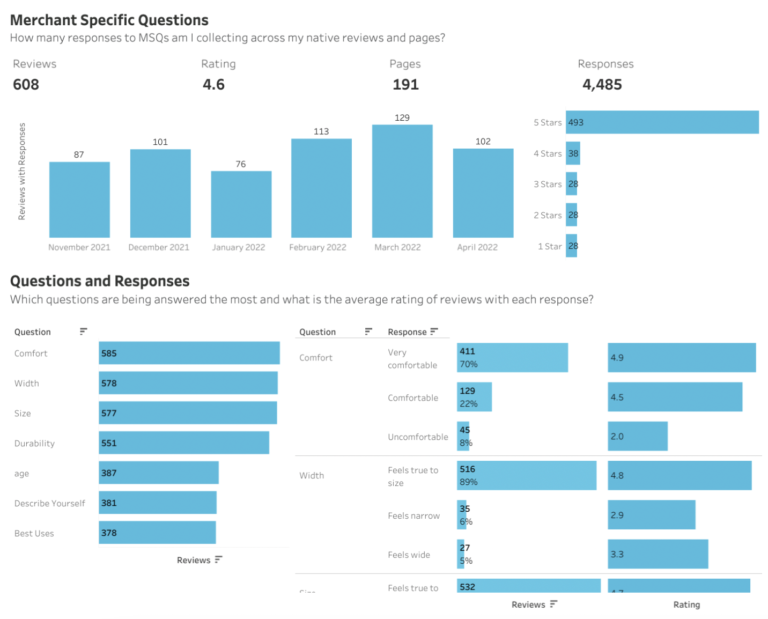
To make your Review Display more helpful, consider adding filter tags based on the most popular questions. If certain questions correlate with more negative ratings, such as “feels wide,” consider updating your product description.
How you display and present reviews can have a major impact on conversions. For more tips on optimizing your Review Display, check out our official checklist of best practices.
If you’re a current PowerReviews customer, great news: you can access all of these metrics in your reporting for free. Not yet a PowerReviews customer? Learn how we can help you do more with UGC.



How Fake Reviews Destroy Consumer Trust is based on the responses of 12,866 consumers in the US who completed a survey during the month of August 2022. Here’s a high level look at the key findings.
There was a time when consumers sought out feedback by asking for recommendations from family and friends. While word of mouth is still regarded as valuable by some, modern consumers more often seek out this type of feedback at scale – by reading reviews.
The feedback they uncover in those reviews has a large impact on purchase behavior. In fact, research tells us reviews have become the most important factor impacting purchase decisions.
The value of reviews is rooted in their authenticity. When consumers write reviews, they’re not doing so to sell products. They’re contributing content simply to share their genuine feedback – whether good, bad, or somewhere in between.
Yet, one simply needs to do a Google news search for “fake reviews” to see that the authenticity and trustworthiness of reviews is being called into question.
Fake reviews have become more common than you may like to think – especially on certain platforms. And some brands have even gone so far as to suppress negative reviews in an effort to improve consumer perception. Just earlier this year, the Federal Trade Commision (FTC) fined clothing retailer Fashion Nova $4.2m for doing just that.
In the short term, suppressing negative reviews and publishing fraudulent ones can be a quick way to improve a brand’s image – and grow sales. But in the end, these practices cause lasting damage.
Phony reviews mislead customers. This leads to poor purchase decisions – and unhappy customers.
What’s more, when a brand or retailer is found out (notice we said when, not if) for these unsavory practices, it can cause irreparable damage to their reputation. If consumers don’t feel they can trust a company, they’re unlikely to make a purchase.
Brands and retailers must be focused on preserving the authenticity of reviews. But why is this so important? And what actions can they take to do so?
PowerReviews recently surveyed nearly 13,000 US consumers to understand their growing concern with fake reviews – as well as key actions brands and retailers can take to preserve their authenticity. In this report, we’ll explore the key findings.
The report that follows is based on an analysis of 12,866 US consumer responses to a survey from August 2022. Here’s a snapshot of who completed the survey.




When reading product reviews, just over eight in 10 (81%) US consumers are concerned about fake reviews. Concern is fairly steady across all generations.
Also of note, US consumers are less concerned about fake reviews than those in the UK. Our previous research found that 90% of shoppers in the UK are concerned about fake reviews.
We asked respondents to rank their concern with fake reviews on a scale of one to five (with one being the least concerned and five being the most concerned). The average response was 3.00, compared to an average ranking of 3.22 for consumers in the UK.
But make no mistake: fake reviews are a concern for US consumers. After all, 85% rank their level of concern as three or higher.
Fake reviews have always been a concern. But headlines in the past few years have made this fraudulent content top of mind for consumers. The majority (63%) are more concerned about fake reviews when shopping online than they were five years ago. In fact, concern is growing among consumers of all ages.
There have been plenty of news articles in the recent past about the prevalence of fake reviews on Amazon. So it probably comes as no surprise that Amazon.com tops the list of sites where consumers in the US are concerned about fake reviews. This is also the case for consumers in the UK.
How common are fake reviews? And what red flags do shoppers look for to determine if a review is phony?
Fake reviews have become all too common. Nine in 10 (90%) US consumers believe they’ve read a fake review in the past. This is slightly higher than in the UK, where 87% of consumers believe they’ve read a fake review.
Of note, Gen Z and Boomer shoppers are slightly less likely to suspect they’ve encountered fake reviews than Millennials and Gen X.
In addition, the higher the household income of a respondent, the more likely they are to suspect they’ve encountered fake reviews. This is likely because those with higher incomes shop online more – and thus have more opportunities to encounter fake reviews.
Most shoppers in the US believe they’ve seen fake reviews in the past. But what factors lead them to believe a review isn’t authentic?
The top factor is the wording of the review or how it’s written. This factor also tops the list among UK shoppers.
Other red flags include poor grammar, extremeness (either too positive or too negative), and a lack of specific detail.
Fake reviews are common – and that’s a big problem. After all, the presence of even a single fake review can tarnish a shopper’s trust – perhaps forever.
As such, brands and retailers must make it a top priority to preserve the authenticity of reviews.
Reviews can come from a variety of different sources. For example, one review might be written by someone who received a free sample – while another was written by someone who purchased the product on their own.
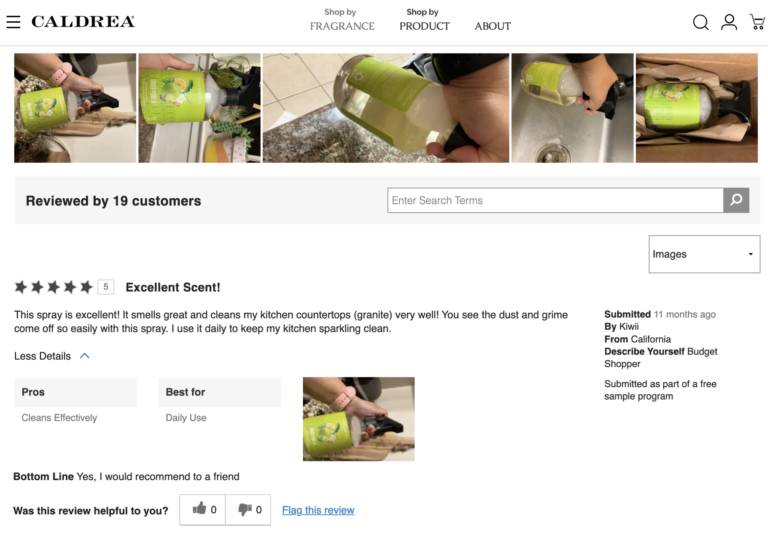
One important way to preserve the authenticity of reviews is to be transparent about their source. Brands and retailers can do this by adding text or a “tag” to each review – which lets shoppers know the source.
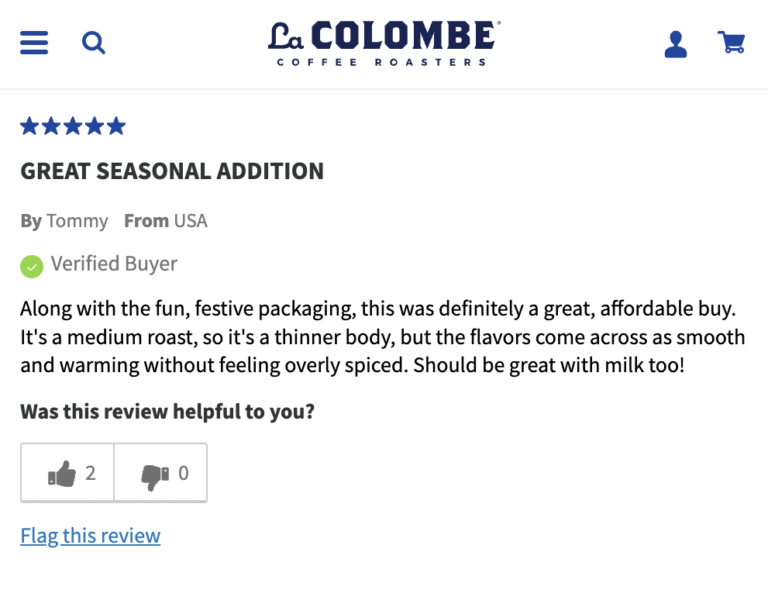
It probably comes as no surprise that the “verified buyer” tag is the tag that has the largest impact on US consumers’ perception of a review. After all, such a tag is proof positive that the shopper has actually purchased the product in question.
Negative reviews are never the goal for brands and retailers. But a lack of negative content can raise suspicions among shoppers. As mentioned earlier in this report, if a review is too extreme – whether positive or negative – it raises red flags for over half of shoppers. In addition, a previous survey found that nearly half (46%) of consumers are leery of products with a perfect average star rating of five out of five.
Our most recent research confirmed that perfect average star ratings are rarely ideal. A mere 6% of shoppers indicate that 5.0 is the ideal average star rating for a product. The largest portion of consumers – 44% – feel that the ideal average star rating falls between 4.5 and 4.99. 42% think the sweet spot sits between 4.0 and 4.49 stars.
Again, negative reviews shouldn’t be the goal. However, there is a positive side to them. For starters, negative reviews are an important tool many shoppers depend on to make the best purchase decisions.
Research tells us that 61% of consumers actively seek out one-star reviews. Doing so helps them determine the worst case scenario – and whether it’s something they can live with.
In addition, displaying negative reviews shows your shoppers you have nothing to hide. That transparency boosts trust – and purchase likelihood.
These days, nearly all consumers consult reviews. But fake reviews and manipulated review footprints threaten authenticity – and consumer trust. Brands and retailers must make it a top priority to preserve the authenticity of reviews.
These are the top five takeaways from our latest survey on review authenticity.
Reviews have become a key part of the purchase journey. In fact, research found that reviews are the top factor impacting purchase decisions.
Yet, there’s growing concern about fake reviews. Over eight in 10 (81%) US consumers are concerned with fake reviews. And 63% are more concerned about fake reviews now than they were a mere five years ago. Amazon is the site consumers are most concerned about fake reviews.
Nine in ten (90%) of consumers believe they’ve come across a fake review in the past. They identify fake reviews by looking for certain red flags, including wording, extremity, and a lack of specific details.
Your ratings and reviews platform should have a robust moderation process in place to spot phony reviews so they never see the light of day. Be sure to ask about it.
Consumers value reviews because it’s authentic content provided by others like them – rather than a brand trying to make a sale. One key way to preserve trust is to leverage badges that disclose the source of reviews.
For example, consider adding a badge indicating when a review was written by a verified buyer – or when a shopper received a free sample or some other incentive. For many shoppers, these badges positively impact their perception of the given review.
Over half of US consumers (54%) say that if a review is too extreme – whether positive or negative – that makes them think it might be a fake. What’s more, a mere 6% feel that the ideal average star rating for a product is a perfect 5.0.
Consumers know that a single product can’t be all things to all people. So when they see all glowing reviews for a product, it makes them suspicious. Of course, it’s important to have a moderation process in place that flags fraudulent or inappropriate reviews. But such a process shouldn’t suppress reviews simply because they’re negative.
Negative reviews are an important tool consumers use to make informed purchase decisions. Display negative reviews – and add features to your review display that make it easy for shoppers to find them. By doing so, you’re helping your shoppers find the products that best fit their needs – while showing them you have nothing to hide.
Sure, there are certain red flags that can help you determine if a given review is fake. But preserving review authenticity at scale can be a challenge – especially considering how prevalent fake reviews have become.
If review authenticity is a priority (and it should be), turn to the experts. Here at PowerReviews, we have a comprehensive fraud detection process that combines technology and human moderation. With this process, you can keep fraudulent content off your site – and preserve the trust you’ve worked hard to earn.


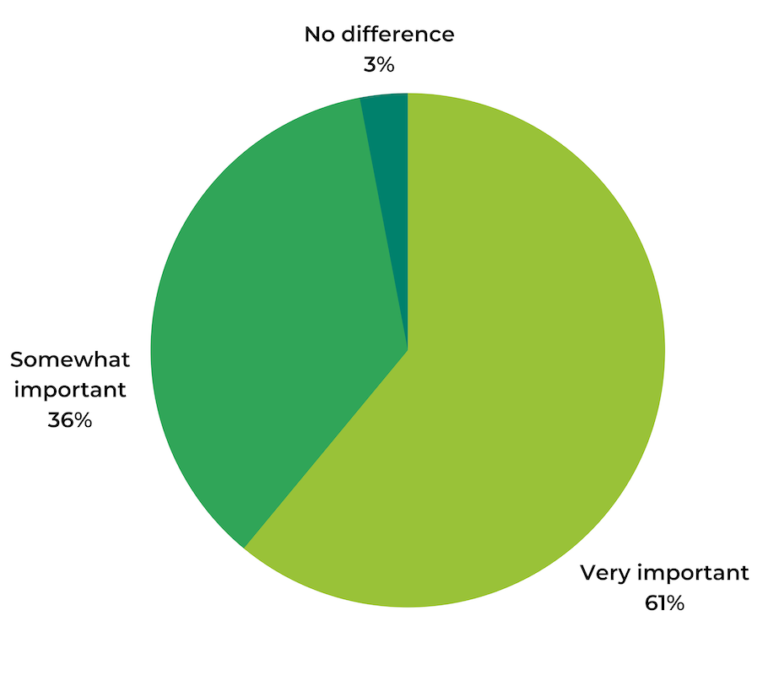
Reviews have become the single most important factor influencing purchase decisions, even above price. A vast majority (86%) of shoppers say they simply won’t buy products without reading reviews first.
By now, most brands understand the power of reviews. Getting and displaying reviews is table stakes. The real differentiator is knowing how to get more from your reviews.
To answer questions like these, you need review analytics. Read on as we share ten review collection metrics you should be watching, why they matter, and how to improve yours.
Review coverage describes how many of your products have at least one review.
Simply interacting with ratings and reviews lifts conversion by 120.3%, so you want to have reviews for all of your products. Plus, 80% of consumers say they’re less likely to buy a given product if it has no reviews, including 44% who say they simply will not buy a product without reviews.
Email is one of the most effective ways to consistently generate new reviews, so implement a post-purchase email campaign to follow up with customers after every purchase. To ensure new products launch with reviews, run a sampling campaign.
Review coverage by product describes the average number of reviews you have per product.
Review volume is important to consumers, with 79% of consumers “always” or “regularly” considering it when reading reviews. There is a direct, linear relationship between the number of reviews a product has, and the conversion lift it experiences. Over half (55%) of consumers say a product must have at least 25 reviews for them to feel comfortable making a purchase.
Review your analytics to see which products fall below your average review coverage. Then spin up dedicated campaigns to boost review numbers for those products.
Review recency refers to how old your most recent product reviews are.
Review recency may be even more important than review volume, especially when purchasing a new product or brand. 64% of consumers say they would be more likely to buy a product with fewer, more recent reviews than one with a large volume of reviews older than 3 months. How recent is recent enough? Roughly half of consumers prefer to see reviews written within the last month.
Send post-purchase emails at the right time. We recommend 7 days later for seasonal products, 14 days for perishable and soft goods, and 21 days for hard products. This way, the product is still fresh in their minds, but the consumer has had sufficient time to provide a thoughtful review.
Review length refers to the character count of your reviews.
Consumers overwhelmingly find longer reviews to be more helpful because they contain richer detail and more relevant information. They also tend to contain more keywords, which gives your SEO a nice boost. Our research shows that reviews of 500 characters or more have the largest impact on conversion rate.
Add a character counter to your review form. Inspire shoppers to keep writing with encouraging phrases like “Keep going!” and a green progress bar.
This captures the sources through which you have collected reviews, such as email, social, SMS, or organic traffic.
It’s important to know which channels are your top-performing for review collection, so you can focus your efforts in the places that generate the most reviews. By the same token, if you notice that one channel is underperforming, you can look into it and see what you can do to improve review collection.
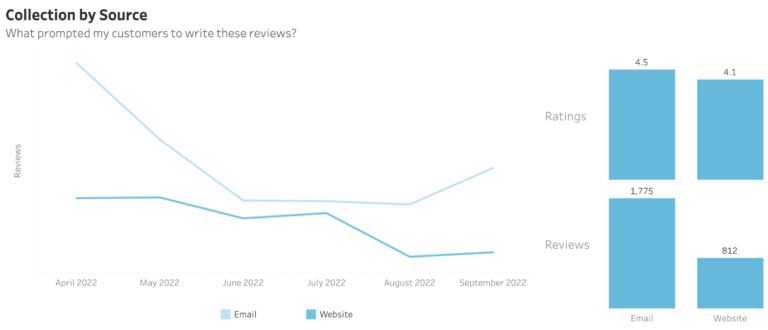
Keep an eye out for trends. Do certain channels drive more positive or more negative reviews? Do some channels, such as text, generate shorter reviews? Consider optimizing your Write-A-Review form or provide yes/no questions they can answer.
This describes the incentive programs you use to collect reviews, such as loyalty points, sampling, or sweepstakes.
Nearly three-quarters (73%) of consumers say they need an incentive to be motivated to write a review. The top incentives include receiving a product for free or before it’s available to the public, or earning discounts or loyalty points with a store or brand. It’s good to track the success of your different incentive campaigns so you can determine which type of incentive is most persuasive to your particular customer set.
Pay attention to how different incentive campaigns affect your review generation and ratings. If one is particularly successful, you may want to regularly run that type of incentive program throughout the year.
This captures how many reviewers actually complete their review, out of how many started writing a review.
In many ways, the usefulness of your reviews hinges on the success of your Write-a-Review form. Analyzing your form submission rate can reveal potential issues, such as whether the form doesn’t work as well on mobile devices or for certain products.
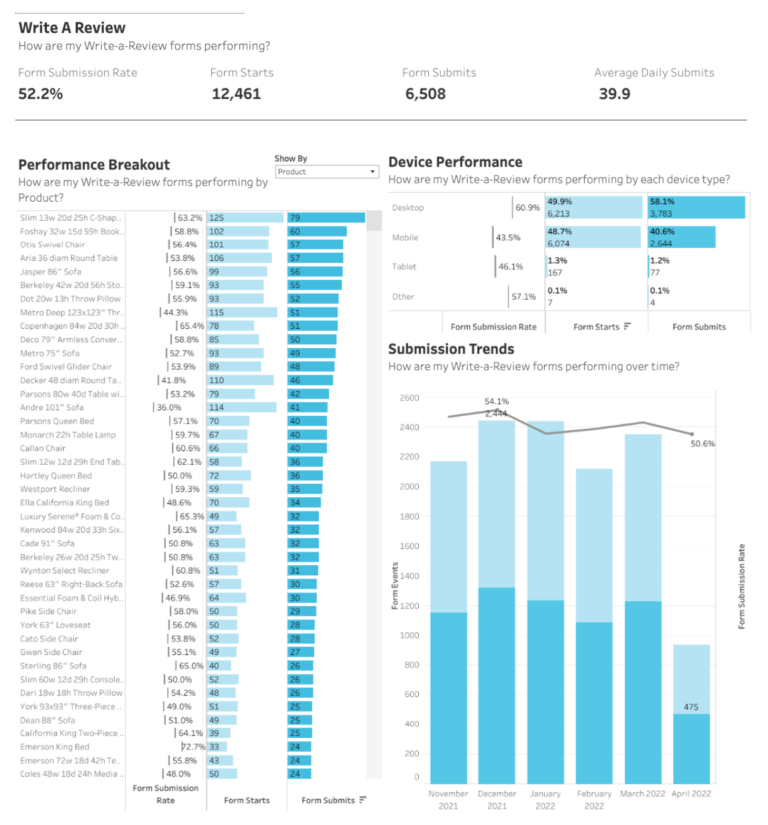
Keep an eye on your review form submission rate. If it suddenly drops on a certain day, or for one type of device, something may be broken. If the review submission rate is much lower on certain products, it may be that some of the questions feel less relevant to that product. You can also experiment with a shorter review form — or making more questions optional — to increase your submission rate.
This captures the response rate for individual questions on your review form.
To make their reviews more helpful to customers, many brands and retailers opt to add optional questions to their review form, beyond the standard star rating and blank text box. This is something we always encourage as it improves review quality – which shoppers value highly. However, you want to ensure you are asking the right questions. One way to tell is by seeing the average response rate for these questions, and the average star rating that corresponds with each one.
Pay attention to trends with your review questions. If certain MSQs correlate with lower star ratings, that may indicate a product quality issue you need to deal with to improve your ratings — or you may just need to rephrase that MSQ. If you have a hunch you have too many questions on your review form, consider removing some of the less-answered MSQs and see how that impacts your review submission rate.
Review observations are rules you set that automatically prevent some content from being published, such as reviews containing profanity or personally identifiable information (PII).
An important part of review content moderation is preventing profanity, PII, and other problematic content from getting published. However, sometimes a reviewer includes some of this content by mistake, like PII — and that can be easily fixed by improving the instructions on your review form.
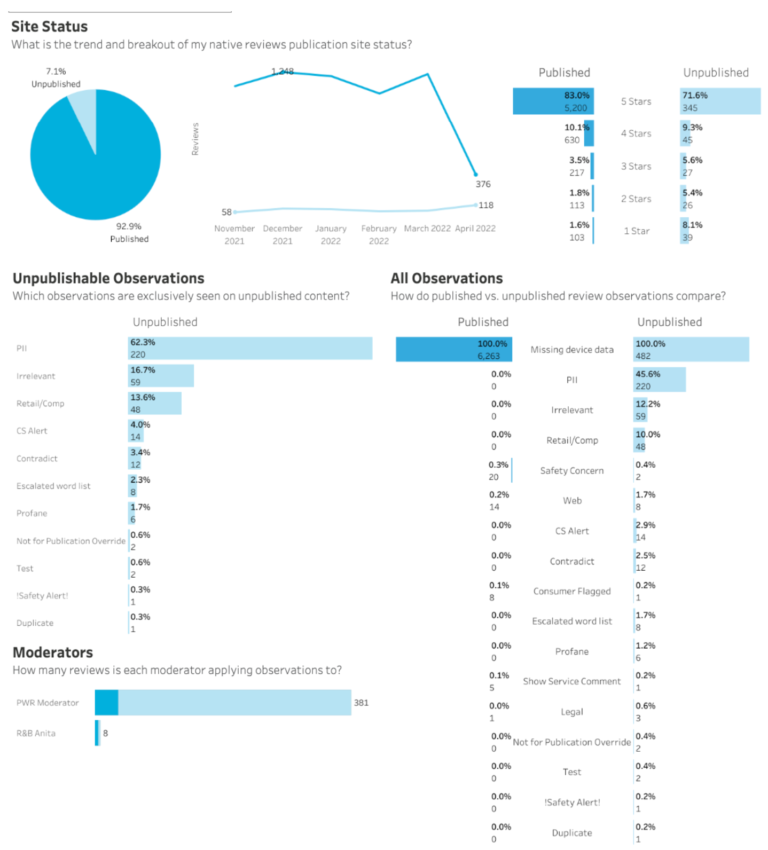
Pay attention to which observations show up often. If you see a lot of PII appearing in your unpublished reviews, consider updating your review form instructions and reminding people not to include PII like their name or location.
Review trends describe trends in your native review collection, such as how your star rating, review collection, and review length are trending over time.
Having a bird’s-eye view of how your review collection is going can help you identify potential issues or opportunities. For example, does your review collection soar or slump during certain times of the year?
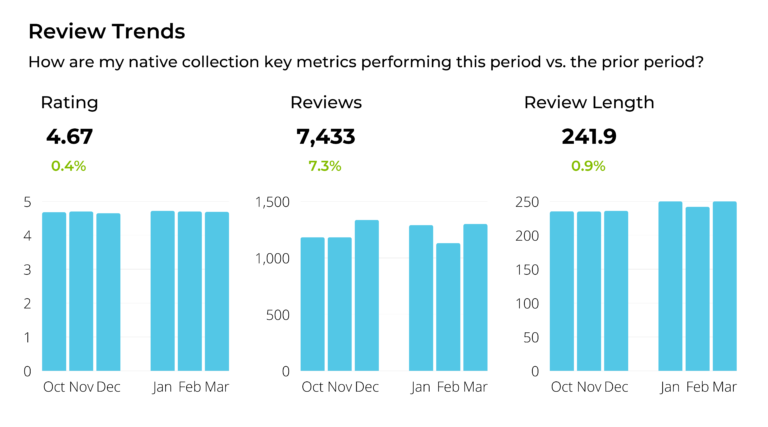
Stay ahead of negative reviews by responding to changes in review trends. If your rating goes down, read the reviews to understand why. If you notice a dip in review length, update your character counter. If you identify slow periods, proactively run a sweepstakes or sampling campaign during that time of year.
Review analytics can be the game changer between a decent reviews strategy and an outstanding one. By analyzing your review collection, you can unlock essential insights and discover opportunities to generate more impactful reviews.
If you’re a current PowerReviews customer, you can access all of these metrics in your reporting for free. Not yet a PowerReviews customer? Learn how we can help you do more with UGC.
From window displays to television commercials, shoppers have always placed a high value on visual content. That’s not anything new. We’re visual creatures, after all.
What is new is the type of visual content shoppers value. User-generated visual content has become increasingly important to consumers. 94% of shoppers seek out visual UGC at least sometimes. One in four shoppers always seek it out.
“But aren’t our photos enough?” you may ask. No, they’re not. Today, 80% of consumers say photos from other customers are more valuable than those provided by brands or retailers. That’s a big increase from five years ago, when only 44% felt this way.
What’s more, 54% of consumers say company-generated product photos are “unhelpful” and actually dissuade them from buying.
Fashion brands have embraced the power of UGC for years, mining their social media channels for customer images to share on their own websites and marketing materials.
We have a newsflash for you: this process, which is known as social curation, is no longer just for fashion brands. Increasingly, consumers expect to see visual UGC content across product verticals. Nearly 40% of online grocery shoppers, for example, seek out customer-submitted imagery and videos. From CPG to health and beauty, consumers want to see more imagery from other customers.
Read on as we explore the power of social UGC for non-fashion brands, complete with real-world examples.
Social curation is the process of sourcing product images posted by your customers on Instagram, and then displaying it through your own website to provide social proof and lift conversions. Here’s how it works.
88% of consumers specifically look for visuals (such as photos or videos) submitted by other consumers prior to making a purchase.
The first step is choosing how you’ll collect the images from social media. With PowerReviews, you can designate certain @mentions, @tags, and #hashtags to source content from, such as mentions of your brand name or a campaign-specific hashtag.
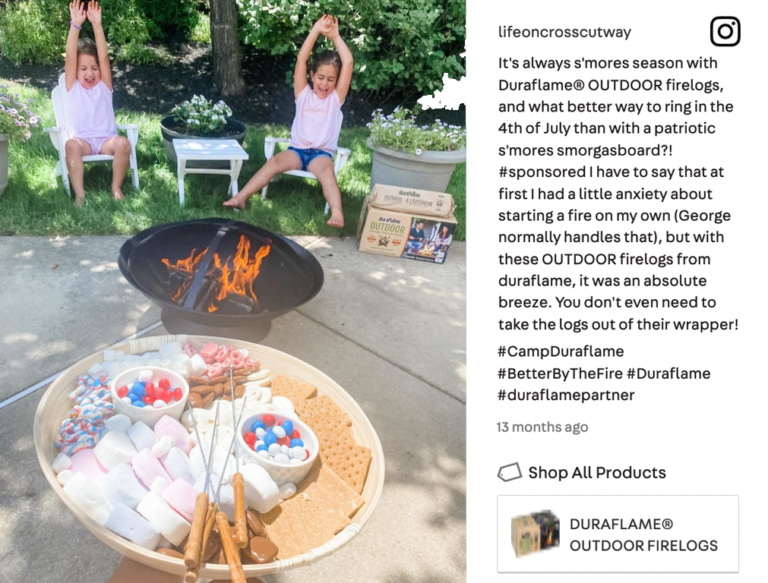
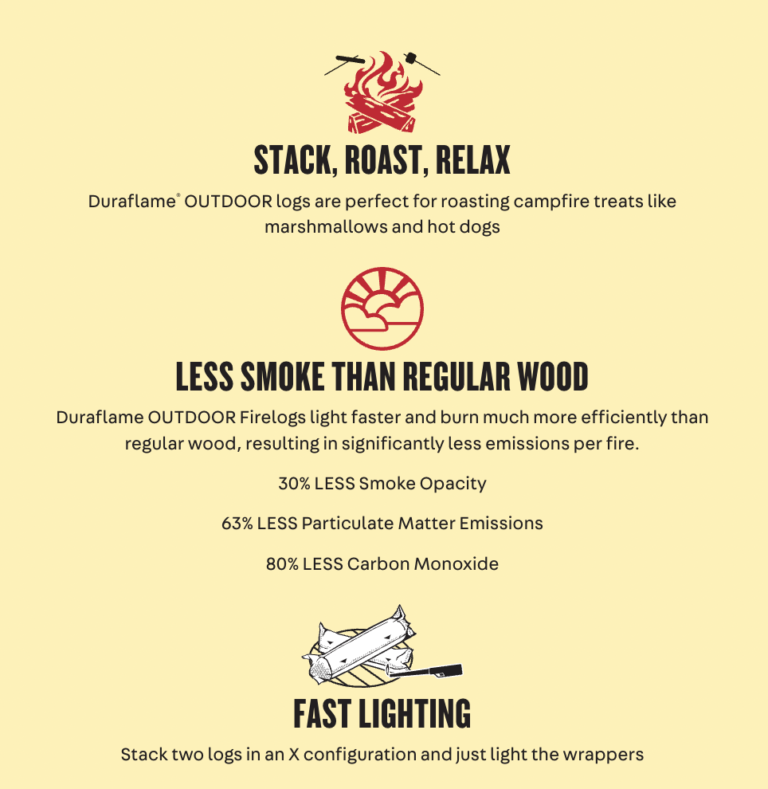
It can be helpful to be specific with this (e.g. #BrandNameLove vs. #OOTD), as that ensures you generate more relevant content that actually features your products. For example, Duraflame uses the hashtag #BetterByTheFire:
You’ll need to get permission from consumers before using their photos or videos across your website or in other marketing materials. Work with your legal team to establish a Terms and Conditions page, and link to this page whenever you ask for permission.
Always be sure to attribute your customers’ content to them, such as linking to their Instagram page or including a caption like “Photo courtesy of [insert Instagram handle]. Here’s an example from Janie and Jack:

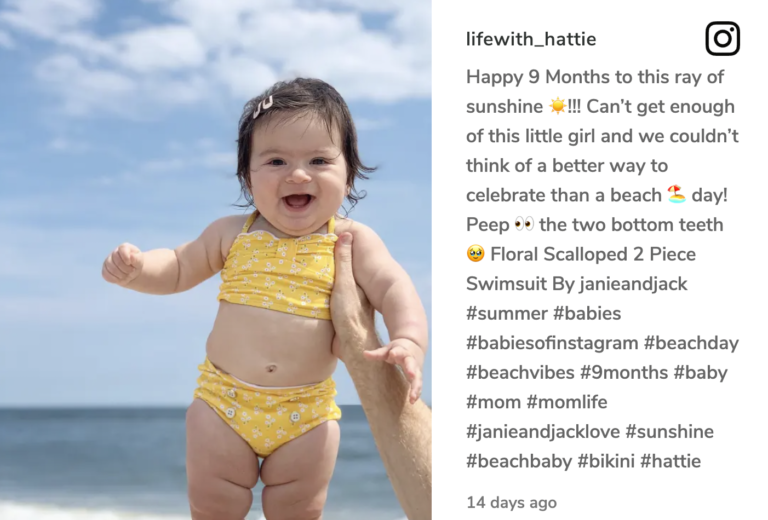
Once you’ve taken care of the legal p’s and q’s, it’s time to promote your campaign. Encourage customers to post photos with your products via email campaigns, social media posts, product packaging, billboards, and anywhere else you communicate with your customers. Give them some tips for how you want them to post, such as the hashtag they should use, and to be sure they’re actually featuring your products in their post. Here’s an example from Benefit Cosmetics:
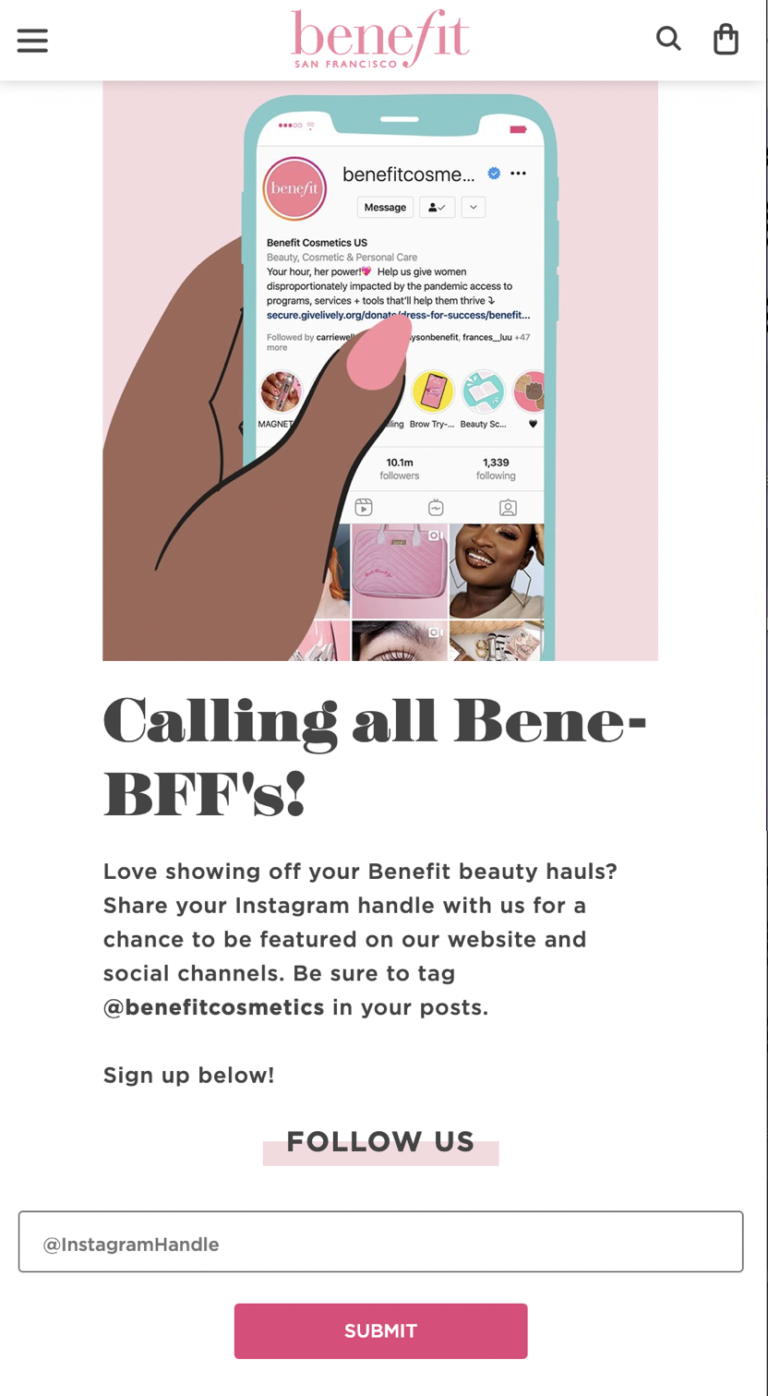
Next, it’s time to put that social content to work! Once you have your customers’ permission, you can reshare their images on your:
Want extra credit? Monitor the performance of your social content. Who are your top creator contributors? What products are featured more, or less, often? How is the photo quality? Knowing the answers to these questions can help you find ways to improve your campaigns and collect more effective social imagery.
How important is social imagery, really? Visual media is so important to consumers that they overwhelmingly rate images as the most valuable part of any individual review, even above the review length, title, and aggregated pros and cons lists.
Let’s take a look at some of the value brands and retailers can derive from curating and sharing social UGC.
More than half of consumers say imagery provided by previous purchasers is a top factor influencing their purchase decision. When people interact with visual UGC, their conversion rate doubles. Our latest data shows a 106.3% lift in conversion among visitors who interact with user-generated imagery on a product page. That’s a significant increase from the conversion lift of 91.4% found the year prior, indicating the increasing impact of user-generated imagery on purchase behavior.
Imagery interactions that are particularly impactful on conversion include:
Further, our research shows that consumers who spend more online are more likely to “always” seek out visual content within reviews. 35% of consumers who spend $2,000+ online each month always seek out visual content within reviews, compared to 20% of those who spend $250 or less monthly.
Benefit Cosmetics curates photos from their own social feed featuring real customers. They include the precise shade and product used in each image, enabling shoppers to see how the different shades look on different people.
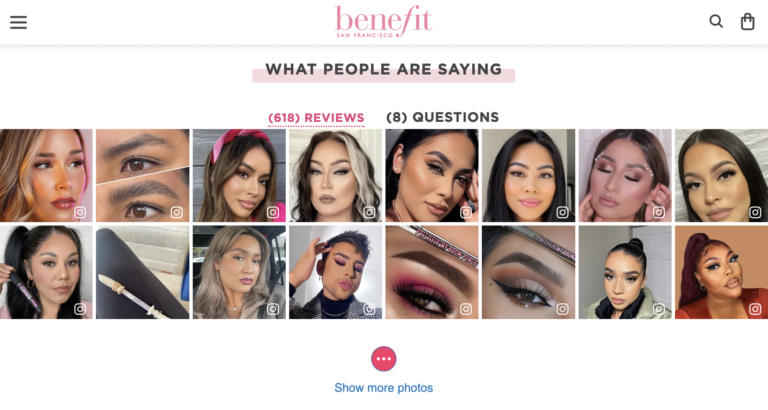
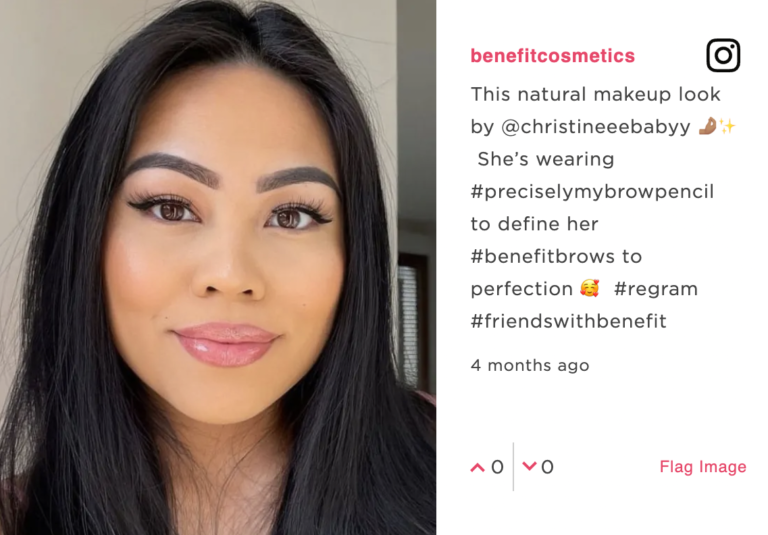
57% of shoppers read reviews to find imagery or photos of the product from a real-life shopper. Several of the top reasons consumers value visual UGC speak to authenticity:
Visual UGC that is collected from social media authenticates your marketing claims and provides powerful social proof. Not only are your customers willing to write a rave review, they’re so passionate that they’re happy to promote your brand on their social media pages.
There’s another added benefit to social image curation. Almost everyone, whether or not they’re an influencer, treats their social media like they are an influencer. That means you get to collect influencer quality content without the pricey cost of maintaining an influencer relationship.
Here are two examples of social UGC, one from a beauty influencer for Babor and another from an everyday customer of Soylent. Both are persuasive and feature the product in an authentic light.
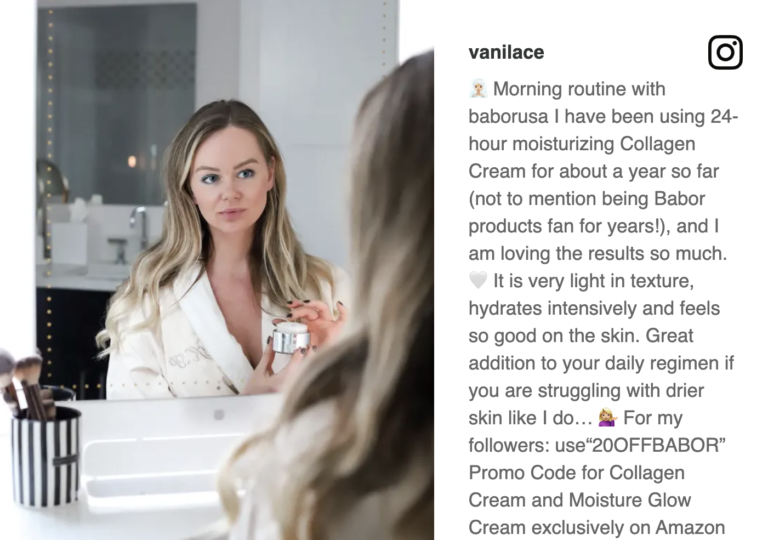
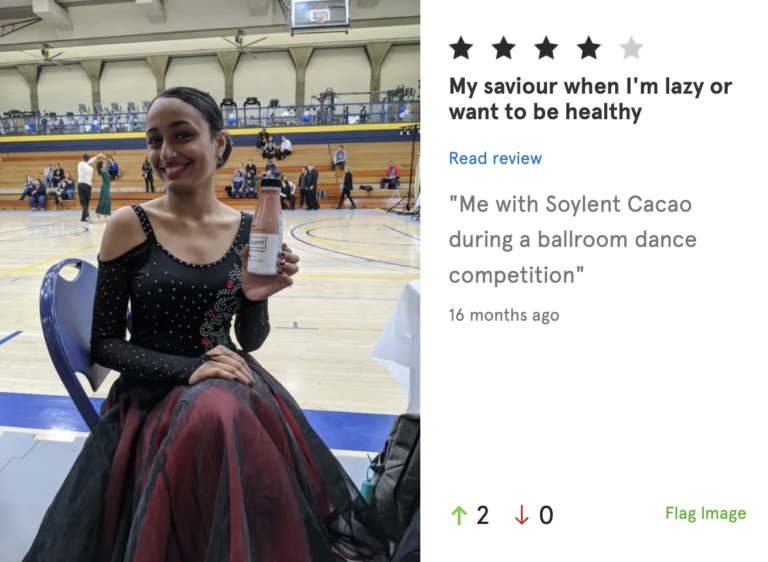
Visual UGC is especially important to younger consumers, with 91% of Gen Z’ers and 84% of Millennials always or regularly seeking it out. In fact, a third of Gen Z shoppers and nearly a quarter (21%) of Millennials won’t purchase a product if there is no visual content from people who previously bought it.
Soylent recognized that social media is the essential medium for targeting a younger audience. The brand found that 100% of customers who go to their site look at their image gallery. This knowledge has helped them grow their business, launch new flavors, and expand to new retailers.
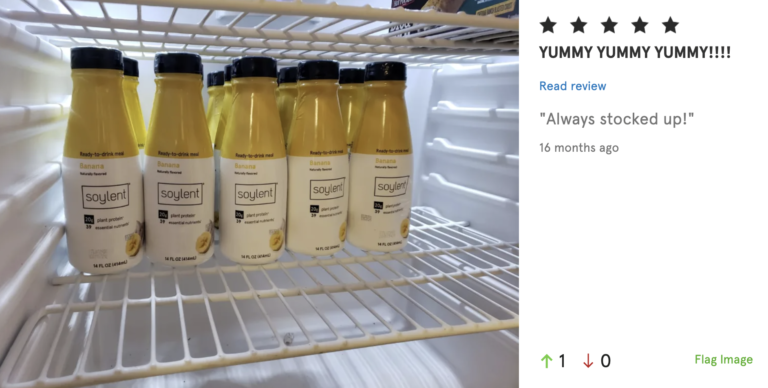
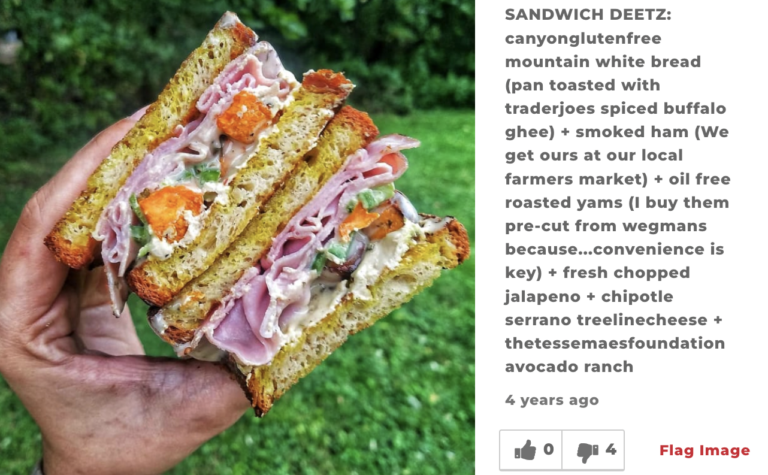
With all of the food influencers out there, there is a huge opportunity for CPG and grocery brands to pull in their content to their product pages. These creators dream up yummy recipes and show off the results on social media. By curating images like these from social media, your brand can inspire other shoppers.
Canyon Bakehouse’s product pages are filled with the types of images we’re talking about. They feature their customer’s delicious creations on the product pages, offering different ideas for how shoppers can use their gluten-free bread. “Social curation has allowed us to add a lot of color and credibility to the product display pages on our site,” shared Katie Pusateri, Marketing for Canyon Bakehouse.
With social curation, you can display shoppable customer image galleries on your site wherever you need to provide social proof, enable product discovery, and inspire sales.
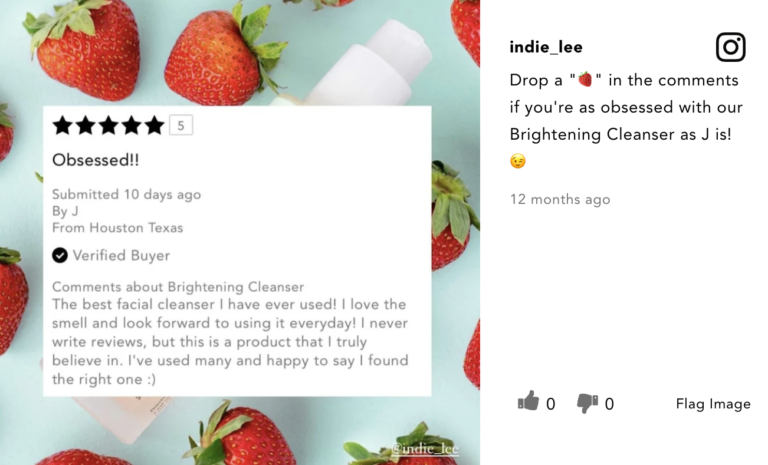
You can reuse these images in marketing materials across your website and email. You can even get really meta and showcase reviews in your social media, only to curate those same images right back on your product page, like Indie Lee does. It’s like the movie Inception for UGC!
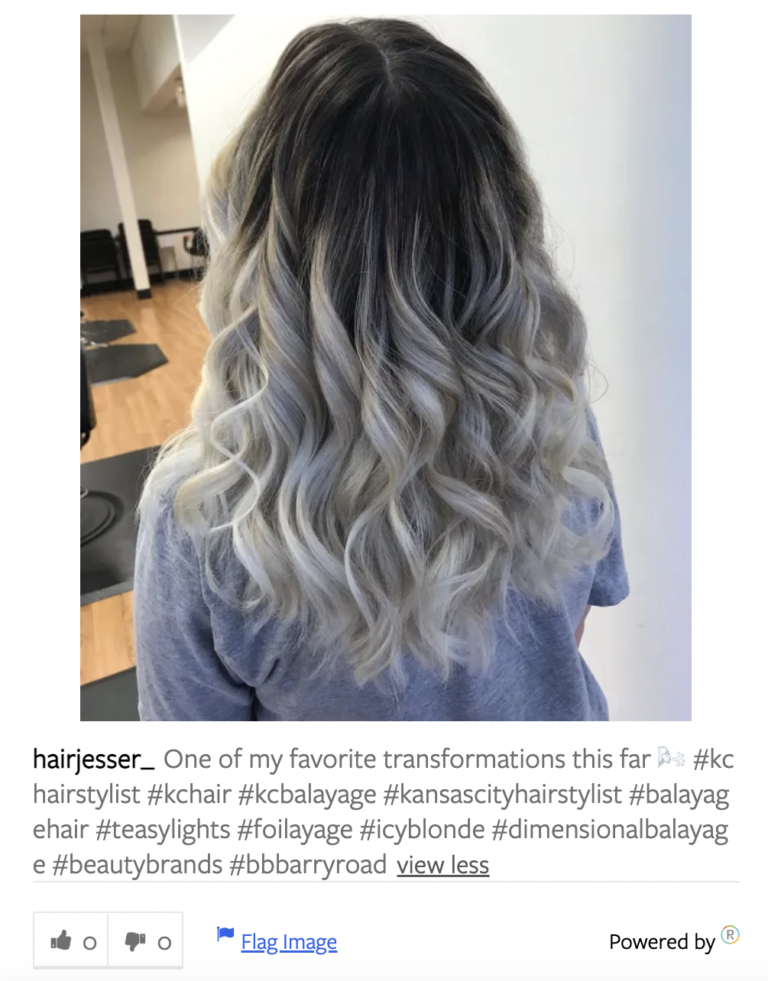
The #1 reason shoppers value visual UGC is to see what the product looks like in real life. Another popular reason is to understand how the product performs. By curating images from social media that include their branded hashtag, Beauty Brands enables shoppers to easily see how their product works for a wide range of hair colors, styles, and lengths. This helps build trust and inspire purchases for a wider range of shoppers than a simple product photo gallery could ever provide.
How many images is enough? You can never have too many images. Fortunately, when you’re collecting images from social media, you tap into an endless supply of creative and beautiful imagery created by real customers.
If you’re looking for hard numbers, though, check out our latest benchmark study on visual UGC. Independent of vertical, the average product has 12.8 images or videos. However, what’s typical can vary by vertical. The typical food and beverage product has 14 images or videos, on average, while CPG products have 20 images or videos, and health & beauty products have 23 images or videos.
The key, of course, is to have strong visual UGC coverage across all your products. Get started with these four tips for getting the most out of your visual UGC.
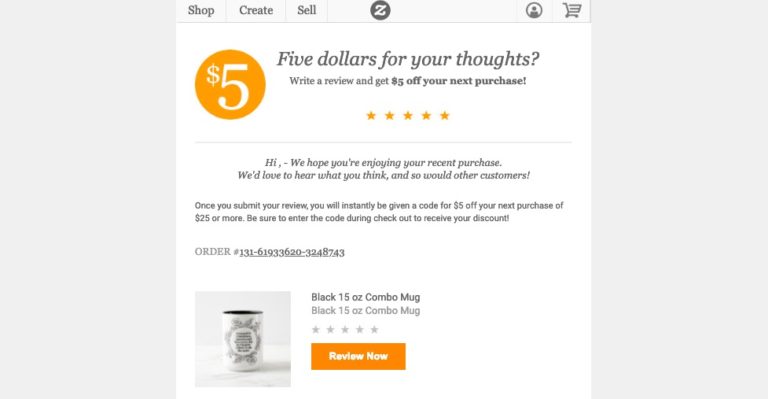
From free samples to free discounts, up to 86% of customers need an incentive to leave a review.
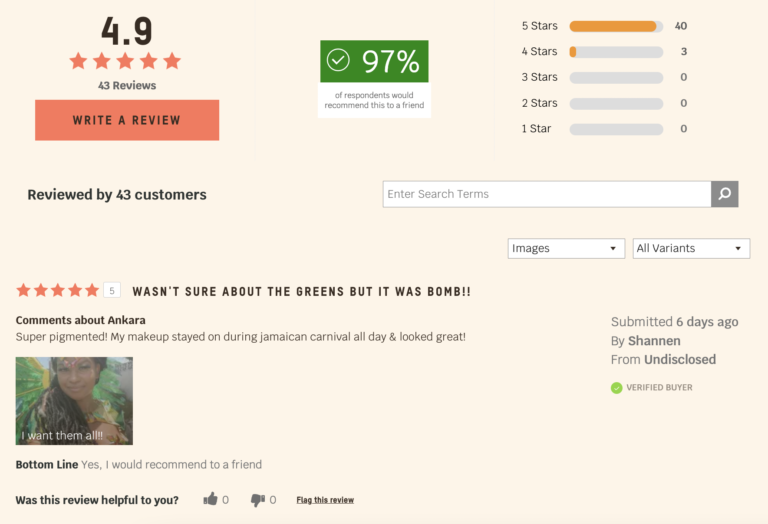
Over three-quarters (77%) of shoppers find filtering options useful when browsing review content. Include a filter for reviews that feature visual UGC.
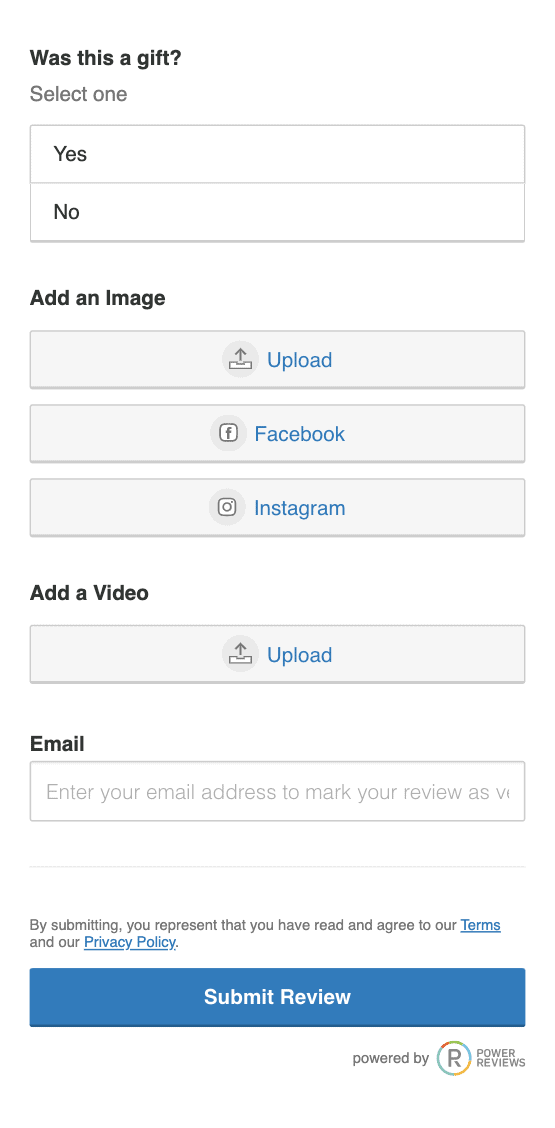
Make it easy for reviewers to add social UGC, by letting them upload photos from their Facebook or Instagram page.
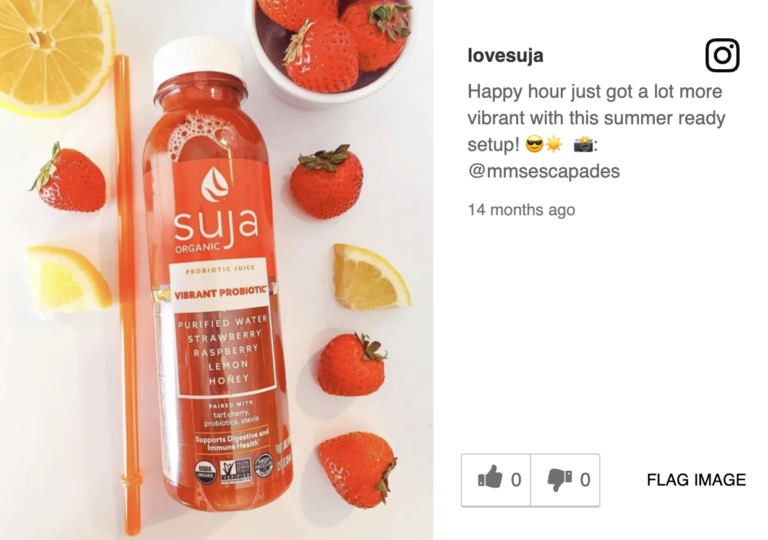
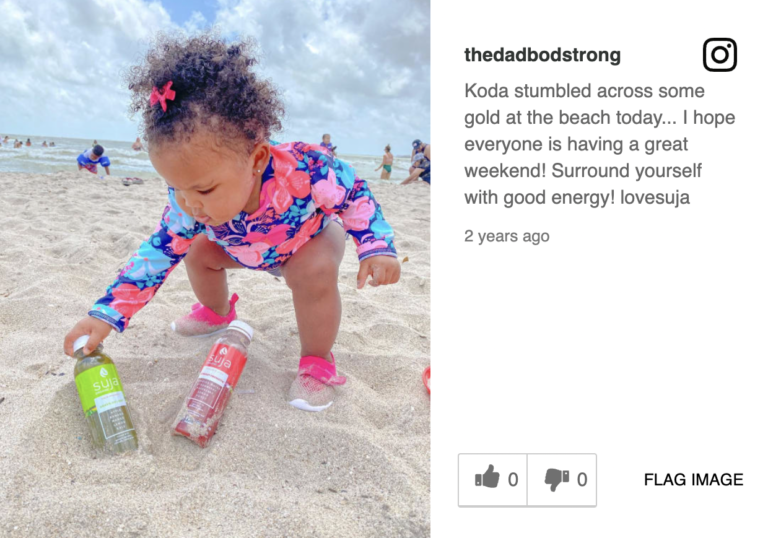
With PowerReviews Social Curation, brands and retailers capture 221% more images and videos. You can collect images posted with specific hashtags, from both your brand and customers. Suja Juice includes images from their brand account as well as fans in their review snapshot.
Social media is not just for sharing; it’s for selling. The brands who recognize this have a clear competitive advantage. They’re the ones who are collecting native content from their customers, showcasing it on their site, and leveraging it to boost sales and engagement. Adopt an image-first mindset today, and watch as your brand connects with – and sells to – customers better than before.
According to Digital Commerce 360, more than 20% of consumer spending in the first quarter of 2022 occurred online. Even in-store shoppers are doing plenty of online research before making a purchase decision.
At the same time, brands and retailers face steep competition – regardless of category. Brands and retailers must work hard (and smart) to attract and convert shoppers who have more choices than ever before.
If you’re like most brands and retailers, you likely invest plenty in SEO and digital initiatives to drive more traffic to your dot com. But what happens when someone clicks through and lands on one of your product pages?
While click-through is an important metric, conversion is the ultimate goal. Brands and retailers, therefore, need to ensure their product details pages provide all of the information shoppers need to make confident purchase decisions – regardless of the device they’re using to shop.
In this guide, we’ll discuss why it’s critical to continuously optimize product details pages – as well as the 10 key ingredients of PDPs that convert (with real-life examples of these ingredients in action).
Typically, a consumer doesn’t start the purchase journey on a PDP. Instead, they might start their search on Google, see a digital ad while scrolling through their favorite website or social media channel or do a search on a brand or retailer’s website.
Once the consumer clicks through, it’s the PDP that makes or breaks the sale.
One of the downsides of online shopping is that consumers can’t see and touch a product prior to purchase. Instead, they depend on the PDP to get an accurate picture of what to expect from a product. Great PDPs give shoppers all the information they need. This increases their confidence – and their likelihood of making a purchase.
Returns are a thorn in the side of all brands and retailers. However, returns are especially common when merchandise is purchased online. In fact, CNBC reports that the average return rate for online purchases is nearly 21%.
A great product page sets realistic expectations. That way, there are no surprises when the item arrives in the mail. And that means customers are less likely to make returns.
The best PDPs equip shoppers with the information they need to make confident purchase decisions. But the harsh reality is, many PDPs are falling short. According to Baymard research, a mere 18% of the 141 top-grossing US and European ecommerce sites have what they deem to be “good” or “acceptable” product page UX performance.
PDP optimization must be a top priority for any brand or retailer that sells online. But what exactly does an “ideal” PDP look like?
The short answer is, there is no single PDP formula that’ll work for every brand and retailer. Instead, it depends on a lot of factors including the product type and industry, among others.
That said, there are certain commonalities across all of the best product details pages. Here’s a bird’s eye view of what “good” looks like.
In the following sections, we’ll dig deeper into each of these 10 key ingredients.
According to Insider Intelligence, retail mobile commerce reached $359.32 billion in 2021, a 15.2% year-over-year increase. By 2025, retail m-commerce is expected to reach $728.28 billion and account for just over 44% of total retail commerce sales in the U.S.
It’s critical to ensure your product pages are easy to view and navigate, regardless of the device a shopper is using.
In fact, ALL components of the product page – including imagery and user-generated content (more on that later on) should be mobile-friendly.
The bottom line is that shoppers must be able to easily find and consume the same product information on a mobile device as they can while browsing on a computer. Brands and retailers that fail to optimize for mobile are certain to lose the growing number of shoppers who browse and buy directly from a mobile device.
A descriptive title is the foundation of a great PDP. A great title impacts where (or if) your product page appears in search – which is where many shoppers start the purchase journey. Plus, a well-written title can provide a lot of upfront information to shoppers. This helps them determine whether the product fits at least their initial search criteria. If a product does fit that initial criteria, an informative (yet concise) title) can entice more shoppers to scroll to learn more.
This PDP features a descriptive title that lets shoppers know the flavor, size and quantity of the product. It’s easy for them to see exactly what they’ll get – even without reading the full description.
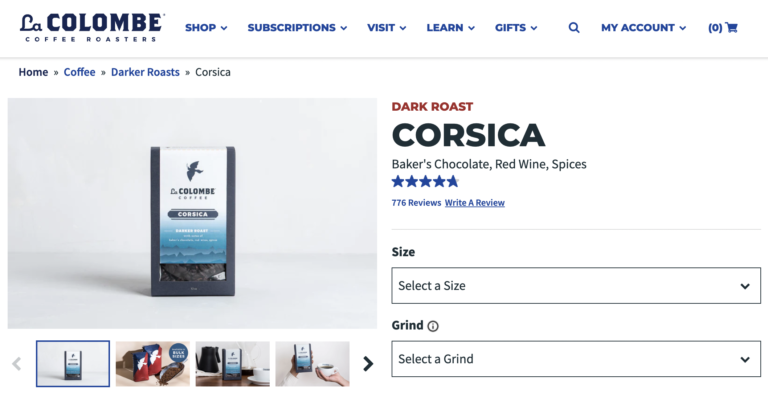
The title on this product page for coffee lets the shopper know the type of roast – as well as the flavors it has. If the shopper is a fan of baker’s chocolate, red wine, and spices, they’ll scroll on to learn more. Otherwise, they’ll take their search in a different direction.
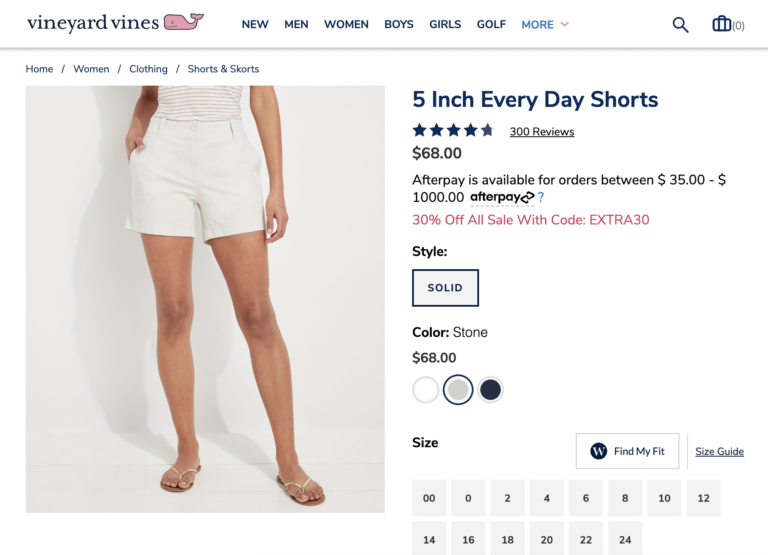
Shoppers get a lot of information from the title on this PDP for shorts, too. They can see that the shorts are five inches in length (an important search criteria for many shorts shoppers) – and they’re good for everyday wear.
The product description tells the story of your product, highlighting the important features – and how they benefit customers. The best written descriptions give shoppers all the information they need to make smart, confident purchase decisions. Research from Salsify found that 87% of shoppers place a high value on product descriptions as a key factor for making purchase decisions.
As an added bonus, clear, detailed, well-written product descriptions can positively impact how high your product pages show up in search results. That means more shoppers will land on your PDPs when starting the purchase journey on Google or another search engine.
There’s no set formula of what should (or shouldn’t) be included in a written product description, as it varies from brand to brand and even product to product. However, there are a few best practices that apply across all product categories. For starters, use a conversational writing style that’s easy for shoppers to read.
In addition, remember that large blocks of text are challenging to read – especially for the growing number of consumers who are browsing and buying on a mobile device. As such, consider using lists, bullet points, visual icons, and other techniques to break up text and make it easier to read. For example, both of these PDPs use bullet points to list out the main features of products.
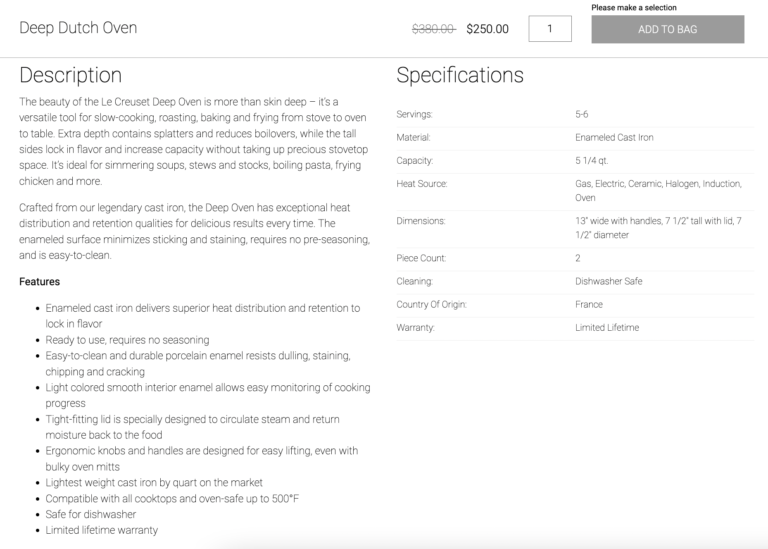
This is another home and garden PDP that also uses bullet points to convey the key features of the product. The brand also uses graphic icons to chunk the text into easier-to-read sections.
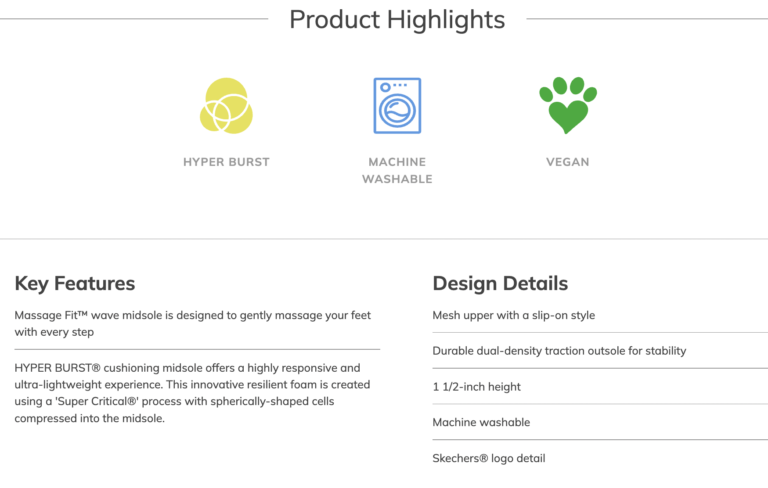
This shoe brand also does a great job conveying a lot of information – but doing so in a way that’s easy to scan and not visually overwhelming. There’s a short introductory paragraph at the top, followed by product highlights, key features, and design details that are easy to scan.
Some brands and retailers break up the product description into multiple sections so shoppers can hone in on the details that matter most to them. For example, this brand has multiple tabs on its PDPs, including a description, information about use, and ingredients.
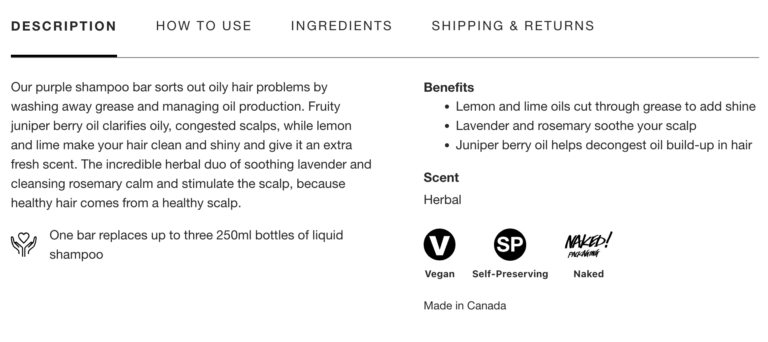
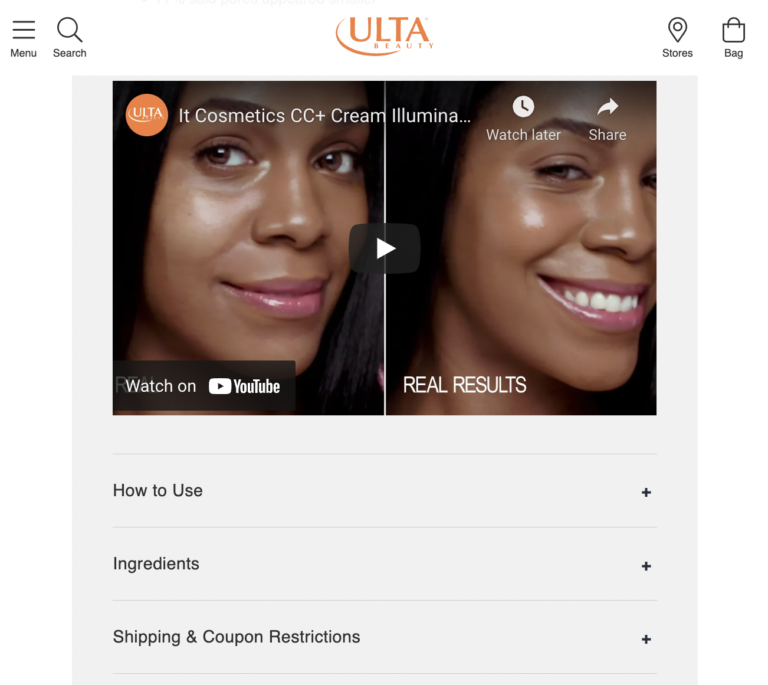
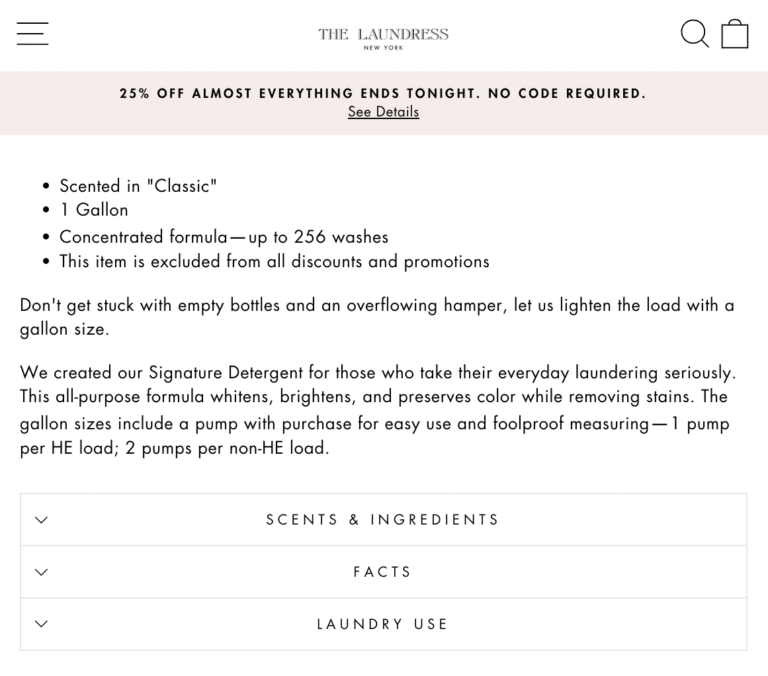
These two PDPs take a similar approach, with expandable sections for things like usage instructions and product ingredients.
Online shoppers return merchandise for many reasons. But size or sizing concerns rise to the top. According to Narvar, 42% of consumers made their last return because of size and fit issues.
Size is important across many product categories – but perhaps the most obvious is clothing and shoes. If a product doesn’t fit correctly, a shopper is likely to return it. What’s more, many shoppers engage in bracketing, which is the practice of buying multiple versions of an item (in this case, multiple sizes), trying them at home, and returning what doesn’t work. This, of course, causes headaches (and unnecessary costs) for brands and retailers.
Size matters for other categories, too. For example, a consumer needs to be sure a coffee table will fit well in her small living area. Or, a consumer may be disappointed (and make a return) when a bottle of face cream ends up being smaller than expected.
When shopping online, it can be difficult for shoppers to assess size and sizing. But the right tools on the product page can ensure the shopper chooses items that fit their size or sizing criteria, which increases customer satisfaction (and decreases returns and negative reviews).
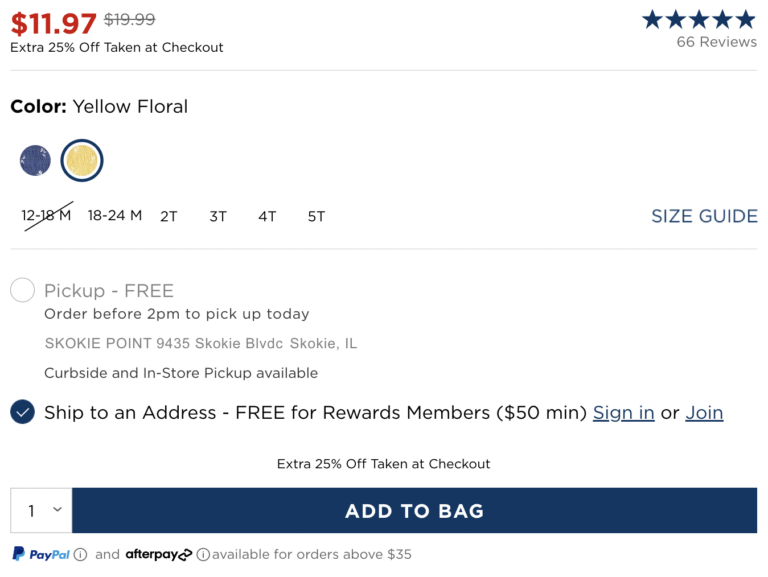
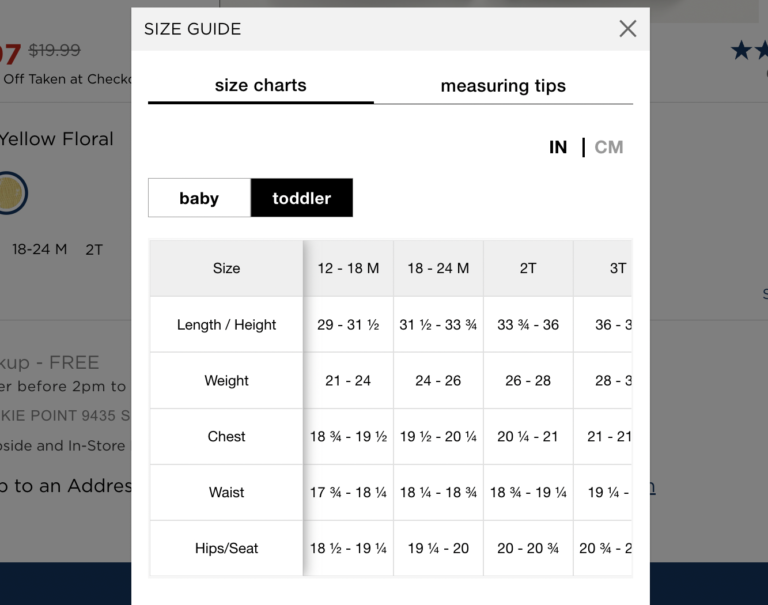
At a bare minimum, brands and retailers must include product measurements and size charts on their product pages.
For example, this apparel page includes a “fit & sizing” section to provide details about how the item is intended to fit.
They also provide a sizing chart on each product page. Finally, they provide tips for measuring to determine the appropriate size.
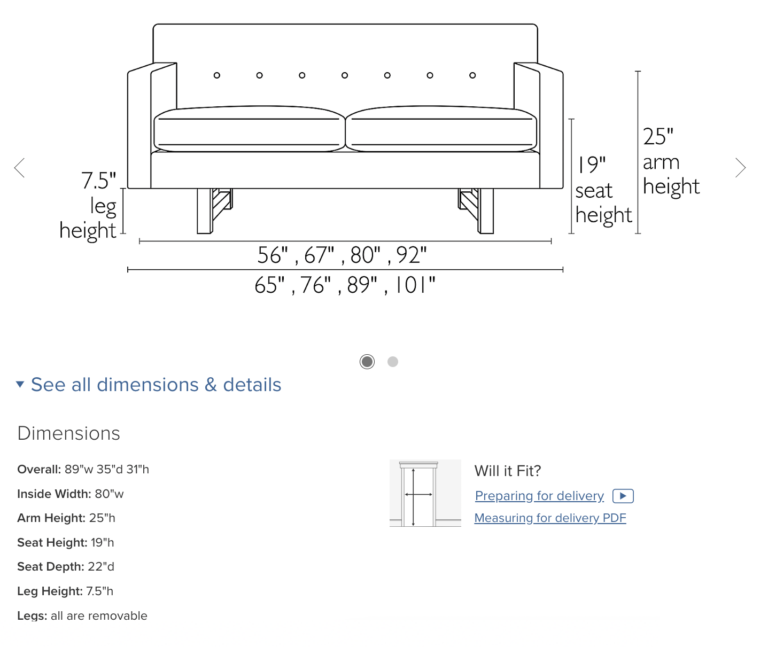
This home and garden retailer, on the other hand, includes comprehensive product measurements so shoppers can ensure the product fits in their space.

Room & Board is another example of a home retailer that makes it easy for shoppers to visualize the size of an item.
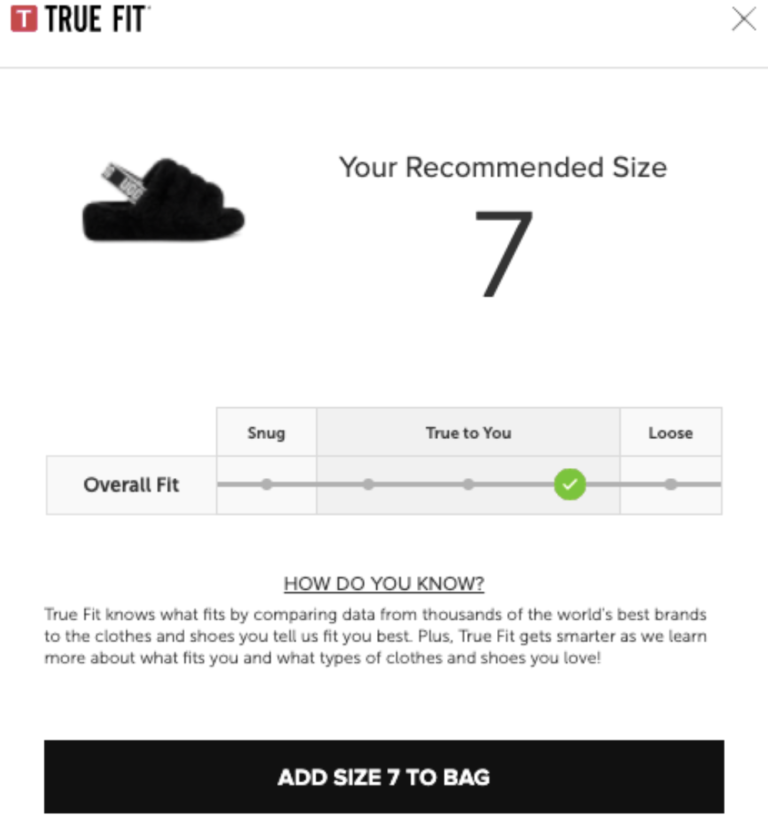
Many customer-centric brands and retailers also include innovative, interactive tools on their product pages to help ensure shoppers find the products that are the best size and fit.
For example, this shoe brand leverages a tool that collects information from the shopper – including the size they wear in other brands. Based on this information, the tool recommends a size for the shopper to purchase.
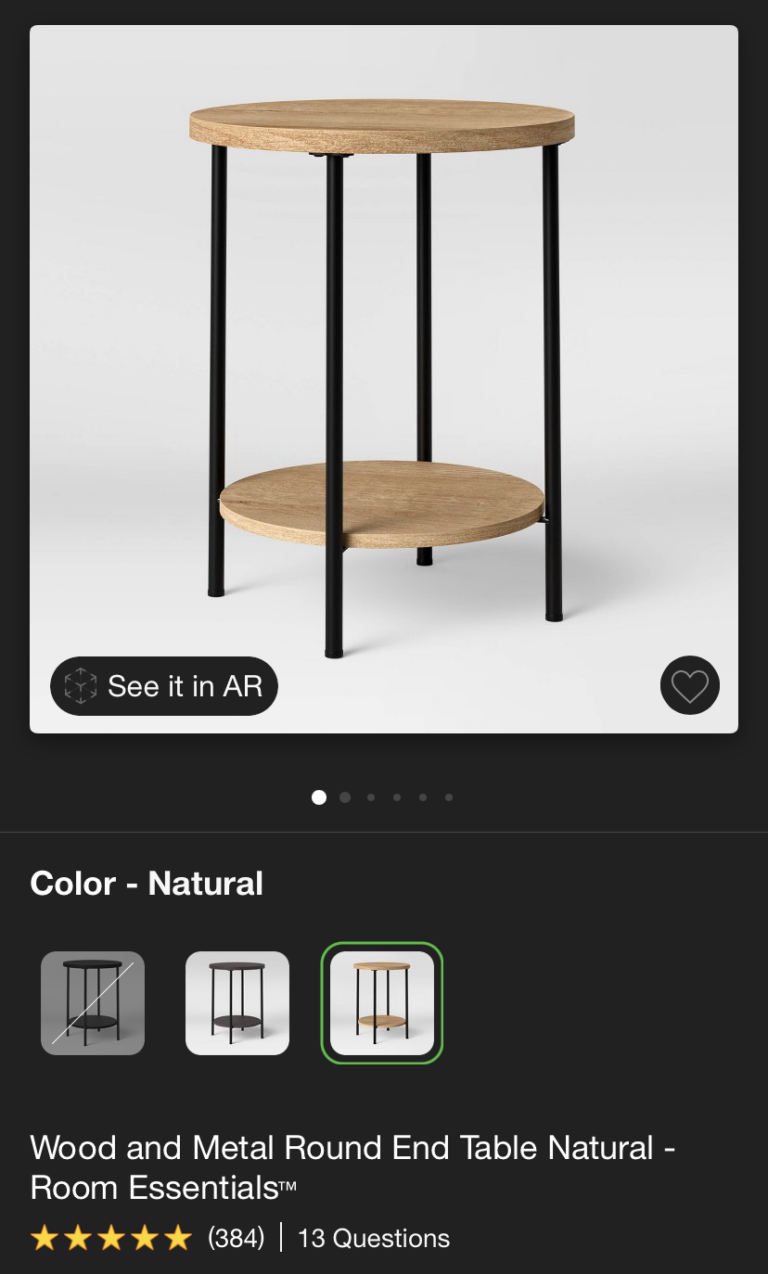
This retailer, on the other hand, leverages AI to allow shoppers to snap a photo of their space – and see how the item will look in it.
User-generated content including reviews and imagery (both of which we’ll explore in more detail later on) can help shoppers understand size and sizing sight unseen – and choose the products that are the best size and fit.
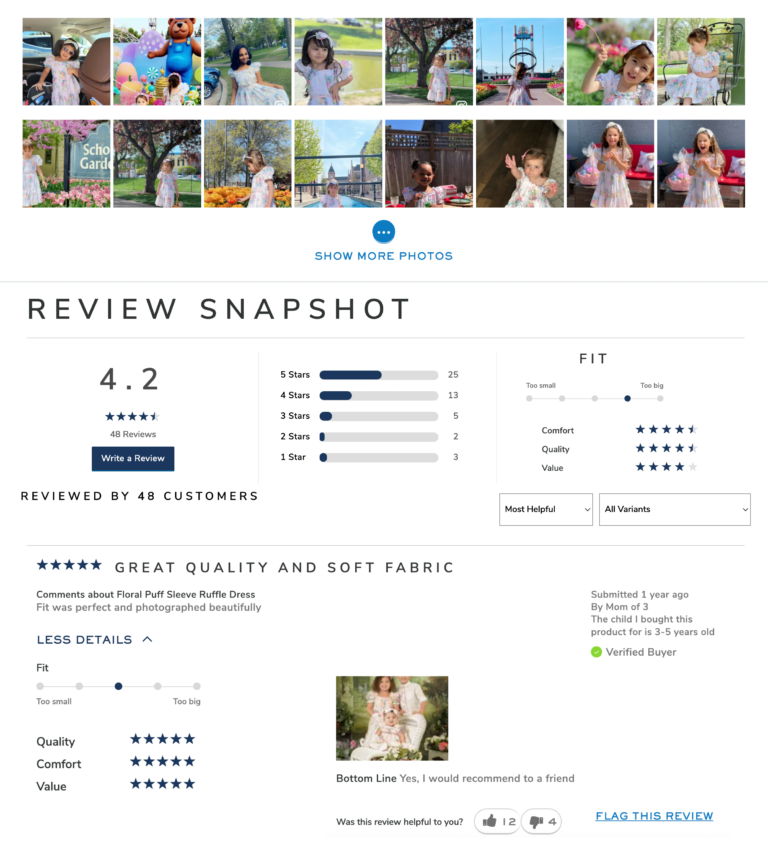
Some brands – including children’s clothing brand Janie and Jack – ask reviewers to include information in their review about how the product fits upon arrival. Then, the brand aggregates this data and includes a size and fit summary in the review display. Based on the reviews for this product, we can see that this item typically is found to be slightly large.
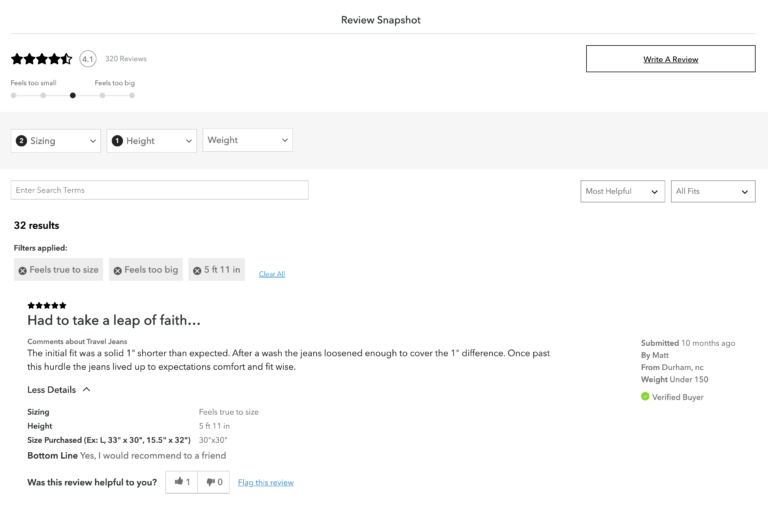
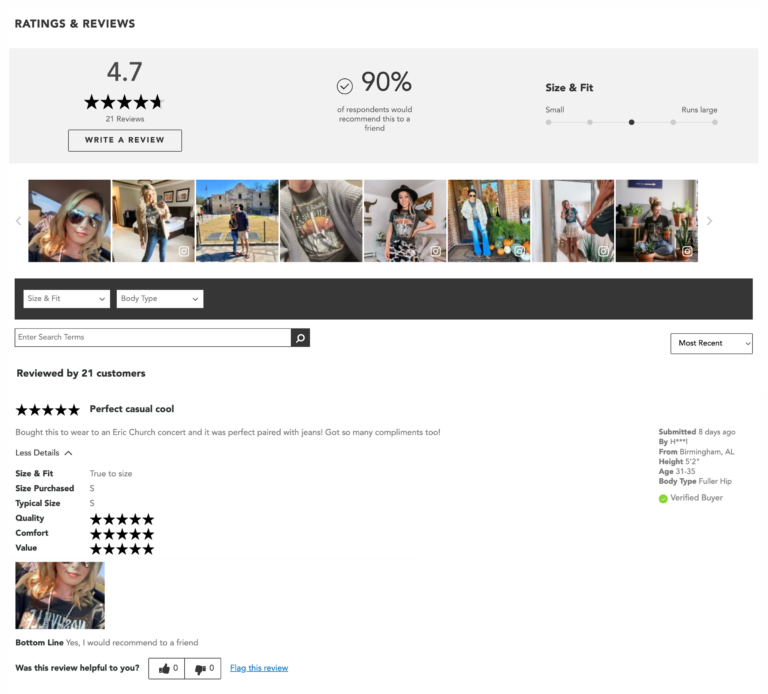
Some brands and retailers also ask reviewers to include details such as height and body type. Shoppers can then filter reviews to find feedback written by those with similar characteristics to them. For example, on this brand’s site, visitors can filter to see reviews written by those of specific heights and weights.
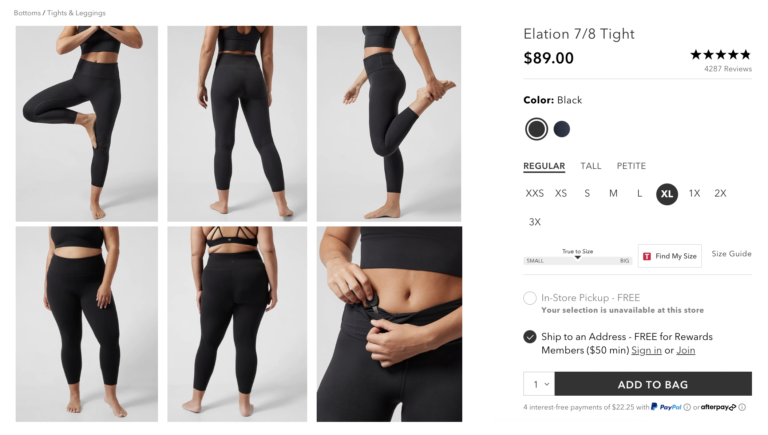
The right photos and videos (both brand supplied and consumer generated) can also help shoppers understand the size or sizing of a product. For example, some apparel brands and retailers include photos featuring models of different shapes and sizes to help shoppers beter gauge how an item looks on someone with a similar body type.
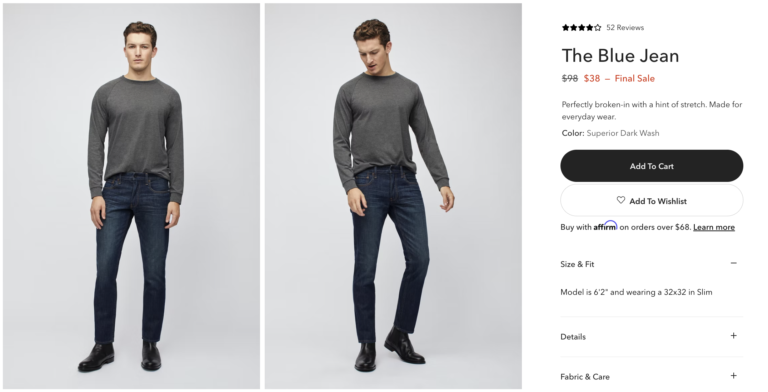
Some brands and retailers list a height and weight for the models – as well as the size item they’re wearing.
If the brand or retailer showcases user-submitted photos, shoppers can also browse this content to find content from those with similar body types.
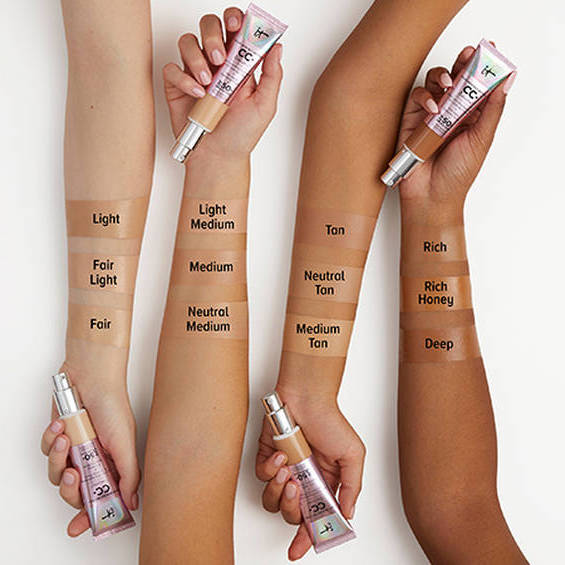
Imagery can also help shoppers understand the scale of a non-clothing product. For example, this cosmetics brand includes a photo of peoples’ hands holding bottles of the skincare product. This can be a more effective way than dimensions alone for consumers to visualize scale.
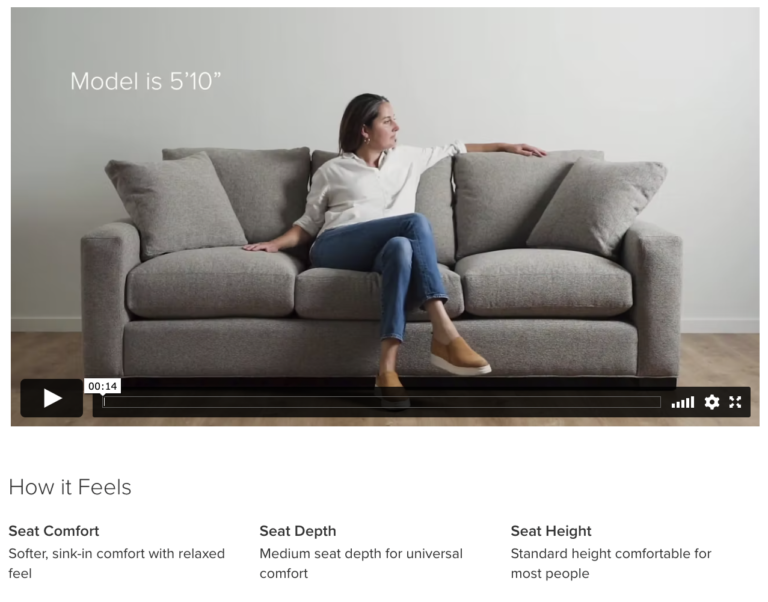
As another example, this home brand includes a video of a couch with a person (along with their height measurements) on it to help shoppers understand scale.
We’ll explore the importance of featuring photos and videos on your product pages in more depth later on in this guide.
Consumers consider many factors when weighing a purchase decision. It probably comes as no surprise that price is one of the top ones. Our research found that 91% of consumers consider the price of an item when deciding whether or not to buy it.
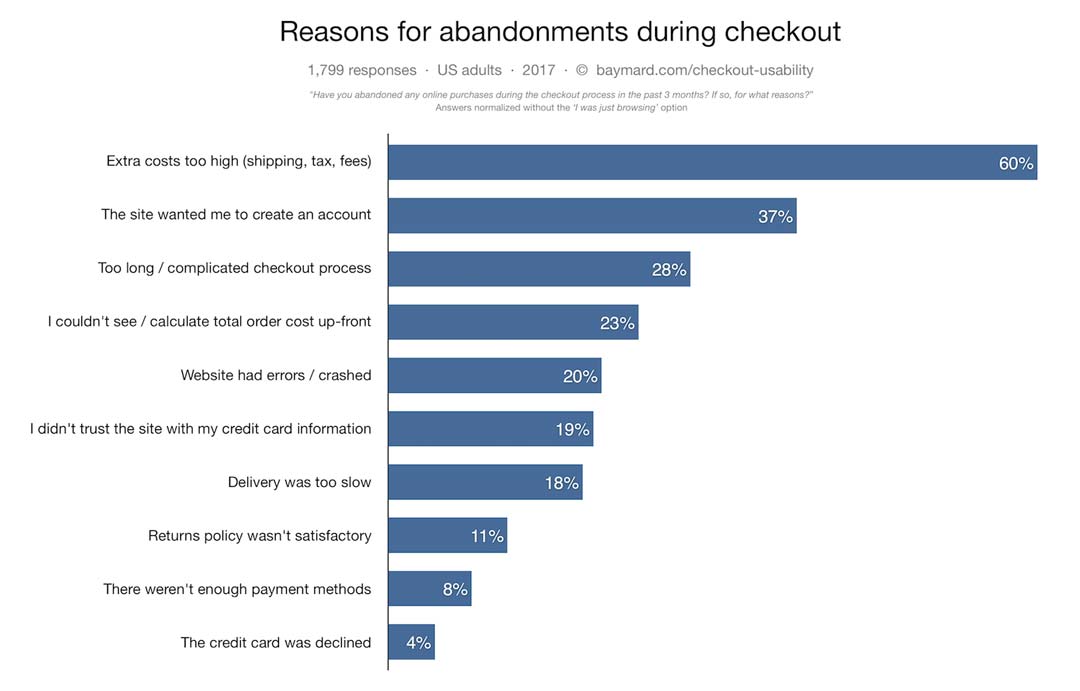
Yet, according to Baymard, 60% of consumers say they’ve abandoned an online purchase during the checkout process because the extra costs were too high.
Be sure to make pricing information prominent on your product pages. And be transparent about any extra costs, including shipping or other fees.
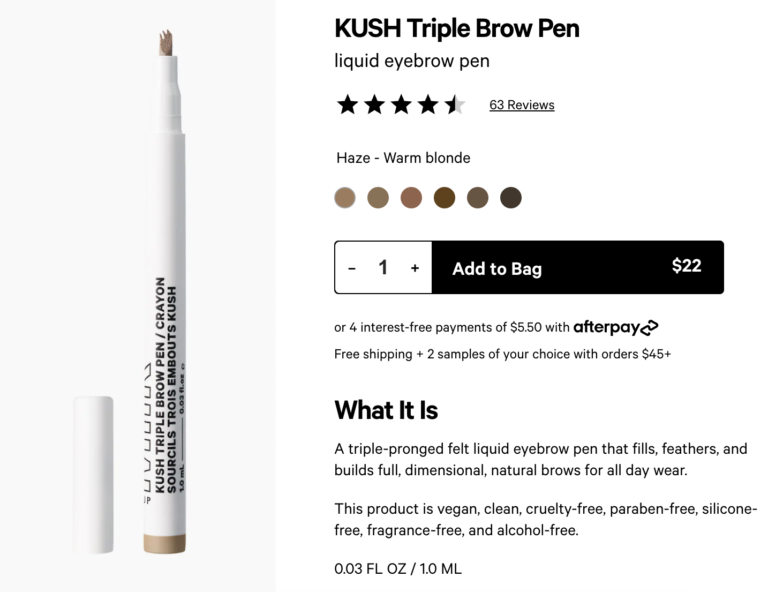
For example, shoppers considering this brow pen can easily see that the item is $22 – and that unless they spend over $45, they’ll have to pay for shipping too. Shoppers can also see that it’s an option to pay for this product in installments.
This electronics brand is also very transparent about pricing. Shoppers can clearly see that the item is $999.99, includes free shipping, and can be paid for in $91 monthly installments.
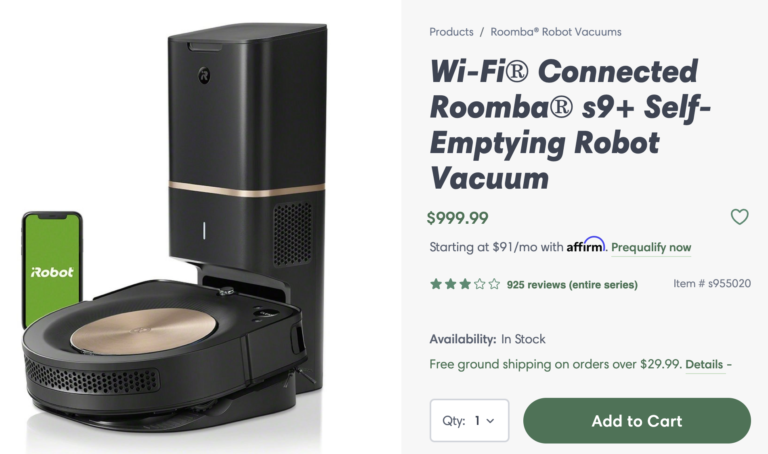
When costs are clearly featured on the product page, there are fewer surprises at checkout. And that means fewer abandoned carts.
According to research from Navar, 35% of consumers won’t make a purchase if they’re not sure when the item will arrive. And 39% won’t buy if they can’t easily find the return policy.
In order to increase conversion, brands and retailers must make shipping and returns information prominent on product pages.
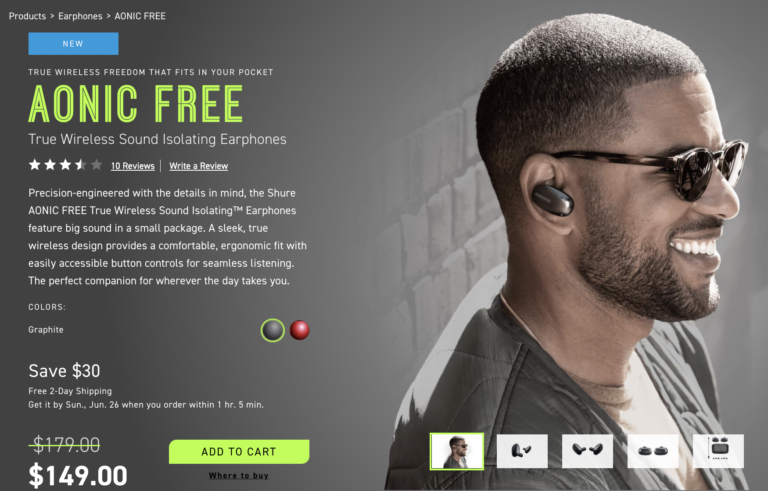
This electronics brand makes it clear that buyers will get free two-day shipping. They even go so far as to display the exact date the item will arrive.
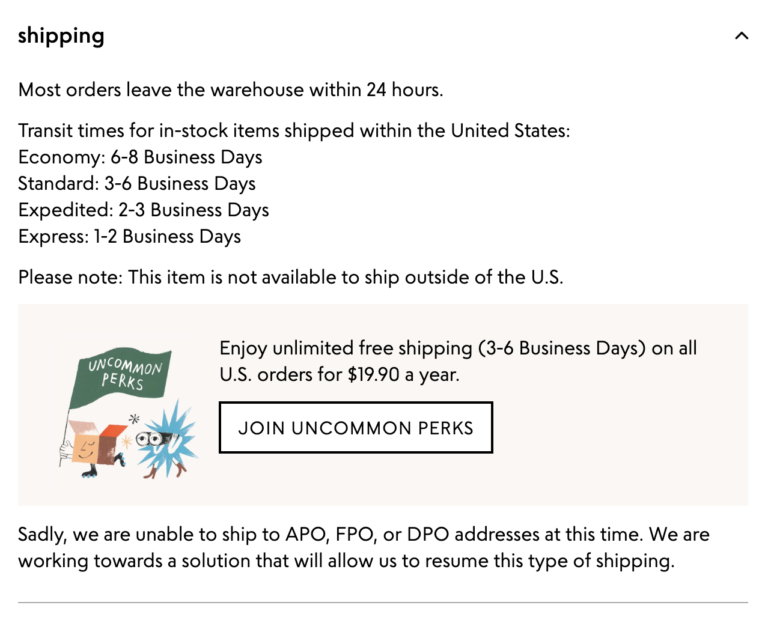
This specialty retailer includes an entire section on product pages devoted to shipping information. This section lets shoppers know how quickly items leave the warehouse and how long transit time is, based on the selected shipping method. They also include a list of addresses they’re not able to ship to, which can eliminate frustration during the checkout process.
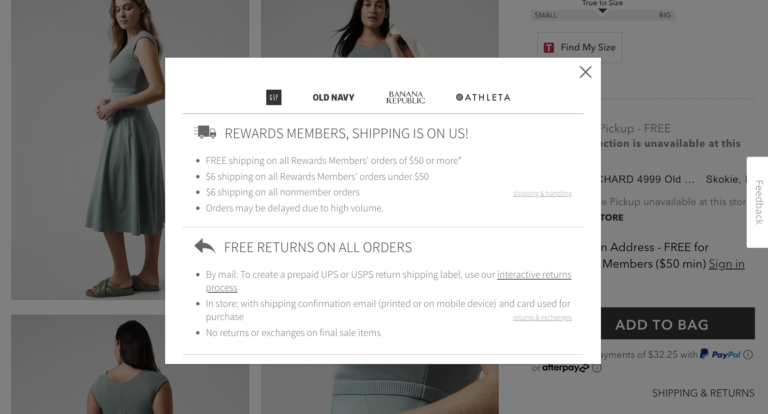
This apparel brand displays the text “shipping and returns” on their product pages. If a visitor clicks through, a pop up appears with detailed information about shipping costs and procedures for returns.
This product page on a beauty brand’s website is another great example of clear shipping and returns information. Visitors can input their zip code and get an exact date of when they can expect the product to arrive.
If the visitor scrolls down further, they can find an entire tab dedicated to shipping and returns information.
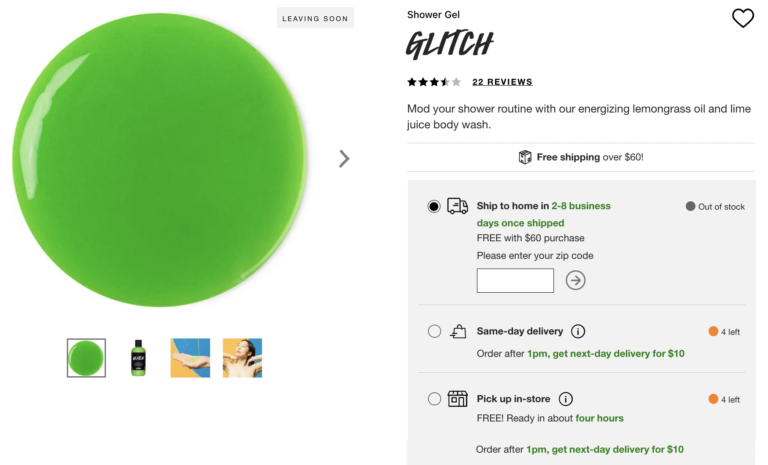
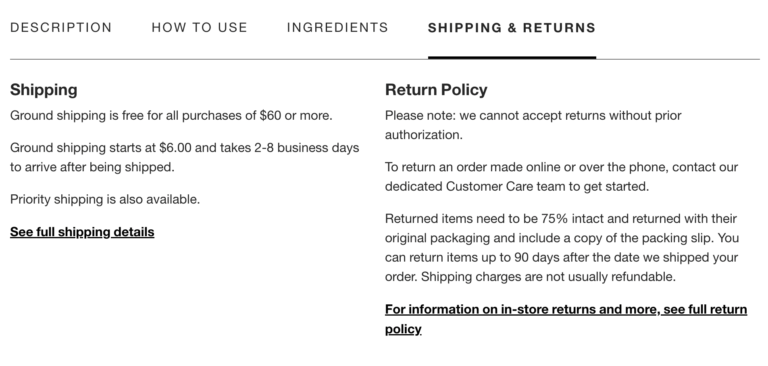
Clear, accurate shipping and returns information gives shoppers confidence that they’ll receive their product in time – and that if it doesn’t work out, they can return it. It’s essential to include this information on your product pages so shoppers can easily find it.
When consumers are shopping online, they don’t have the opportunity to see a product in person prior to purchase. As such, most depend on visual content to understand what a product looks like – and whether it’ll suit their needs and preferences. Our research found that 86% of shoppers always or regularly seek out photos and videos prior to making a purchase.
Prominently showcasing professional photos and videos on your product pages is a great start. Be sure your imagery clearly showcases various details of your products.
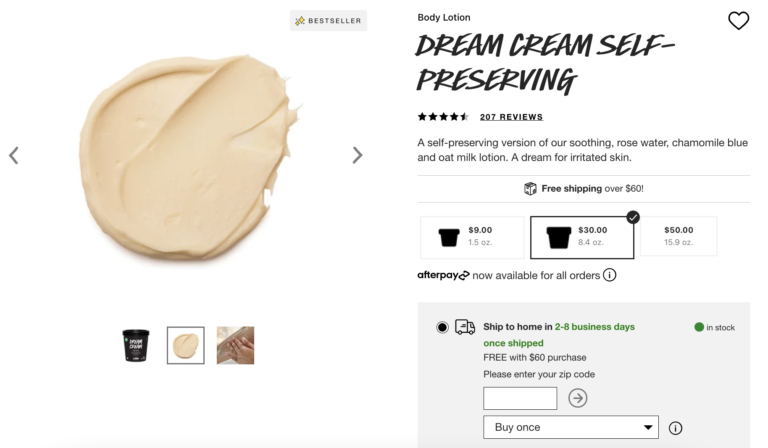
This product page for a beauty product is a great example. The brand-provided imagery includes not only a photo of the lotion in its packaging, but also a couple images of the product itself to help shoppers understand consistency.
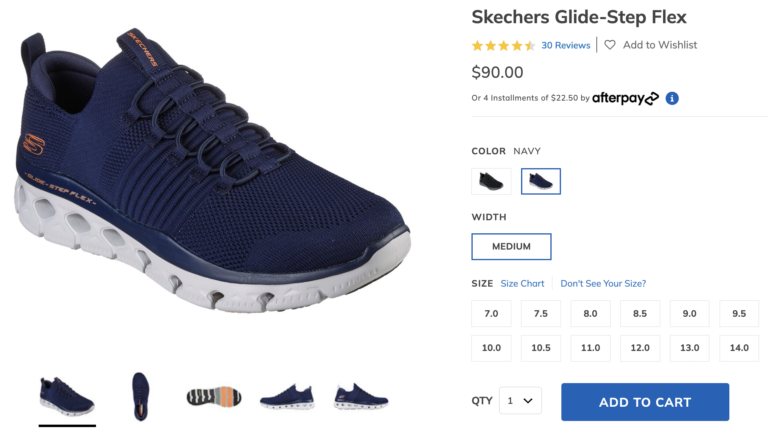
Great professional photography can help online shoppers understand what a pair of shoes looks like from a variety of different angles.
Imagery on apparel PDPs can help shoppers get a better idea of the details of the product – for example, pockets and seams. And, as we covered earlier, if a brand or retailer showcases multiple models on their apparel PDPs, it allows shoppers to get a better idea of what an item of clothing looks like on different body types.
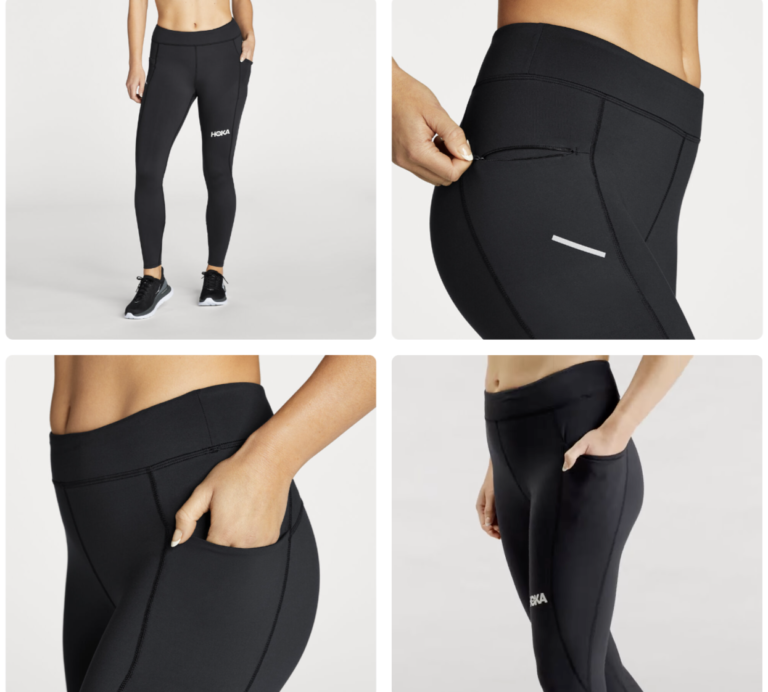
Professional photography is important. But for many shoppers, it’s no longer enough.
Research tells us that 77% of consumers always or regularly seek out visual content from others who have already purchased a product. What’s more, 80% of consumers indicate that photos from other consumers are more valuable than those from brands or retailers.
Consumers are smart. They know that professional photos and videos are taken to show a product in the very best light. User-generated content, on the other hand, is more authentic. It allows shoppers to get a better idea of what a product looks like when it’s being used by a real person “in real life.” This content can boost confidence – and conversion. A recent analysis found that there’s a 106.3% lift in conversion among visitors who engage with user-generated visual content, when compared to those who don’t.
As such, the best brands make it a priority to collect photos and videos from their customers – both alongside reviews and from social media. And, they prominently showcase this content on their product pages. A best practice is to display user-generated visual content in an imagery carousel. Doing so is an important way to meet shoppers’ expectations – and drive sales. After all, our recent analysis found that there’s a 106.3% lift in conversion among visitors who interact with user-generated imagery on a product page.
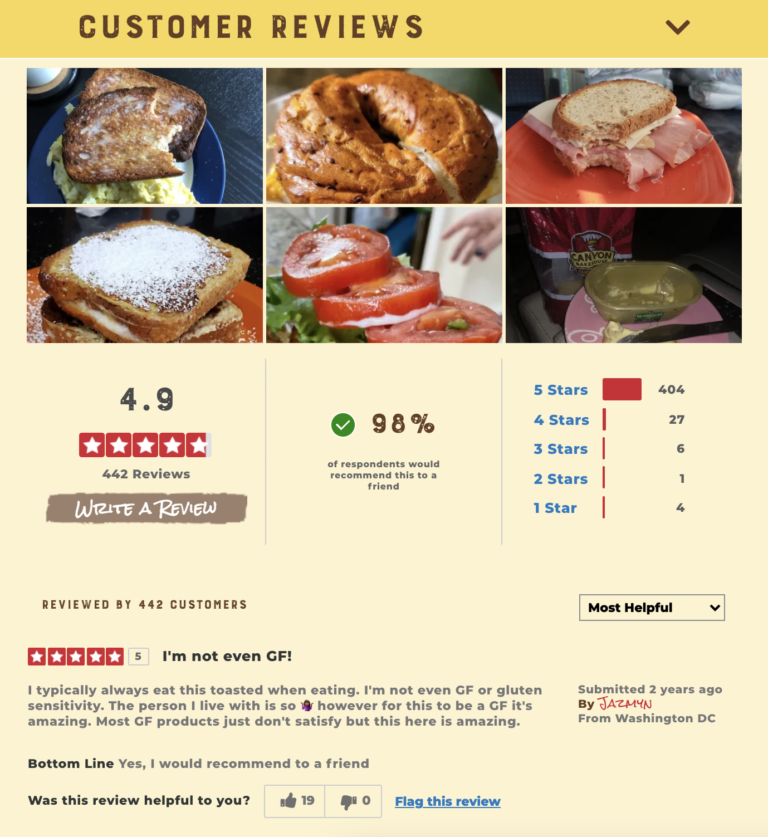
User-generated visual content can help shoppers imagine the possibilities of an otherwise mundane product. As an example, check out this product page for bagels. The brand showcases a photo of the bagels in their packaging, which certainly lets shoppers know what the product looks like. However, the photos and videos submitted by other shoppers let site visitors see all the unique and delicious creations that can be made with the product.
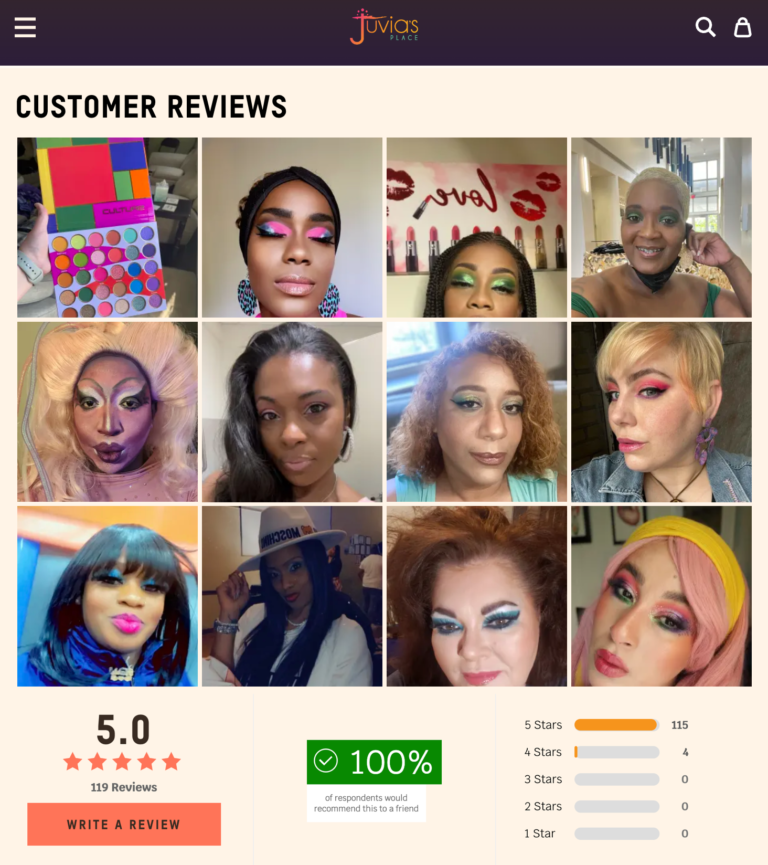
User-generated imagery can also help shoppers understand how an item that looks different on different people (think clothing or makeup) will look on someone similar to them.
For example, a shopper seeking out makeup can browse the imagery on this product page to find consumers with similar skin tones and types.
User-generated imagery can also inspire shoppers. And this inspiration can lead to cross-sales.
For example, someone considering this cardigan might check out the photos from previous customers and see one styled with a particular shirt. So, they add both items to their cart.

Showcasing both professional and user-generated imagery allows your customers to more easily identify the products that best fit their needs. This leads to greater satisfaction, more positive reviews, and fewer returns.
Increasingly, consumers seek out user-generated content. The onus is on brands and retailers to make it as easy as possible for their visitors to find.
It’s best practice to include a UGC preview (also referred to as a snippet) at the top of product pages. Typically, such a preview includes a summary of the UGC available for the product. This entices shoppers to dig deeper to learn more – and eventually convert. Our analysis found that there’s a 164.3% conversion lift among consumers who click through the snippet.
Typically, the UGC preview includes information like the average star rating and review count. Let’s take a look at some examples of ideal UGC previews.
This CPG brand displays the average star rating and review count right at the top of each product page, enticing shoppers to click through to the entire review display.
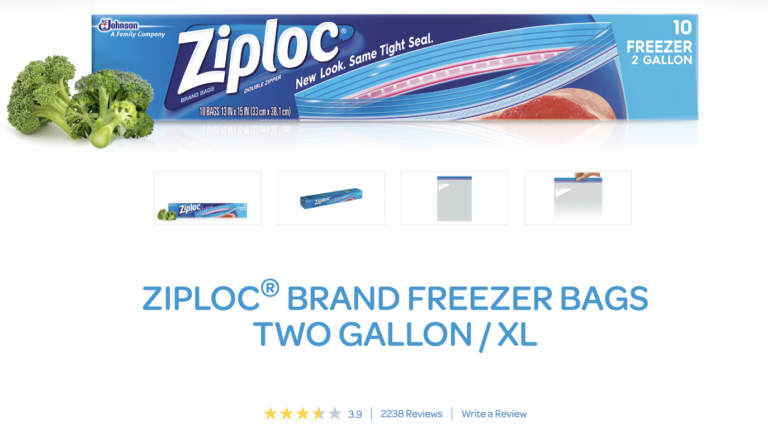
The pet food PDP also has a UGC snippet – right at the top of the product page.
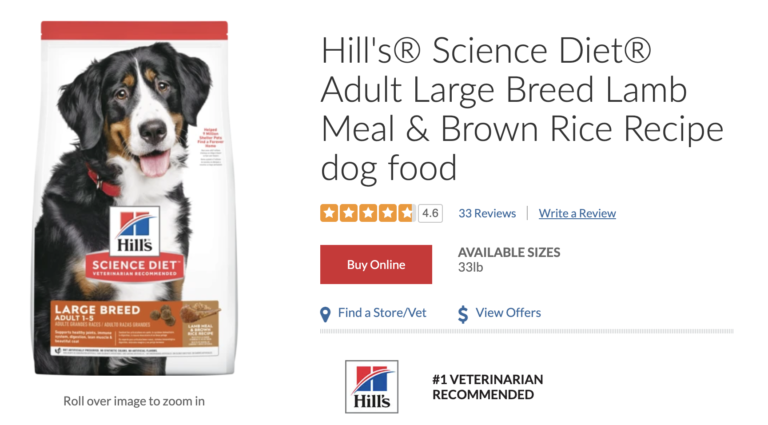
By featuring a UGC snippet at the top of each page, you’re making it as easy as possible for shoppers to find this content. Then, they can dive deeper into the review display – and gain the confidence they need to make a purchase.
Today, nearly all consumers seek out reviews at least sometimes. And, 86% don’t purchase products online without reading reviews.
What’s more, a recent analysis found that visitors who interact with ratings and reviews convert at a rate that’s 108.3% higher than average. Certain features of review displays can boost conversion even more.
The review snippet we explored in the previous section is a great starting point. But, it’s not enough. That’s because our research found that nearly all shoppers (99% to be exact) look beyond this basic information and read the actual review content at least sometimes.
It’s important to develop a review display that makes it easy for shoppers to surface that content that’s most relevant to them.
Research from Baymard tells us that users rely more on the ratings distribution summary than the individual reviews. But nearly half of ecommerce sites don’t have such a summary. And of those that do include a distribution summary, 39% aren’t clickable.
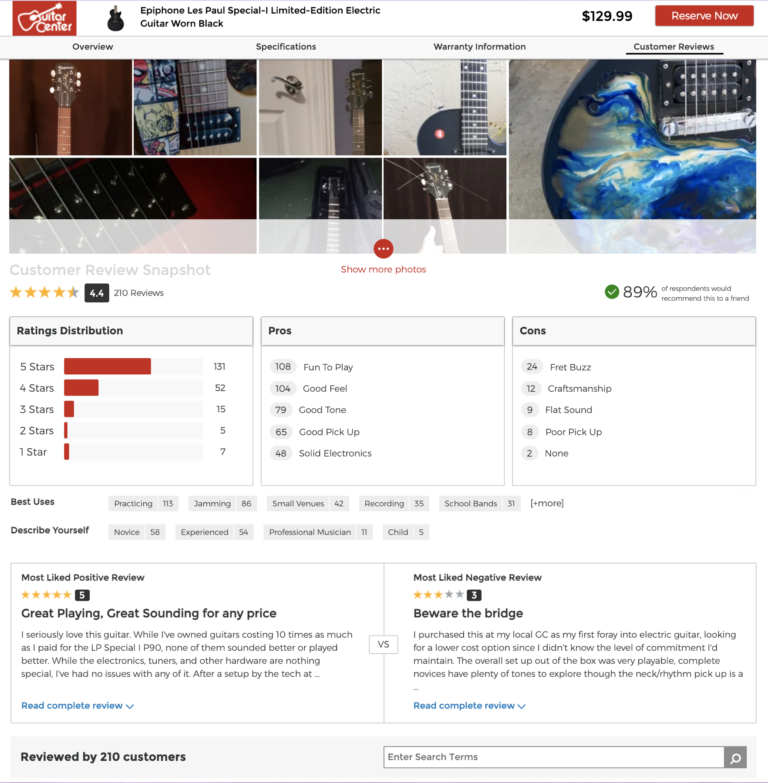
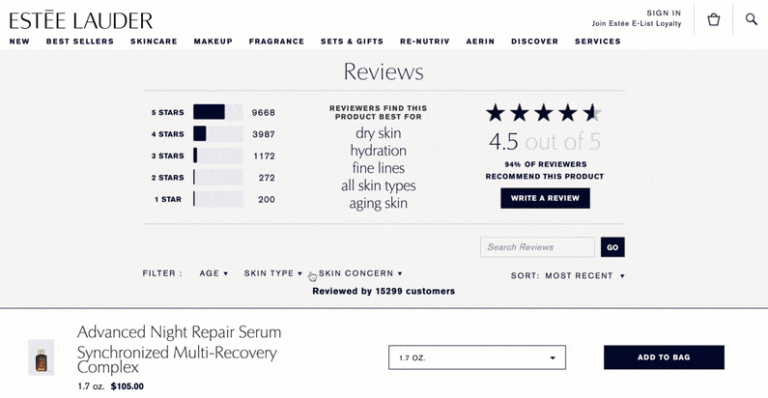
A good review snapshot gives shoppers a high level overview of the reviews available for a given product. And, it can serve as a launching point for the shopper to find reviews that speak to their needs and use cases.
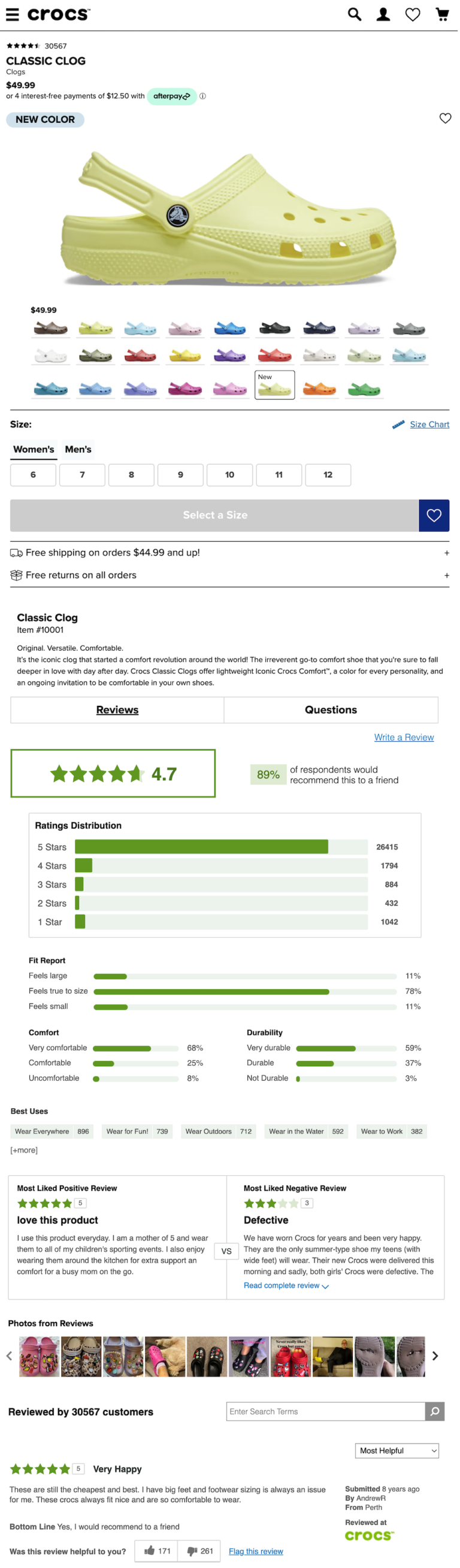
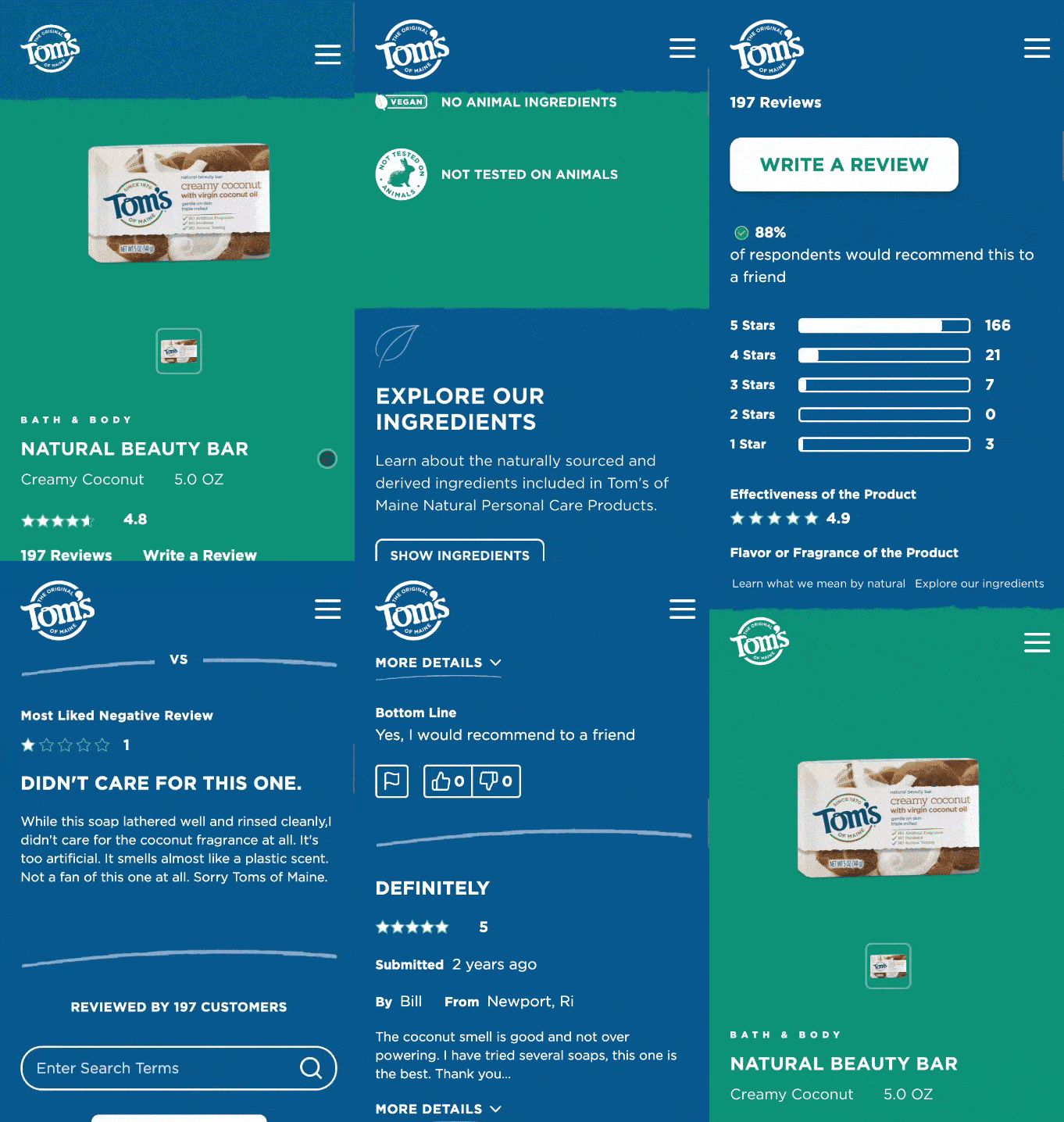
In this example, the shopper can see the average star rating, the number of reviews, the percentage of customers who would recommend the product, and how the reviews are distributed among the different star ratings. Visitors can click on each star rating to see only the reviews with that particular star rating. This particular snapshot also lets shoppers see the most liked positive review alongside the most liked negative review, which is a great way for visitors to quickly understand the upsides and downsides of this product. They can also quickly see the pros, cons, and best uses and click on any of those categories to see the reviews that speak to these features.
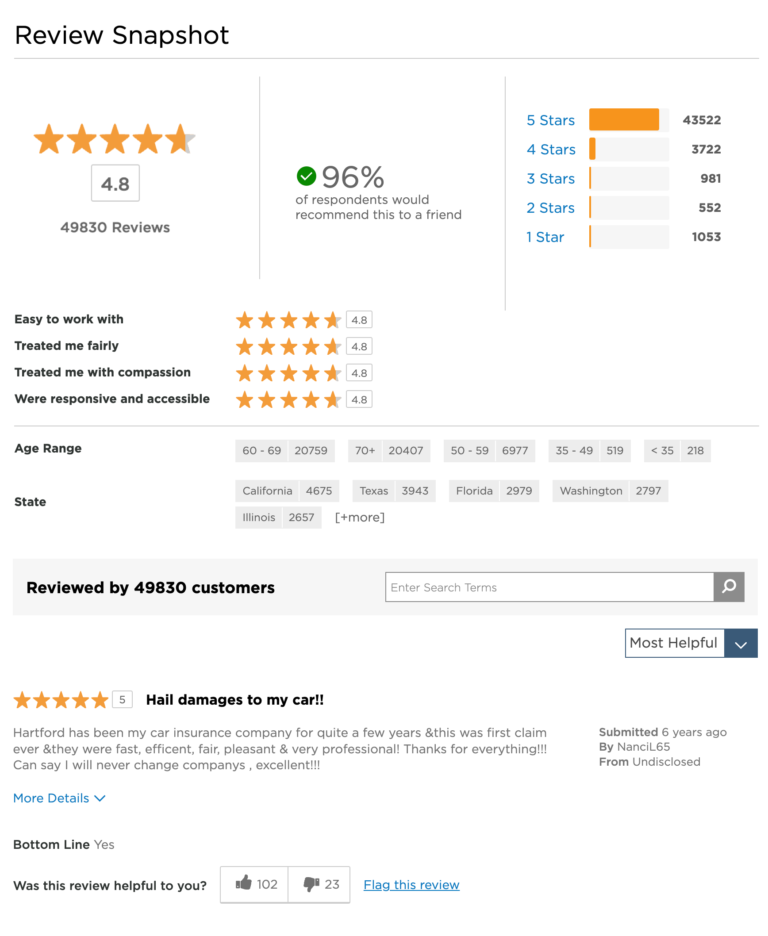
This review snapshot for a financial services brand includes many of the features of the other examples we shared. One unique thing about this display is that the brand asks reviewers to include their age range and state. Then, in the snapshot, they indicate the number of reviews available for each age range and state option. Shoppers can click on a specific state or age range to see content that matches these criteria.
Typically, a shopper won’t read every single review available for a given product. Instead, they want to quickly find the content that’s most relevant to them.
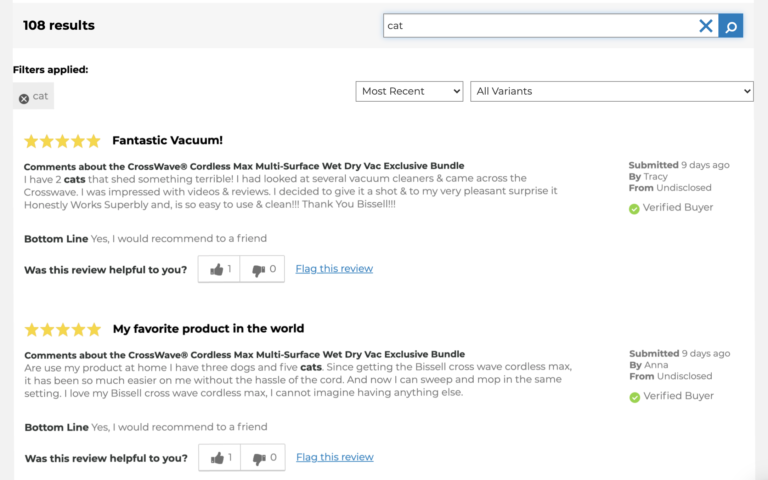
The best review displays include features that allow visitors to sort, filter and search to find relevant content.
On this review display, the shopper can sort reviews by a number of different factors, including star rating, recency and the availability of imagery. They can also do a search for content that includes a specific word or phrase.
This beauty brand’s PDPs also feature robust sorting and filtering features. In addition to being able to filter by star rating, visitors can also filter by best use – as well as the age range and skin tones of the reviewers.
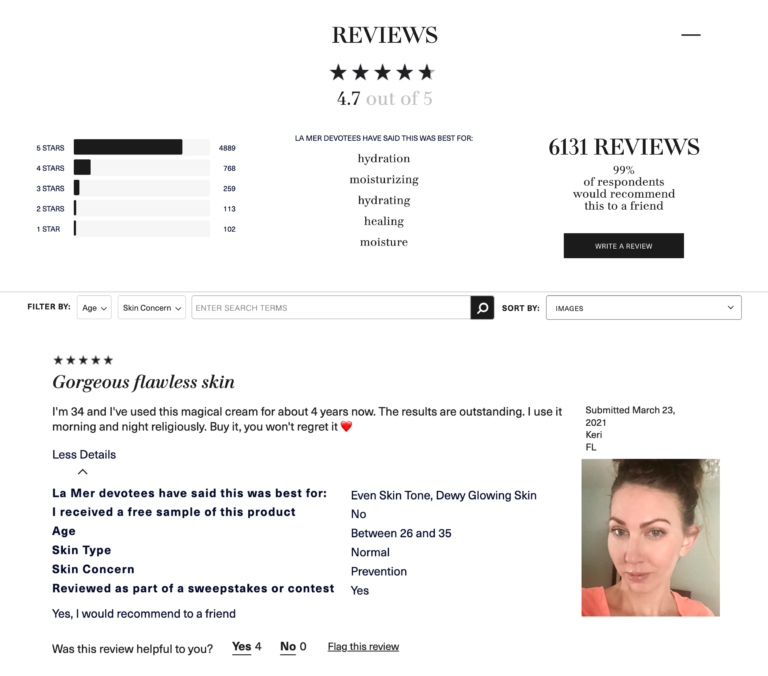
Consumers trust reviews because they’re written by others like them. In order to preserve authenticity and trust, it’s a best practice to include details about who wrote reviews. This might include badges indicating if a shopper is verified buyer or verified reviewer – or if they received a free sample. It might also include demographic details (including age and location) and personal preferences (such as style or flavor preferences) of the shopper.
For example, it’s clear this review was written by a consumer in Florida who is between the ages of 26-35 and received a sweepstakes entry in exchange for writing a review.
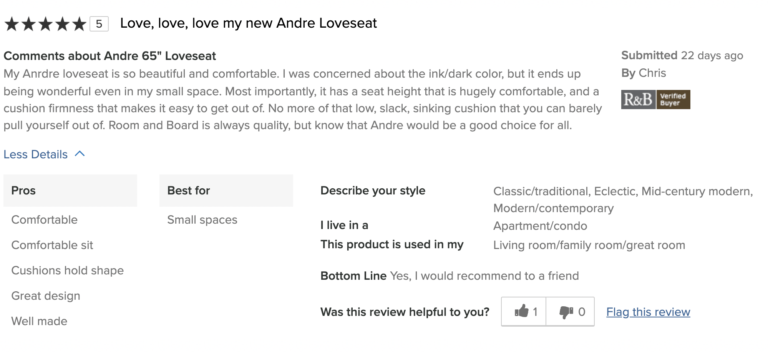
This review, on the other hand, was written by a customer who describes their style as modern – and is a verified buyer. We know for certain she purchased the product in question.
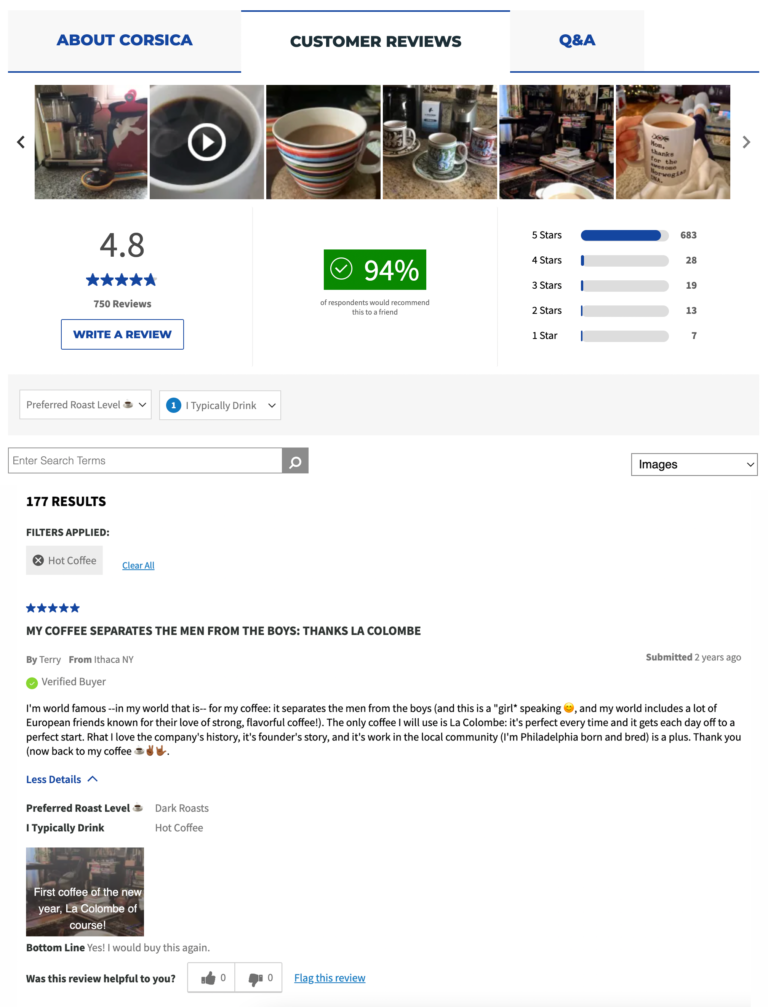
This review for a coffee product was written by a verified buyer from New York who prefers dark roasts and drinks hot coffee.
In-store shoppers can seek out a sales associate if they have questions. Obviously, online shoppers can’t. It’s essential for brands and retailers to provide a means for online shoppers to get their questions answered, as 55% of shoppers will abandon an online purchase if they can’t get a quick answer to a question.
The best brands and retailers feature a questions and answers (Q&A) section on their product pages, which allows visitors to browse questions that have already been asked – and submit their own. It’s an important tool that helps online shoppers gain confidence – and it increases their likelihood of making a purchase…a lot. Research tells us that nearly all (99%) of consumers read Q&A at least occasionally, when it’s available. What’s more, there’s a 194.2% lift in conversion among visitors who interact with Q&A on a product page – making it the most impactful form of UGC on conversion.
As an added bonus, the presence of Q&A is proven to increase traffic to product pages.
Before submitting a question, many consumers browse through existing questions to see if someone has already asked something similar. It’s important to build a Q&A display that makes it easy for visitors to sift through existing questions.
In this Q&A display, visitors can sort existing questions by factors including recency and number of answers. Shoppers can also easily search for questions that include certain keywords or phrases.
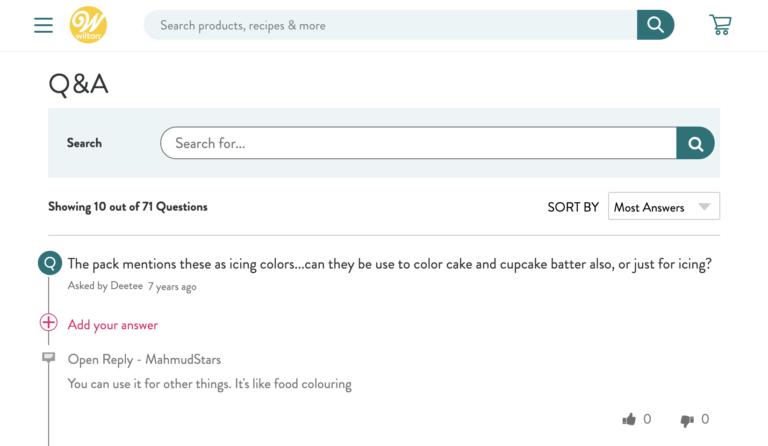
Some brands and retailers answer all Q&A internally. Others allow answers from multiple sources, including product experts and consumers who already own the product in question.
For the sake of transparency, it’s important to indicate who it was that provided each answer. Previous research tells us 82% of shoppers pay attention to the small print detailing who provided a Q&A response.
For example, this question submitted on a beauty retailer’s website was answered by the brand that makes the product.
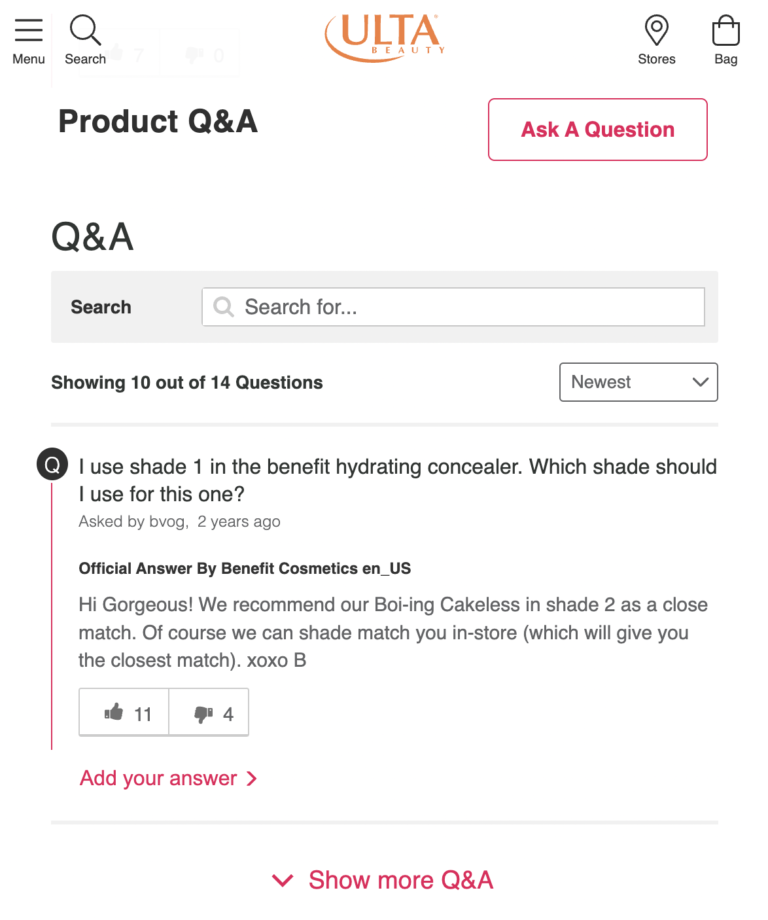
If a visitor can’t find a similar question to theirs, they may submit their own. Our research found that 68% of shoppers have left a question in the Q&A section of a PDP.
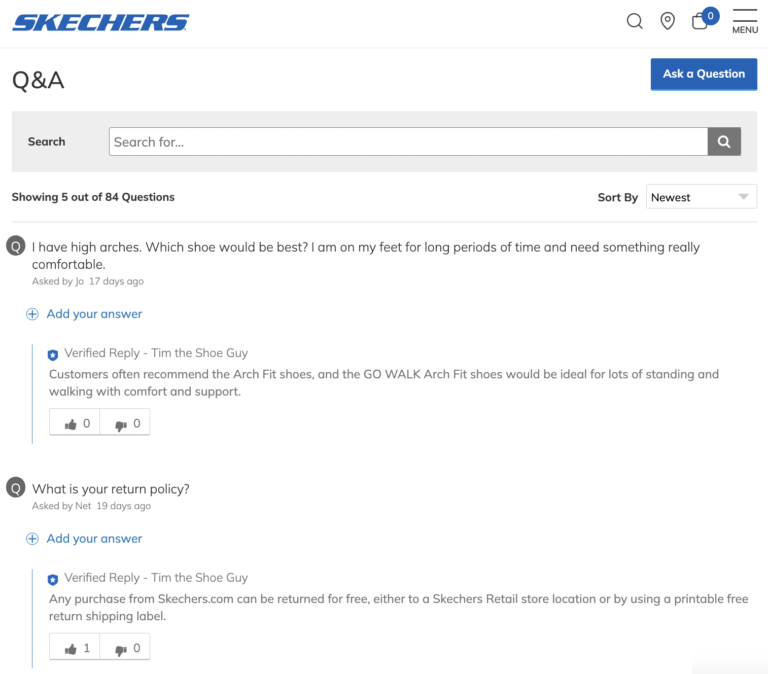
It’s key to make it easy for shoppers to submit their own questions. Our friends at Skechers find that the typical conversion rate among those who ask a question and receive an answer via Q&A is 80%! As such, they include a button to submit a question right at the top of the Q&A display.
Landing on a product details page is the pivotal moment of truth. It’s on these pages that shoppers determine whether they’ll purchase a given product – or keep looking.
It’s key to ensure your PDPs are buld to convert. Of course, there’s no set PDP formula that guarantees increased conversion for all brands and retailers. Rather, it varies by brand and category, among other factors.
However, the key ingredients we explored in this guide are a great starting point.
It’s imperative to measure PDP performance on a regular basis. Then, use these insights to drive continuous optimization that drives even conversion.
Nearly 90% of shoppers say they simply won’t buy products without reading reviews first. And when consumers interact with ratings and reviews, the product experiences a 120.3% lift in conversion.
The value of reviews is evident. As for how to squeeze more value from reviews… that’s where things get murkier.
Fortunately, there’s something that can help: review analytics. Analyzing your reviews can provide answers to questions like:
Regularly analyze your review content, and you’ll get ideas for increasing your review collection, improving your product marketing, and selling more products.
Here are five very specific reports that will help you level up your entire Ratings and Reviews program, ensuring you optimize for review collection and display – and in turn conversion – success.
Any Review Trends Report displays a bird’s-eye view of how your review collection efforts are going. On a month-by-month basis, you can see the average star rating across all of your products. How many reviews have you collected? How long are those reviews, on average?
Here’s an example from a PowerReviews customer.
The report also reveals the same metrics for your highest- and lowest-rated products.
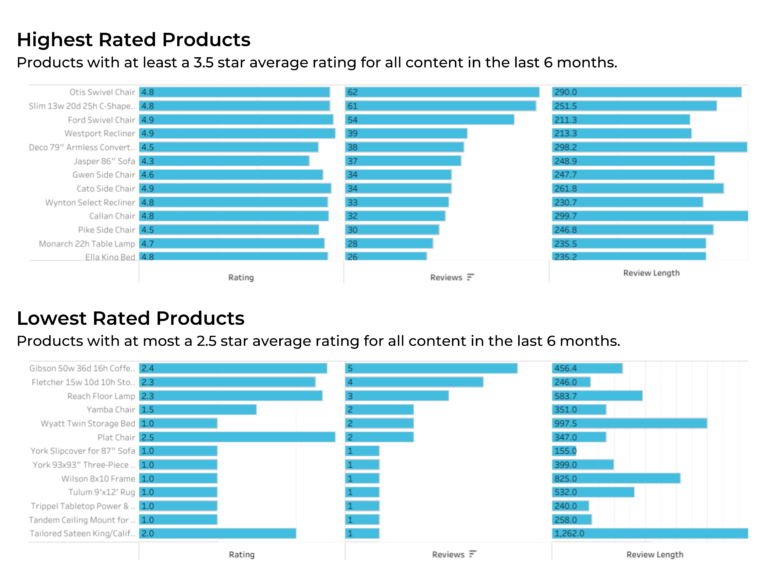
Reports containing this information can help you spot trends in your native review collection efforts (e.g. the reviews you collect directly onto your website from shoppers who have bought your products). Does review volume stay steady throughout the year, or are there certain months when your review volume slumps or soars?
One potential actionable takeaway: To ensure you maintain a consistent flow of reviews, slower months could be an opportune time to run a review sweepstakes or sampling campaign to ensure recent reviews come in at a steady clip.
Consistent review generation is essential to satisfying consumer expectations and keeping them on your product pages. Nearly 80% of consumers “always” or “regularly” consider review volume, and 86% of shoppers feel that recent reviews are more important when considering a product or brand they haven’t purchased before. And just over a third (38%) of shoppers will simply not purchase a product if the only reviews available were published three months ago or more.
For your products, you can see at a glance which products could use a little TLC. Low-rated products with longer review lengths indicate customers have a lot to complain about. Are there product or manufacturing issues you can fix? For products with longer reviews, what features or benefits do customers speak about? Be sure to call them out in your product description.
In some aspects, your review generation efforts hinge on one critical element: how you ask for reviews. That’s why understanding the performance of your Review collection form is critical.
At PowerReviews, we solve for this with our Write-a-Review Report (or WAR Report for short). It shares key details, including your review submission rate, review starts, and review submissions — both overall and for every single one of your products. If you have significantly fewer review submissions than starts, you may have too many questions on your Write-a-Review form. Are there any non-essential questions you can remove to increase your submission rates?
In this example you can also see how many reviews you collect per day, on average, as well as your review start and submission rates by device (desktop, mobile, tablet, or other). If certain devices have significantly fewer submissions than starts, that could be a sign that the form or another element on your website is not mobile-friendly.
Also understand your review submission trends over time. If lower submission rates are becoming a trend, you might try shortening your review form to make it easier to submit a review.
Some reviews aren’t fit to publish. They may contain profanity, personally identifiable information, or irrelevant content. At PowerReviews, our four-step content moderation process filters out this kind of content and tags it for review by our human moderation team. We call these “observations.”
Some of this content can’t be fixed – for example, angry reviewers who drop “F” or any other naughty bombs. However, some reviewers may unintentionally include personally identifiable information (PII), and that’s something that can be fixed with instructions on your review form.
In the report below (taken as an example from the PowerReviews Observation report), you can see a breakdown of publishable vs. unpublishable content based on observation moderations.
If you notice a significant number of reviews are moderated with “PII,” you can add helper text to your Write-a-Review form reminding people not to include personal information like names and location.
If there’s a high proportion of “irrelevant” content, you can enable review rejection emails to explain why a person’s review couldn’t be published. Once they understand the issue, they may go back and update their review. Either way, they’ll know how to write a publishable review the next time they purchase from you.
To make their reviews more helpful to customers, many brands and retailers opt to add optional questions to their review form, beyond the standard star rating and blank text box. This is something we always encourage as it improves review quality – which shoppers value highly.
At PowerReviews, we call these merchant specific questions (or MSQs for short). MSQs can range from questions about size and fit (for apparel or shoe brands) to ideal use cases, pros and cons, and demographic information. Analyzing how these perform can be super valuable to informing future collection efforts.
For example: the below “MSQ Report” reveals which of these questions are most popular with customers, and the average star rating that corresponds to those questions.
This data can inform your review collection efforts as well as your product marketing. For example, let’s say you manage reviews for a shoe brand. If a majority of customers say the shoe “feels narrow” and give it a low star rating, that may be your cue to update the product description with text like “This shoe runs small.”
At PowerReviews, we enable shoppers to also publish reviews they submit to your site to Amazon. After customers finish writing a review for your website, all they have to do is click this button. They’re taken directly to the corresponding product page on Amazon.com, where they can paste and submit their review.
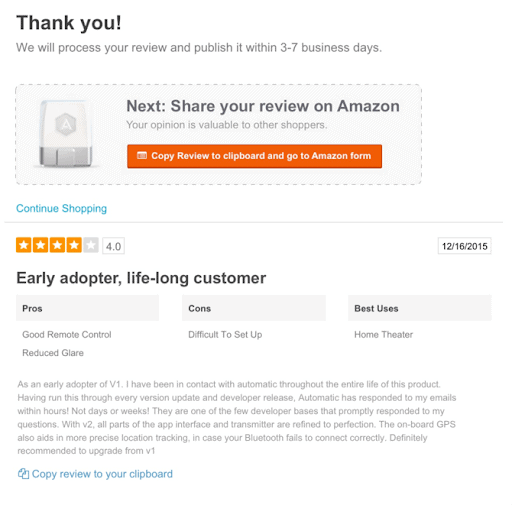
The Share to Amazon Report displays several key metrics related to your Amazon reviews, including:
You can also see the percentage of reviews shared from your site to Amazon, so you can understand how many customers are using this feature.
The report even calculates the difference in review length between the two platforms. Review length is something consumers care about, with nearly 70% regularly seeking out longer, more detailed reviews. So this information can help you identify and act on this issue.
Review collection, display, and promotion are all part of a well-rounded UGC marketing strategy. Add in review analytics, and your efforts will go so much further. You can make smarter decisions, optimize your marketing, and supercharge your review collection efforts.
The good news if you’re a PowerReviews customer is that you can access these reports now. And even if you’re not, we’d be happy to show them to you any time.