Last month, we published a blog that was essentially a beginner’s guide to Google Seller’s Ratings. Check that out if you want to learn more about how to get set up. Here we look in-depth at the most recent changes Google made to its Seller Ratings and explain how to know if you qualify.
Why are Google Seller Ratings so important?
With the continued explosion of ecommerce due to the pandemic, your company’s presence on Google has never been more important.
To recap – for any brand or retailer which purchases Ads on Google, Seller Ratings are a key way to add social proof to your ads.
If you’ve ever typed into Google’s search bar, you’ve seen Google Seller Ratings in action. In essence, it’s a star rating that displays underneath the URL on your Google Adwords ads. While most often associated with eCommerce companies, any company with a digital presence can take advantage of Google Seller Ratings.
These are important because the seller ratings extension benefits both searchers and businesses, as it increases click-through rate by 10% on average which can lead to a higher quality score.
The 4.9 rating in the below screenshot is a Google Seller Rating.
But, as we mentioned, Google recently made updates to their Seller Rating requirements. We wanted to quickly outline what these are to ensure you’re fully compliant so you can continue to reap the rewards of this key acquisition channel.
What are the new requirements?
These updated Google Seller Ratings requirements apply to reviews collected beginning July 2020. They are primarily focused on enhancing transparency and authenticity.
Businesses are not allowed to offer their customers financial incentives of any kind to write Google Seller Ratings. This includes anything of monetary value including free samples, gift cards, discounts on future purchases.
What this means: You need to focus on generating reviews by creating an exceptional brand and excellent overall experiences.
Customers must complete their review within 90 days of receiving an invitation
What this means: Make sure you send follow-ups to ensure you comply with this requirement.
Only reviews directly collected by a review provider should be sent through the Google feed or displayed and factored into ratings on a review provider’s merchant page. Scraped reviews are not allowed, and reviews collected on a merchant’s site must be directly collected by the review provider.
What this means: Ensure you are using an independent review provider who has been approved by Google (PowerReviews is one such review provider).
Each business must have a page that is public, visible, and discoverable via search engines with all reviews shown for Seller Ratings to be displayed. For example, the merchant pages should be included in the sitemap shared with search engines.
What this means: Transparency for consumers. This is standard for product reviews (as they are a key conversion generator). You can use PowerReviews display capabilities for this purpose.
Business Seller Rating pages and corresponding reviews should never be deleted after a business stops collecting reviews with a given review provider and the previous reviews should continue to be included in feeds to Google, except where reviews are deleted for content guideline violations or at a user’s request. For example, if a merchant switches review providers, the original reviews provider should maintain a page with the reviews previously collected for that merchant and continue to submit those reviews in their feed to Google.
What this means: Fairly self-explanatory. You need to build dedicated pages to highlight your Google Seller Ratings. If you do ever change vendor, you will need to combine the reviews collected from both new and old vendors or create separate pages displaying this content.
Businesses are not able to remove or moderate their reviews. Ensure your review provider has shared their moderation requirements with Google and are approved to continue sending content (PowerReviews has been approved)
What this means: As we’ve always advocated, the content of your reviews cannot be adjusted in any way, shape, or form. This ensures authenticity.
How do know if I qualify for Seller Ratings?
Aside from these new requirements, there are some baseline standards you need to meet to ensure compliance:
There must be at least 100 verified site reviews per country from a review platform
Those reviews have been within the last 12 months
The reviews have an average star rating of at least 3.5 stars
Up to six weeks have passed since the feed was first submitted (it may take less time)
Conclusion
Google Seller Ratings are a key tool for promoting and marketing your business. A good rating drives traffic to your site and gets more eyeballs on your products – which can only lead to more sales. But Google recently changed its requirements for its Seller Ratings, placing more of a focus on transparency and authenticity.
Complying with these rules should be fairly straightforward if you typically follow standard best practices. Our technology certainly ensures you meet all these new requirements. But if you are a PowerReviews customer and need support, please reach out to your Customer Success Manager.
We can all agree that user-generated content (UGC) like ratings and reviews is important.
But, why is it so important? What is it about ratings and reviews that drives customers to purchase? And what about other types of UGC, like videos, images, and Q&A?
How do customers interact with this type of content, and what impact does it ultimately have on their decision to click the “Buy Now” button?
At PowerReviews, we decided to find out. Our analysts mined the data from thousands of brands and retailers using our UGC Analytics technology to see how frequently customers interacted with UGC, how it impacted the buyer journey, and whether certain types of UGC were more effective than others in driving conversions.
Read on to discover what we found, along with pro tips for applying these insights to your own UGC.
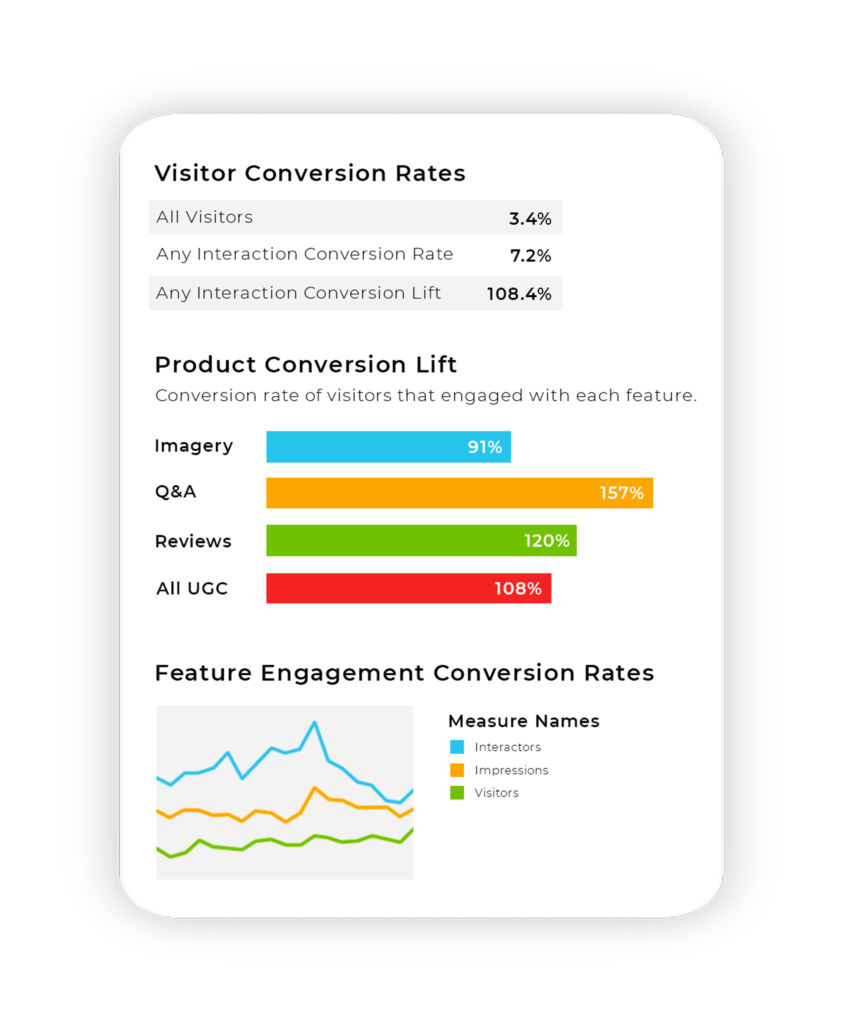
Customers Who Interact With UGC Are 103% More Likely to Convert
That’s right. Customers who engage with some form of UGC — be it reviews, imagery, or Q&A — are twice as likely to convert than customers who don’t.
Here’s the better news. A majority of online shoppers (77%) interact with UGC when it’s available. Which type of UGC is most helpful to pushing customers through that barrier to purchase? Here are the results:
Q&A is the most impactful content (153% increase in conversion)
Reviews were in second place (115% increase in conversion)
Imagery rounded out the list (81% increase in conversion)
Let’s look at some examples of these types of UGC in the wild, and why they’re so impactful on customer purchasing decisions.
Ratings and Reviews
Ratings and reviews allow customers to share their experience with a product or service, and give it an overall star rating.
How important are reviews? After price, reviews are the second-most important factor to customers making a purchase decision. Displaying ratings and reviews on your product page can lift conversions by 115%.
Why? Ratings and reviews provide invaluable social proof to shoppers. They can’t see, touch, and smell a product they’re purchasing online. But when they read the reviews, shoppers can cross-reference with people who have already purchased your product, to verify that it looks and works like you say it does.
Reviews help answer questions shoppers have about your products. They can learn from others’ experiences, both positive and negative.
Yes, even negative UGC is helpful! Our data shows that two-thirds of visitors filter for 1-star reviews when interacting with UGC. Those visitors still convert at 108% the rate of your general web traffic. People want to see one-star reviews because it helps them better evaluate whether a product is the right fit for them. When it comes to UGC, a negative really can be a positive.
A lot of the time, something that is a negative, one-star-worthy dealbreaker for one shopper might not be a big deal for another.
For example, say a shopper is searching for a pair of slipper-type shoes that she can wear outdoors when running errands. She finds a pair of slippers that look perfect, but wants to look through the one-star reviews to see if there’s anything jarringly wrong with the slippers before buying.
She sees that some previous buyers gave the slippers 1-star because they don’t have enough fuzziness on the inside to keep their feet warm enough. The shopper, who lives in Miami, will be wearing the slippers in the hot Florida climate, so really this one-star review validates that these slippers are perfect for her.
WEBS – America’s Yarn Store makes it easy for customers to glean the information they’re looking for from their reviews. Their product pages feature a Review snapshot that captures the average star rating, ratings distribution, pros and cons, and a most liked negative and positive review.
And with PowerReviews’ UGC Analytics, they can understand the exact ROI of each of the features they are displaying on their site — from pros and cons to visual content.
This presentation of unbiased UGC increases customer trust. It also keeps customers on site, as WEBS eCommerce Manager Dena Childs shared. “You never want a customer to leave your website, hoping to find the information they need somewhere else. Customer content builds confidence, and PowerReviews has allowed us to showcase that social proof on our site, facilitating the path to purchase for our customers.”
Reviews help your shoppers make a more confident purchase decision. The more you can do to make your reviews more useful to customers, the better. For example, Briogeo added custom fields to their review form to better categorize and sort their review content.
When displayed on the product page, these fields help customers navigate to relevant information faster, increasing trust and satisfaction. The filters show the wide range of hair types Briogeo products work on, and enable customers to filter to read reviews from customers like them:
Reviews aren’t just good for customers. They’re good for brands, too. Room & Board has reviews or Q&A for nearly 80% of products on their site. The customers who interact with these features have a 95% higher conversion rate than those who don’t.
Q&A
Q&A are like mini-FAQ sections for each of your products. Instead of reading every review, customers can find answers and ask questions related to the specific product they are considering. They can ask about anything: size, function, appearance, durability, shipping and delivery times.
How impactful is Q&A? Of all types of UGC, our research shows Q&A is the most impactful content, driving a 153% increase in conversions.
Why? Q&A helps your customers decide if they really want to buy your product. They might be wondering, “Are these rain boots good enough for Seattle to wear them all the time? Are they waterproof?” With Q&A, they can get those answers instantly — or ask themselves and get an answer in a timely manner. Best of all, their answers come from previous brand buyers, or actual brand experts from your company.
Duraflame’s Q&A are manned by brand experts like Jessica. Jessica’s answers demonstrate the knowledge the Duraflame team has, impressing shoppers and earning their trust. They’re also helpful for learning the answer to very important questions, like whether their firelogs are safe for s’mores! (They’re not — opt for their Campfire Roasting Logs instead.)
Pro Tip: Pre-seed Q&A for a new product page if there are questions you think will be asked. Add them before someone has to ask, so it’s already there and they don’t have to wait.
What should you do when new questions come in? Answer them quickly. Skechers commits to response times of 3 hours or less.
How’s that worked out for them? More than half (51%) of shoppers who receive an answer to their question ended up purchasing the product. “Because a customer who submits a question is already engaged, if we can give them the answer they want in a timely fashion, they usually buy the shoe,” shared Tim Lakin, Ecommerce Merchandising Manager for Skechers.
You can also use Q&A to cross-sell other products, like MAC Cosmetics does. In the Q&A for their Matte Lipstick, brand experts offer tips for getting more out of lipstick by using it with a matching lip liner and lip brush, with links to the respective product pages.
As an added bonus, Q&A happens to be great for SEO. It’s a really good way to get fresh content from your customers, which is something Google really prioritizes. With more fresh content, you increase your opportunities to rank for related search terms, and increase traffic to your site. “With Questions & Answers, we were able to boost [Skechers’] rankings in Google’s organic search for the keyword ‘shoes’ to be on the first page of results,” shared Lakin.
Image and Video Content
Image and video content bring UGC to life, whether customers upload their media directly through your website or you curate it from Instagram. It adds visual interest to your product page and motivates shoppers to convert.
How impactful is UGC imagery? Online shoppers who interact with UGC imagery are 81% more likely to convert.
Why? Image and video content is so important because it accomplishes three things:
1. It builds customer trust.
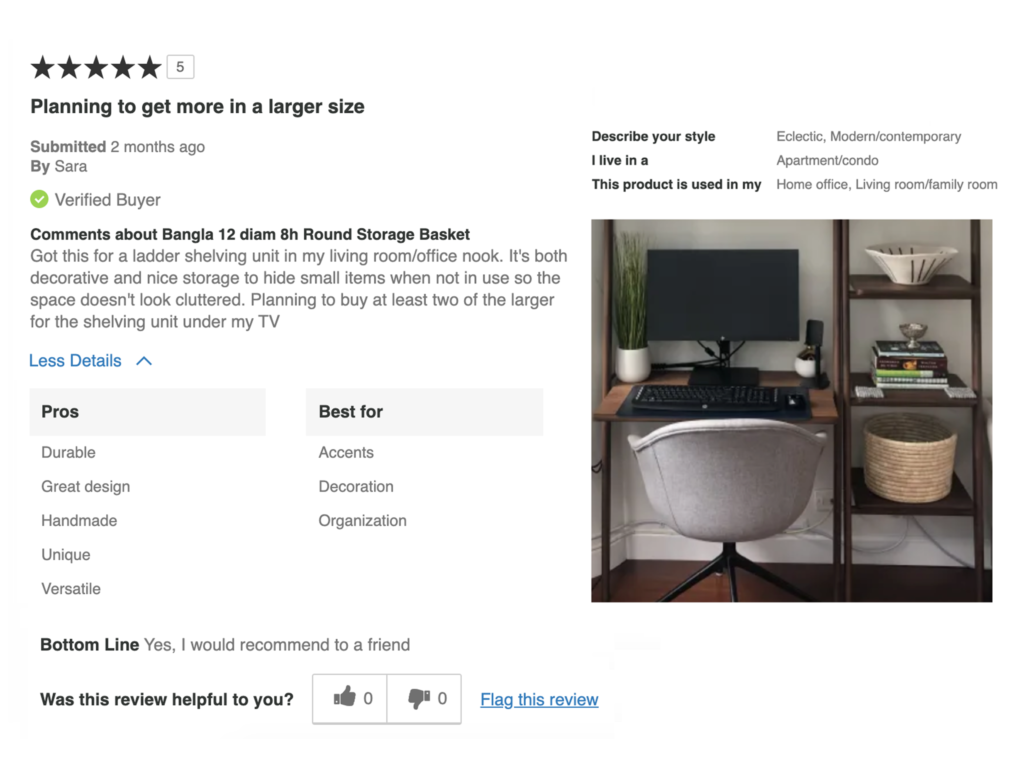
By browsing through customer-submitted photos, shoppers can see what an item looks like when it comes in the mail, and verify that it matches your product photos.
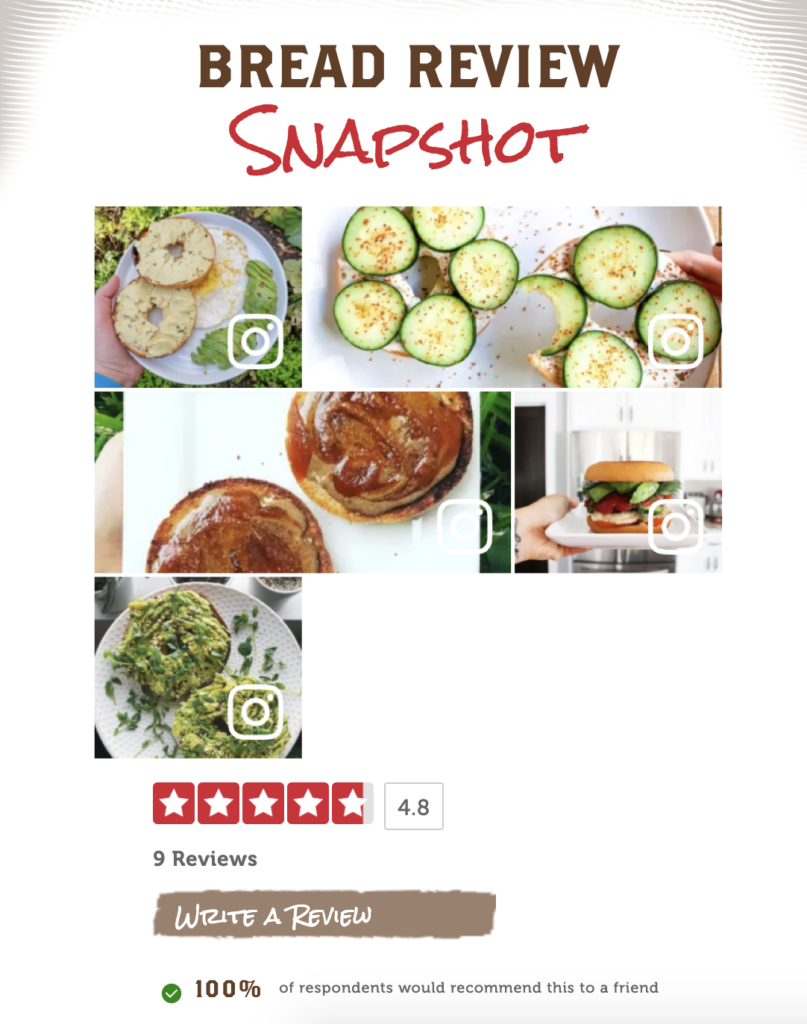
It also gets them excited to purchase the product, because they can visualize using it and imagine all the possibilities. Canyon Bakehouse encourages customers to share photos of dishes they’ve made using their gluten-free bread, giving future buyers fun recipe ideas:
2. It helps customers understand the size of the product.
Sleek as they may look, stock photography or product photos with white backgrounds give customers no reference for how big (or small) your product is.
One of my colleagues recently bought a basket on Amazon for raffle tickets. She thought it would fit 500 tickets, but when it arrived, it was so tiny it could fit in the palm of her hand. So, she had to return it. That return cost the retailer money that could have easily been avoided with a customer photo that put it on a coffee table.
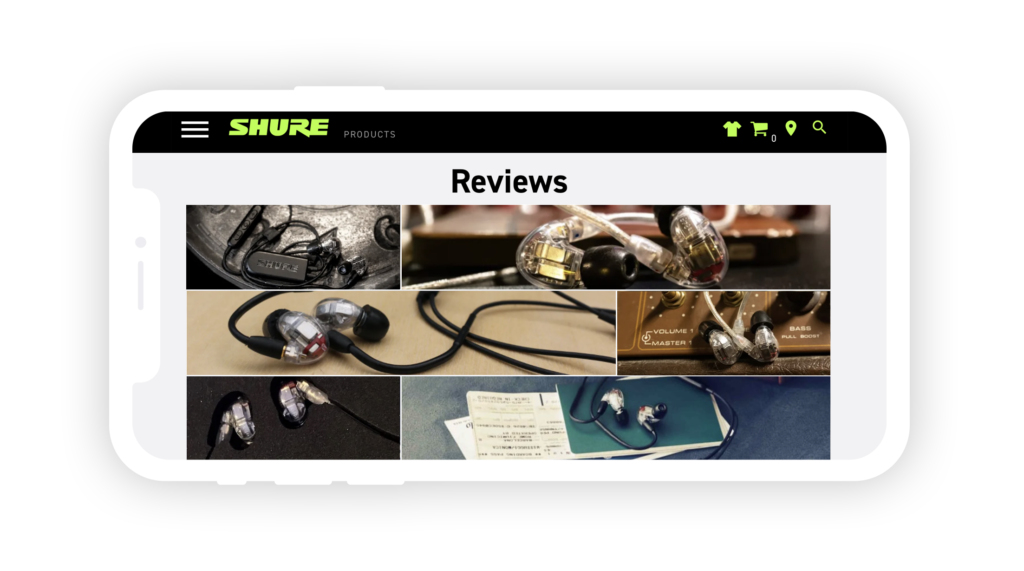
Shure Incorporated has collected over 1,200 images from social media for their product pages. These show customers the size of the product and the type of packaging it arrives in, avoiding scenarios like what happened to my colleague.
3. For apparel and cosmetics, it helps shoppers see what the product looks like on different types of people.
A dress on a 6-feet-tall model will look different on a shopper who’s 5’4”. UGC photos help shoppers determine how well your products will fit them.
In addition to photos, you can ask questions in your review form to help shoppers assess fit, like Janie and Jack does. Shoppers can rate how “true to size” a product is, and describe the age of the child they purchased it for. Reviewers also have the option to upload a photo, which you can then display in shoppable visual content galleries across your website on product, category, hashtag, or homepages to increase sales and inspire other purchases.
In the end, it all goes back to helping your customers make confident purchase decisions. The more information you can provide your shoppers with — using actual customer images — the more likely they are to buy something they actually want. That means fewer returns (which can get expensive), and more successful purchases!
The Power of UGC
The most exciting thing about UGC is how quickly it works. When we look at our PowerReviews client data, the average online customer might have a super low conversion rate, say around 4%. But when that same customer simply interacts with UGC — even if they just click on an image or expand a Q&A — it skyrockets to something like 11%. It’s really powerful. Interested in how UGC can impact your conversion rates? Our PDP Site Analytics (where we mined this data) is available for all PowerReviews clients who use Ratings and Reviews. Find out how our UGC solutions can boost your sales by 92%.
Let’s face it: getting a negative review can feel like a punch to the gut. After all, your brand is laser-focused on developing products and experiences that your customers love. And it’s never fun to hear negative feedback about something you’ve worked hard to create.
But negative reviews are inevitable. Even the most well-loved businesses get them from time to time. That’s because it’s simply impossible to create a product that meets the needs of every single customer who comes your way.
Of course, negative reviews are never the end goal. But the good news is, there’s a positive side to negative reviews. Yes, you read that right. In fact, one and two star reviews can actually be good for your business.
Not convinced? Let’s explore how negative reviews can positively impact your brand — and three key actions you can take to get the most benefit from your one and two star reviews.
How Negative Reviews Benefit Your Brand
In an ideal world, every one of your customers would write glowing reviews for the products they purchase. But that’s not reality. And that’s OK.
Getting the occasional one or two star reviews doesn’t mean your business is going under. In fact, one or two star reviews can benefit your business in these four key ways.
Negative Reviews Help you Build Trust with Shoppers
Today, consumers have literally endless shopping options. Of course, there are dozens of things a consumer considers when determining which companies to do business with — and which to pass up. But one top consideration is trust.
Research from Edelman found that 81% of consumers say they must be able to trust a brand prior to making a purchase. And 70% indicate trusting a brand is more important now than in the past.
In order to earn that trust, brands must be transparent. And a key way to do that is to display feedback from other shoppers — including the negative kind. When shoppers see negative reviews, they see you have nothing to hide. And that lets them know you’re a brand they can trust.
Negative Reviews Increase Product Sales
You might assume that the higher the average star rating of a product, the more likely a shopper is to buy it. And that’s true — up to a point.
We partnered with Northwestern University and made an interesting discovery, though. We found that a shopper is actually more likely to purchase a product when it has some negative reviews.
In fact, our research found that purchase probability peaks when a product’s average star rating is between 4.2 and 4.5 (it varies a bit by product category). If the average star rating surpasses 4.5, the likelihood of purchase actually drops.
Let’s look at an example. In the chart below, we can see that the purchase probability for salon haircare products peak at 4.4 stars. When the average star rating surpasses 4.4, the purchase probability goes down. In other words, a shopper is more likely to purchase a product with an average star rating of 4.4 than one with a five star rating.
But why is that the case? Because consumers perceive products with perfect five star ratings as too good to be true. If there are no negative reviews, a shopper may even jump to the conclusion that a brand is hiding something — and that they shouldn’t be trusted.
On the other hand, the occasional negative review can actually boost sales of a product, as this content brings your average star rating closer to that sweet spot of 4.2-4.5
Negative Reviews Help Consumers Make Better Purchase Decisions
Shoppers depend on negative reviews to determine which products fit their needs — and which don’t. Our research found that a staggering 85% of shoppers seek out negative reviews.
To elaborate on why this may be the case, our research also highlights that a third of shoppers say that poor reviews gave balance to their shopping research, stating that a negative perspective was either a ‘very important’ or ‘important’ factor influencing their decision.
In fact, when researching products, two-thirds of ecommerce shoppers filter for one-star reviews. These visitors still convert at 108% the rate of general web traffic (incidentally, this is the type of insight our PDP Site Analytics solution routinely surfaces).
But why is this the case? Here are three things we’ve noticed from speaking to brands and looking at this data day-in, day-out:
1. Based on the negative reviews, the shopper determines the product isn’t a good fit for their needs. They keep searching for a product that’s a better match — and you avoid an unhappy customer and an unnecessary return.
2. The shopper determines the feedback in the one and two star reviews isn’t relevant to them– so they disregard it. For example, let’s say a shopper is looking for shoes for their toddler. They scroll to the reviews and filter to see only one and two star content. Most of the negative reviews are focused on how the shoes aren’t good for kids with wide feet. The shopper’s daughter doesn’t have wide feet, so this feedback isn’t relevant. She decides to purchase the shoes anyway.
3. The shopper determines the worst case scenario isn’t a concern — so they purchase the product anyway. For example, imagine a shopper is researching dining tables. She filters to see only one and two star reviews to better understand the absolute worst case scenario. Most of the negative reviews are focused on difficult assembly. This particular shopper is very handy and enjoys building furniture — so she doesn’t find this concerning. In fact, she sees this feedback as a problem with the reviewers rather than the product itself
In each of these three situations, negative reviews helped a shopper make a more informed purchase decision. Of course, when shoppers are happy with their purchases, they’re more likely to become loyal — and a lot less likely to return the merchandise they bought.
Negative Reviews Shed Light on Fixable Issues
One and two star reviews can help you identify issues with your products or services that you may not have known about otherwise. This feedback can help inform improvements that’ll allow you to better serve your customers.
For example, let’s say you sell a children’s play kitchen that has a high return rate. Unfortunately, you don’t have much data on the reasons for the returns. However, you notice the product has a pretty low average star rating. And several of the reviews mention that the product was impossible to assemble because the pieces didn’t line up correctly.
So, you bring this feedback to your manufacturer to improve the quality control process for the product. And then, you observe how the average star rating goes up after this improvement.
Three Ways to Leverage Negative Reviews to Boost Your Bottom Line
So negative reviews can positively impact the performance of your brand. In fact, they should be viewed as an opportunity to do just that.
Here are three ways how:
1. Display Negative Reviews
It might be tempting to filter out negative reviews. But avoid the temptation. One and two star reviews add a layer of authenticity to your content and let shoppers know you’re a brand they can trust. What’s more, negative reviews help your shoppers make more informed purchase decisions, which will help decrease returns and boost loyalty.
So be sure to display all reviews, regardless of star rating.
In addition, allow shoppers to easily spot the “worst case scenario” — and determine whether it’s relevant or important to them. Our friends at Athleta do this in a couple different ways. First, shoppers can filter reviews by a specific star rating.
Shoppers can also sort reviews by the lowest rating.
Finally, consider displaying the most helpful positive review alongside the most helpful negative review for a given product, as our friends at ULTA do. Again, this is a great way to help shoppers easily identify the worst case scenario. And this helps them find the products that best fit their needs.
2. Respond to Negative Reviews
When you get a negative review, don’t just cross your fingers and hope it’ll quickly get covered up by positive reviews. Instead, face the review head-on by responding to it.
When you respond to a negative review, you have the opportunity to turn a bad situation around and salvage a relationship with your customer. If you’re able to fix the issue, the shopper is likely to buy from you again. What’s more, your response will show future shoppers that you value your customers and are committed to helping them resolve their issues. And that’ll give these new customers the confidence they need to make a purchase.
Remember: when it comes to responding to negative reviews, time is of the essence. If a customer is left hanging, they’ll only get more upset.
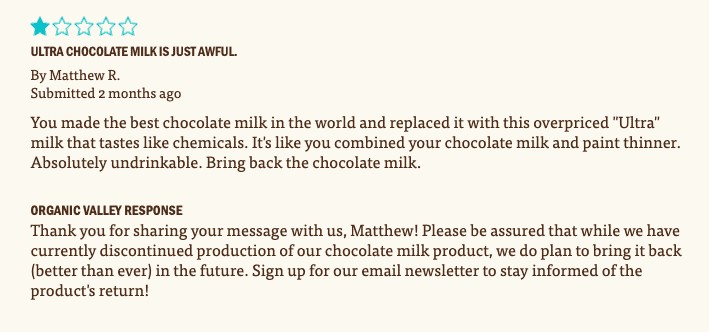
In addition, avoid using a generic, canned response — and don’t get defensive. Instead, personalize your response by using the shopper’s name and address the specific issues raised in the negative review. Our friends at Organic Valley do a great job writing personalized responses to negative reviews.
Finally, take things offline when needed. Sometimes you’ll need more details from the shopper in order to resolve their issue. But be sure to post a public response too, as it’ll let the customer (and future shoppers) know you’re taking action. Here’s a great example of a response from our friends at Clinique, inviting the reviewer to do a live chat to resolve their issue.
3. Analyze Negative Reviews to Identify Actionable Insights
In some cases, a negative review might mention an isolated issue. For example, a product might be damaged in transit.
But in other cases, a negative review can point to a larger issue that needs to be addressed. For example, one of our customers noticed several negative reviews for a watch that mentioned a broken clasp. They rectified the problem and their ratings subsequently improved.
Be sure you’re regularly analyzing your review content to gauge sentiment and identify issues early on. Then, use the insights you uncover to improve your products or messaging/marketing of those products or whatever else the data says needs adjusting.
With the right tool, you can also benchmark against your competitors. Compare by product rating, sentiment, key themes and so on by product, brand, and product category. This is critical insight to improving overall strategic direction and performance.
Start Embracing Negative Reviews
No business sets out to get negative reviews. But – if you are faced with a scenario where you do receive them – they are authentic and honest feedback from real customers. So the last thing you should do is brush them under a metaphorical rug.
Rather than being fearful of negative reviews, start embracing them. Not only are they a key tool that shoppers depend on to make confident purchase decisions, they’re full of insights that can help you improve your products and business, better serve your customers and ultimately generate more revenue.
By now, most brands understand the important role user-generated content (UGC) — including reviews, Q&A, photos and videos — plays in the modern consumer’s path to purchase. Our research found that a staggering 97% of consumers consult product reviews before making a purchase. And 88% of shoppers look for photos and videos from others like them before committing to a purchase.
In a relatively short amount of time, UGC has evolved from a nice-to-have to a must-have. In order to attract and convert customers, brands must make it a priority to collect and display more of this content across channels. By doing so, shoppers can make informed purchase decisions, and brands can boost their bottom lines.
UGC syndication is one way brands strive to increase the reach of the content they collect. However, depending on where you want to syndicate this content to and in what volumes, this tends to be expensive. No brand or retailer – regardless of their size or the revenue power they possess – wants to waste expenditure.
This is a question we get a lot from our customers. So should you assign budget to UGC syndication? The answer is: it depends on what you’re trying to achieve.
UGC syndication, defined
How exactly does UGC syndication work? Essentially, syndication is when one business shares some form of user generated content — such as a review, question, photo or video — with another business.
For example, let’s say a shopper submits a review via a brand’s site. The brand displays the review on its own website. The exact same review is then shared with the brand’s chosen retailers, and these companies display the review on their ecommerce sites, too.
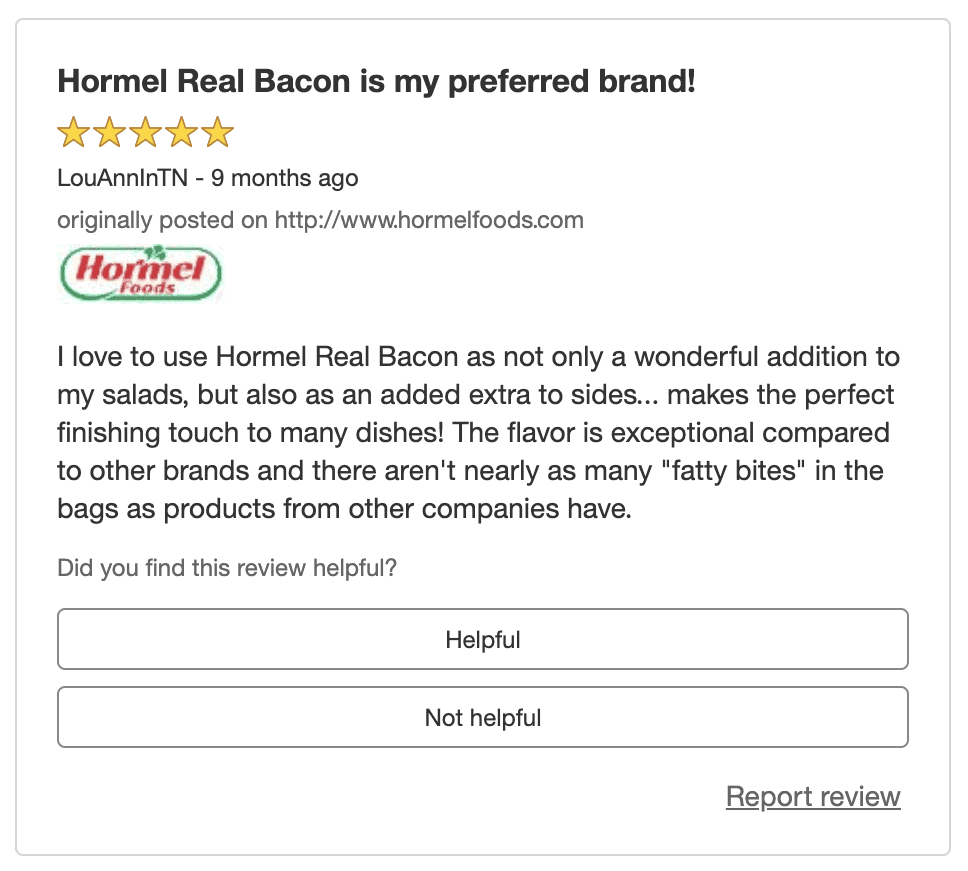
Let’s take a look at a quick example to illustrate how it works. This shopper submitted a review on hormelfoods.com for bacon. This review is displayed on Hormel’s website — and is shared with Target.com for display on the appropriate product page, extending the value of this specific review. A badge is displayed as part of the review on Target.com, letting shoppers know the review was originally posted on hormelfoods.com.
The cost of UGC syndication
There are different cost models out there, so how much you end up paying to circulate your UGC content to all the different platforms on which you sell your products will depend on 1) the vendors you work with and 2) where exactly you want to get your UGC content to.
Different UGC vendors have different “syndication networks”. This means each vendor has relationships with different groups of retailers, and therefore is able to syndicate your UGC to different locations. In certain situations, there is a cost attached to this.
Is content syndication worth the cost?
We have established partnerships with other UGC distribution networks to help our brands reach all their desired content destinations, but you’ll have to consider whether the cost from their providers is worth it. Let’s take a look.
1. How much UGC do your key retail partners already have for your products?
Oftentimes, a retailer has a lot of existing content for a given brand’s products. This is because they have the content the brand has historically syndicated to their site. On top of this, the retailer is also regularly generating their own native content for the products they sell.
If one of your retail partners already has a high volume of content for your products, syndication won’t make much of an impact…and it probably isn’t worth the cost.
For example, Walmart.com currently displays more than 30,000 reviews for Huggies Little Snugglers baby diapers. Content freshness is critical so a constant stream of reviews – as is the case here – is important wherever your products are sold.
Point being: if your retailer partners are receiving a steady volume of native reviews for your product, you may be able to live without a further investment in content syndication.
Incidentally, if you do need to improve “content freshness”, Product Sampling is a great way to do this. Campaigns can be run specifically to generate ratings and reviews on specific retailer sites.
But what about if you’re launching a new product and want there to be plenty of UGC available for shoppers, wherever they purchase the product? In this case, is syndication the answer?
Consider a retailer-specific product sampling campaign instead. It’s generally a more cost effective way to get content on your retailer sites for your new product (or any other products in need of more content).
How does a retailer-specific product sampling campaign work? You send free samples of your product to a targeted audience. In exchange for receiving the product, shoppers share their honest feedback by submitting a review on a specific retailer’s site.
Your retailer gets a high volume of reviews for the new product — at PowerReviews, we find that more than 85% of consumers who receive a free sample will go on to write a review. And you don’t have to foot the bill for syndication. But what if you have a wide catalog of newly launching products, and you need to get all of that content to multiple retailer destinations? In that case, it might make sense to consider paying for access to another syndication network. If you think this might apply to you, either reach out to your PowerReviews Customer Success Manager (if you’re a customer) or contact us today to talk it through.
2. Are you playing second fiddle to retailers on Google?
A PowerReviews survey found that more than a third of shoppers start the purchase journey on Google or another search engine. A solid SEO strategy helps ensure these shoppers can easily find your product pages.
Take a minute to navigate to Google and search for one of your products. Is your eCommerce site the first result? Or is it one of your retail partners?
If you’re not showing up first in search engine results, your money would be better spent increasing visibility to your own site.
UGC is a key way to do that.
A steady stream of UGC keeps your site’s content fresh and relevant with keyword-rich, permanent assets on your product pages. Search engines will crawl this content, and this helps shoppers find it.
So rather than paying to syndicate content to retailers, invest in content generation. Product sampling is a great way to quickly get more content on your site. And doing so will help ensure your website is a top result when shoppers are in the market for your products.
3. Should you be instead focusing on your own site?
The big retailers will always be an important channel for a lot of brands. They offer phenomenal reach and exposure.
However, many brands are now focusing on trying to drive traffic and sales to their own sites. Which makes sense: they no longer have to split the resulting revenue and have more control.
Although a huge brand, Nike is a great example. Now, Nike has invested a lot of money in its own brand and its site and overall web presence reflects this. This makes complete sense. Why? Try googling “Nike” and you’ll see that you are diverted firstly to Nike.com (whether you are on Google Shopping or not) and not the retailers that sell Nike products. So why wouldn’t they want to capture this traffic rather than let it slip elsewhere?
Now you may not be anywhere near as big as Nike. But that doesn’t mean you shouldn’t follow the same model.
Let’s say a shopper navigates directly to your website. Or perhaps they click through to one of your product pages from Google. Will they find enough UGC to make a confident purchase from your site?
The same PowerReviews survey I mentioned earlier found that almost half of shoppers will turn to a search engine if there aren’t reviews (or aren’t enough reviews) for a product on an ecommerce site. And 25% will head to Amazon. I’m willing to bet that in most cases, those shoppers don’t return to the first site.
Also consider this: building a robust set of first-party data about your customer is becoming increasingly important. GDPR and CCPA restrict a marketer’s ability to use third-party cookie data from their retailer partners. Brands must be able to rely on their own data to retarget consumers and personalize the shopping funnel. To gather the necessary first-party data, you need to be driving customers to your brand site, not to a retailer’s site.
Rather than paying to syndicate your UGC, think about investing in content generation for your own ecommerce site. It’ll help give your site visitors the confidence they need to convert.
4. Are there other ways to get your content on key websites?
You’ve determined that sharing content with key retailers is a necessity. But is there a more cost effective way to get it there? And are those retailers so impactful to the sales you generate as a brand that focusing on those make sense for you as a brand?
In fact, there may be other low to no cost ways to share UGC from your website to key retailer sites. For example, we at PowerReviews makes it easy for shoppers to share the reviews they write on your own website to other key locations, including Amazon. Here’s an example. A shopper writes a thorough review for a winter hat on the brand’s website. After submitting the review, they’re asked to share the review to Amazon.
We do this to help brands get maximum impact from their UGC for minimum cost. Be sure to ask your UGC partner what your options are for sharing reviews and other types of UGC.
Is paid syndication right for you?
User-generated content has become a key component of the purchase journey. It’s important to ensure shoppers can find plenty of this content, regardless of where they shop for your products.
It might seem unavoidable to pay hefty fees to syndicate your content. There are a lot of things to consider when making that decision. But in many cases, you’ll get a larger ROI from other initiatives.
Still not sure if syndication is right for you? If you’re an existing PowerReviews client, contact your Client Success Director to discuss. If you’re not a PowerReviews customer, you can either learn more about our approach to UGC syndication or get in touch with us direct today.
How to Curate Social Content for Maximum Impact on the Buyer Journey
Locate authentic visual media content posted on social media by your customers. Then display this throughout your digital experience to provide the social proof that will generate more conversions.
Social Curation
We know that 88% of consumers specifically look for visuals (such as photos or videos) submitted by other consumers prior to making a purchase. It’s key to provide these shoppers with the information they’re looking for, or else you risk losing them to a competitor that does.
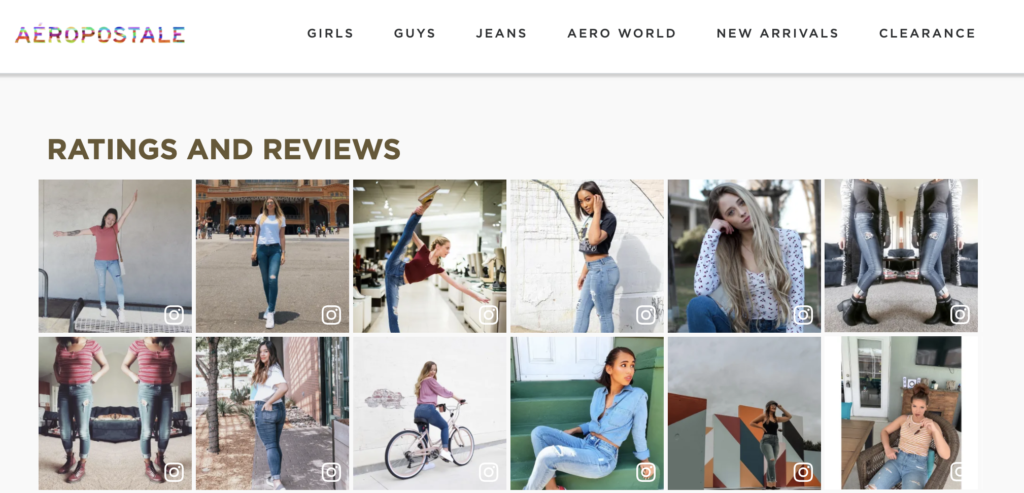
A simple way to generate more user-generated visual content for your home, category, gallery, and product detail pages (and other marketing materials) is to gather it from where it’s already being shared and posted by your customers — on Instagram.
In this guide, you’ll find best practices to put to use during each stage of your social collection campaign.
The first step to success when curating social content is to plan for success. The biggest component of this is selecting the right campaign hashtag to promote and follow on Instagram.
Why is this so important? Because choosing the right hashtag allows you to generate content that’s most relevant to your brand and your products. Plus, it can help you sort through the thousands of images you collect as you choose the UGC that will look best on your site.
Be sure to choose one that relates to the lifestyle of your customers and stays true to your brand’s image. General hashtags (think #OOTD) will generate millions of photos. But many of those photos won’t include your products, and they might even include products from your competitors.
On the other hand, a more targeted hashtag will generate less content, but the content will be way more relevant. This will save your team time in the long run as they won’t have to sift through a high volume of often irrelevant content.
If you want to save even more time and resources, and don’t want to sift through all of the content generated by your campaign hashtag on your own, leverage a specialist provider. The best practice approach of these vendors incorporates the moderation capabilities necessary to match and quality control the content you collect. At the same time, it will also ensure this content is on brand while being displayed quickly on your product, category, gallery and home pages.
Power Pro Tip!Choose a hashtag that makes your customers excited to participate! And as part of your campaign, ask your customers to share photos or videos showing off new skills, exploring new places, or doing something interesting that you can relate back to your brand.
Get inspired!
Here’s how some of our friends are getting creative with their hashtags:
#JanieAndJackLove (Janie and Jack)
#BetterByTheFire (Duraflame)
#StanceForScrubs (Stance)
Here are some things to keep in mind when choosing the right hashtag for your campaign:
Relate it to the lifestyle of your shoppers
Relate it to your brand image and the lifestyle of your brand
Remember to be genuine and stay true to your brand image
Keep it unique to weed out competitors
Don’t forget!
Work with your marketing team to make sure your campaigns and outreach flow with other marketing initiatives. For example, is your marketing planning to run a Holiday campaign? If so, collaborate and plan ahead so that the hashtag and your outreach don’t interfere with other initiatives.
Plan
The first step to success when curating social content is to plan for success. The biggest component of this is selecting the right campaign hashtag to promote and follow on Instagram.
Why is this so important? Because choosing the right hashtag allows you to generate content that’s most relevant to your brand and your products. Plus, it can help you sort through the thousands of images you collect as you choose the UGC that will look best on your site.
Be sure to choose one that relates to the lifestyle of your customers and stays true to your brand’s image. General hashtags (think #OOTD) will generate millions of photos. But many of those photos won’t include your products, and they might even include products from your competitors.
On the other hand, a more targeted hashtag will generate less content, but the content will be way more relevant. This will save your team time in the long run as they won’t have to sift through a high volume of often irrelevant content.
If you want to save even more time and resources, and don’t want to sift through all of the content generated by your campaign hashtag on your own, leverage a specialist provider. The best practice approach of these vendors incorporates the moderation capabilities necessary to match and quality control the content you collect. At the same time, it will also ensure this content is on brand while being displayed quickly on your product, category, gallery and home pages.
Here are some things to keep in mind when choosing the right hashtag for your campaign:
Relate it to the lifestyle of your shoppers
Relate it to your brand image and the lifestyle of your brand
Remember to be genuine and stay true to your brand image
Keep it unique to weed out competitors
Power Pro Tip!Choose a hashtag that makes your customers excited to participate! And as part of your campaign, ask your customers to share photos or videos showing off new skills, exploring new places, or doing something interesting that you can relate back to your brand.
Get inspired
Here’s how some of our friends are getting creative with their hashtags:
#JanieAndJackLove (Janie and Jack)
#BetterByTheFire (Duraflame)
#StanceForScrubs (Stance)
Promote your campaign
Your shoppers won’t use your hashtag or tag your account if they don’t know what hashtag to use or what your handle is. So make sure you promote your campaigns.
Include language in your campaign promotions reminding customers of your hashtag and Instagram handle. Let them know you want to see how they’re using your products, and explicitly ask them to share photos and videos using your products on Instagram, communicate the hashtags you want them to use and request they tag you.
Don’t forget!
Be sure your most engaged and influential followers are aware of your campaigns. If you have a community of influencers (and don’t forget about the influence micro influencers can have), make sure to add their handles to your list of Approved contacts, so their content is automatically approved and displayed.
Engaging influencers will also help increase the reach of your campaign by getting in front of your influencers’ followers as well — a great way to get more content, faster, at the start of your campaigns.
Examples of places you can promote your campaigns:
On your website Homepage, Gallery page, Category pages, Product pages, Homepage banner
Customer emails Post purchase emails, Cart abandonment emails, Newsletters
Social media Instagram, Instagram stories, Facebook, Twitter, Pinterest, Snapchat filters
In person In-store, Billboards, Videos, Magazine advertisements, Catalogs, Pamphlets, On booth backgrounds at events, On photo booth camera rolls
Establish legal messaging and terms
You’ll need to get permission from consumers before using their photos or videos across your website or in other marketing materials.
Make sure you have all legal language crafted and approved before the start of your campaign, so you can start collecting approved content as soon as possible. Establish a terms and conditions page — somewhere users can go if they have questions — and link to this page when asking for permission. Once a user gives permission to use their content in marketing materials, make sure to attribute the content to them. Say something along the lines of “Photo courtesy of [insert Instagram handle].”
During Campaign:
Managing the content you collect
Secure image rights
In order to leverage user-generated images and videos in your marketing initiatives, you’ll need to get the creator’s permission (at PowerReviews, we know how important this process is so we seamlessly incorporate it into our technology).
Best practice:
Tailor the permission messages you send for your different customer groupings and profiles.
Not all your customers are the same, so think about how best to motivate each individual to grant you permission to repurpose their content. Your messages won’t always be one-size fits all.
For example, a sporting goods company’s customers can span from beginners to more advanced athletes — both of which could respond in different ways. Beginners will be more excited to share photos of themselves learning a new skill, while advanced users might want to show more close up photos of the products they’re using to train.
Take note of who grants image rights and note which messaging works best for different users.
Power Pro Tip!If you repost a user’s content on your company’s Instagram page, tag them in it as another way to give them props. This will encourage other customers to share content with you, in hopes of being featured on your page.
Post Campaign:
Repurposing the content you collect, measuring and analyzing the performance of your campaign
Repurpose content
Your shoppers won’t use your hashtag or tag your account if they don’t know what hashtag to use or what your handle is. So make sure you promote your campaigns.
Include language in your campaign promotions reminding customers of your hashtag and Instagram handle. Let them know you want to see how they’re using your products, and explicitly ask them to share photos and videos using your products on Instagram, communicate the hashtags you want them to use and request they tag you.
Some places to promote this UGC include:
In the visual content gallery on your product pages
In-store displays
Marketing emails
Advertisements
On your social media channels
Understand your performance
After your campaign is over, take a look at its performance. Look at who is sharing content and what kind of content they’re sharing.
For example, are the images being shared poor quality? If so, you might need to provide your users with more direction on what you’re looking for.
In addition, take note of who your UGC creators are. You’ll find interesting insights into what products are being featured, and the style of content being created. With this information, your brand can learn more about how a product is being used, who’s using it, and what type of content resonates with different types of shoppers. Note what worked, and what you can change for the next campaign.
Dig even deeper
With PDP Site Analytics, track the actual sales impact of visual content on your site. PowerReviews data across all our customers shows visitors that interact specifically with visual UGC have a conversion lift of 81% over general visitors who don’t interact with visual UGC.
This information specifically applied to your own UGC and Social Curation programs helps you iterate, improve and optimize for bigger impact. Find out what imagery and video resonates best at what point in the journey, then seek to generate and display more of this.
Include language in your campaign promotions reminding customers of your hashtag and Instagram handle. Let them know you want to see how they’re using your products, and explicitly ask them to share photos and videos using your products on Instagram, communicate the hashtags you want them to use and request they tag you.
Conclusion
Authentic user-generated visual content shared on social media provides compelling social proof to shoppers on your site. Brands and retailers are increasingly leveraging this content at high impact points of their digital experience to nurture and convert traffic – whether this is on their homepages, product pages or in their marketing materials.
The key is being able to collect and display this content at scale.
The PowerReviews Social Curation platform enables just this, by providing unique capabilities to cultivate, surface and showcase social media postings to accelerate the path to purchase.
If you’re a PowerReviews customer, reach out to your Customer Success Manager to discuss how to get yourself up and running. If you’re not a PowerReviews customer, reach out to us today to find out more.
The COVID-19 pandemic has drastically changed the retail landscape. Stores have been forced to close, consumers are more hesitant to shop in the ones that are left, and eCommerce is exploding.
BOPIS (buy online, pickup in-store) has grown steadily over the past decade. It combines the efficiency of online shopping with the immediacy of buying an item in-store. But few retailers have managed to get it completely right. Most BOPIS processes have kinks and ultimately deliver poor experiences. And yet, consumer demand for local pickup hasn’t slowed. It’s only accelerated during the new COVID environment, with “curbside pick up” offering a no-contact BOPIS option. Just look at the latest Google Trends data for “curbside pickup”:
Why the sudden surge in popularity for curbside pickup?
Two words: turnaround times. Assuming a product is in-stock, customers can often pick it up the same day they place the order — or faster. Major retailers like Best Buy, Staples, and Apple offer pickup times as short as 1 to 2 hours. That near-instant gratification makes it even better than buying online.
The no-contact nature of curbside pickup has only made BOPIS more attractive to customers. As everyone shifted to online shopping during the pandemic, shipping times suffered. The demand for eCommerce has grown by so much — and with such speed — that carriers simply haven’t been able to keep up. Even Amazon Prime has had difficulty meeting their 2-day shipping times.
What’s the solution for shoppers who can’t wait? Bypass longer shipping times completely and go to the store. Over half (55%) of consumers anticipate making more holiday purchases via curbside pickup this year, according to our consumer survey of 5,383 shoppers. In fact, two-thirds of shoppers said curbside or in-store pickup would make them feel most comfortable shopping in-store during the 2020 holiday season. According to a survey from Adobe, 30% of online buyers actually prefer curbside pickup or BOPIS to traditional home delivery.
3 elements for successful curbside pickup
Create frictionless curbside experiences and you could lock these customers in for life. But what does a great curbside pickup experience look like? There are three key elements:
Intuitive online shopping experience.
How easy is it for your customers to shop for curbside pickup?
Frequent order updates and communication.
How well do you communicate to customers when their order is ready, and where they can pick it up?
Foolproof fulfillment and pickup process.
How seamless is the pickup process once customers arrive to pick up their order?
Nail all three, and you’ll have your customers singing your praises. Let’s break down the process.
1. Designing an Intuitive Online Shopping Experience
What makes curbside pickup attractive is its ease and expediency. That seamless experience needs to begin on your website, as customers are browsing for items and adding them to their cart.
Highlight curbside pickup throughout your website.
As customers browse, they should be able to see at-a-glance whether a product is available in the store nearest them. Clearly communicate which products are available for curbside pickup.
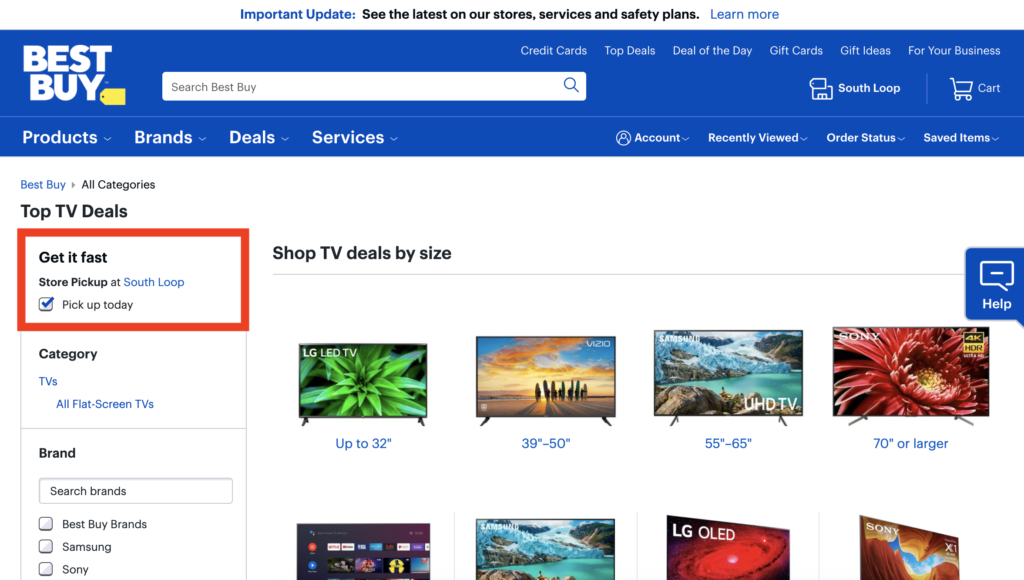
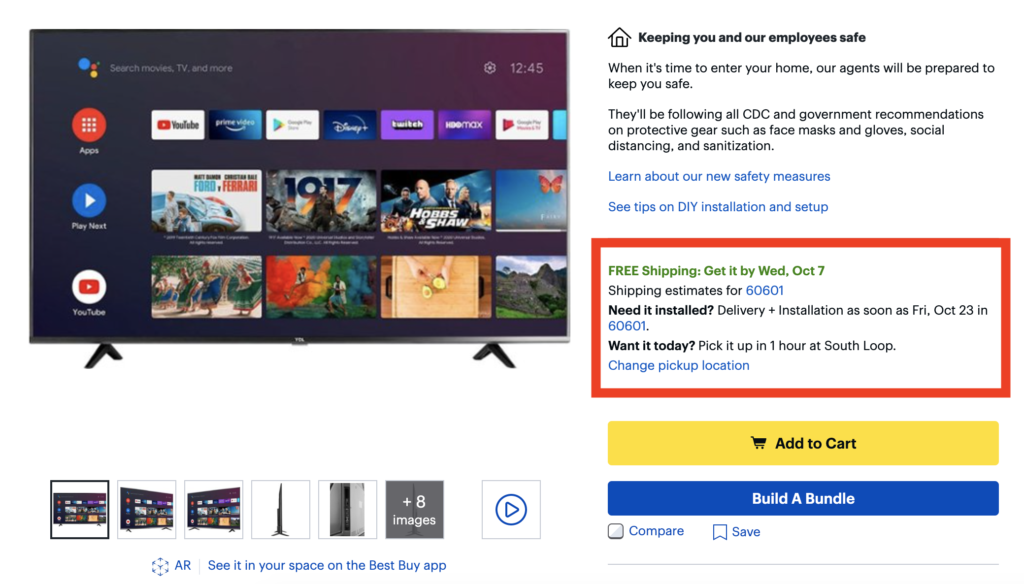
Bonus points if you can highlight the value of BOPIS at the same time, like Best Buy does. The very first filter on their category page is for curbside pickup, with a special call out of “Get it fast.” Shoppers can check the box to “Pick up today.” They’re also transparent, making it easy for the customer to identify which items are available for store pickup and which are not. In the case that they do not have the item available at your local store that day, they’ll provide an estimate of when items can be picked up at a later date.
Best Buy emphasizes the speed of curbside pickup again on the product page. If customers want their product today, they can get it in as little as 1 hour. Talk about convenient.
Set clear expectations.
Make sure that fulfillment times are communicated throughout the browsing and purchasing experience.
Customers choose curbside pickup because of its immediacy and convenience, so they need a time frame they can rely on. Should they plan on picking up their order during the workday, or can they do it before they start making dinner?
Be as explicit as possible. “Typically ready within 2 hours” is more informative than “same day pickup.”
Meet those expectations.
Let’s say you’re like Best Buy. For same-day pickup items, they promise a 1-hour pickup window regardless of product.
If you’re going to make a promise like that one, you need to meet it. Carefully consider what your in-store teams are actually able to commit to during this time. It’s possible you’ve scaled back your staff in-store, and now they’re responsible for more than they were pre-COVID.
It’s critical that you understand their capacity, and realistically evaluate whether they can commit to a shorter window. Should you offer a longer window, or hire more staff? Get the balance right so you can meet your SLA.
Ensure accurate inventory.
Your inventory must be updated in real-time, so that customers cannot purchase something for pickup that isn’t actually available in that store. No one wants to show up for their curbside pickup and discover their product is nowhere to be found.
Staples goes an extra step and displays how many of an item they have in-stock, increasing customer confidence in their ability to fulfill an order.
2. From Cart to Curbside: Communicate, Communicate, Communicate
Once shoppers complete checkout, they’re relying on you to regularly update them on their order status, so they know when to pick it up. Curbside pickup is still relatively new to many shoppers, so it’s better to over-communicate than under.
Set up your email series.
Emails should be automatically sent as a customer’s order progresses through fulfillment.
At a minimum, customers expect that they’ll receive an order confirmation email and an “Your item is ready for pickup” email. Go the extra mile with additional status updates and confirmation of pickup emails.
Remind customers what they can expect.
Take every opportunity to remind customers when they can expect their order to be ready, how you will notify them, and what they need to do upon arrival to pick up their order.
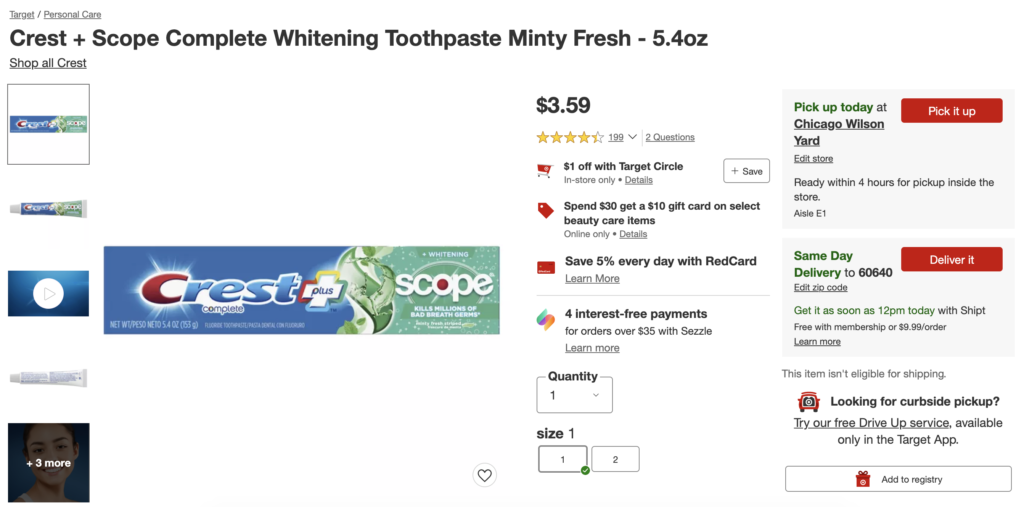
This communication begins on your website. For example, if an item isn’t available at a selected store, Target suggests the closest available option. Target also gives customers a quick idea of where and when, specifically, they’ll be able to pick it up: “tomorrow inside the store.”
Once a customer places their order, you should remain in regular contact with them until they pick up their order. Email notifications are table stakes at this point, but many customers prefer the option to also receive SMS notifications for more real-time updates. Let the customer choose which notification method they prefer for a great experience.
Outline the curbside pickup process.
Tell customers exactly what they need to be able to drive off with their purchase. Do they need their ID and credit card, or is an order number sufficient?
Offer directions on where customers should go to pick up their item when they arrive. Are there dedicated parking spaces in your lot, or do they need to go inside to a special pickup counter? Be sure to address other concerns about in-store shopping during the pandemic, like required face coverings and updated cleaning processes. For example, Target has an entire landing page dedicated to their curbside pickup process, which emphasizes key aspects that appeal to those shopping during COVID:
3. Preparing Your Store for Curbside Pickup
Finally, you need to prepare your store and your staff for fulfilling curbside pickup orders.
Develop staff guidelines.
How do you make sure each curbside order is in-stock, packed, and tied up with a metaphorical bow for each customer? You’ll need to determine:
Who will be responsible for packing curbside pick up items? Will you have dedicated staff or cross-train?
How will staff be alerted that an order has come in? What are their next steps? Define the process for gathering items, packaging them, and completing orders.
How will you ensure the right orders go to the right customers? Outline requirements for validating both the customer’s identity and the products so the customer doesn’t have to come back.
How can you anticipate incoming order volume while balancing the needs of in-store customers? Don’t let a busy store impact the curbside customer’s experience.
Will you provide a way for shoppers to modify their orders after they complete checkout? Determine timeframes and product limits.
Have a back-up plan.
There are going to be times when your curbside fulfillment team is running behind. When this happens, you want to be ready.
Think out your communication plan now so you can dynamically react to a backup in orders if you are over capacity. Your goal is to adjust customers’ fulfillment expectations as soon as possible. Will you send an email alerting customers to a delay with their pickup order?
You can also add a banner to your website, so shoppers are aware of potential delays before they even place their order. For example, Home Depot notifies customers during checkout that their pickup window may be delayed:
Allocate space and signage.
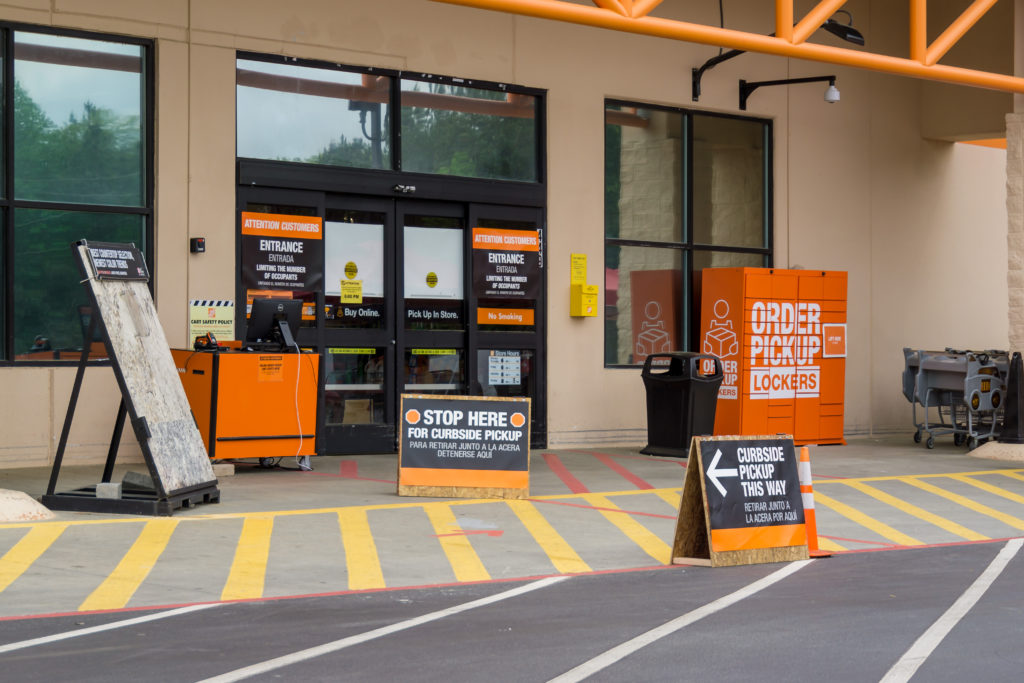
Make sure signage is clear, so that there’s no question for customers of where they should go and what they should do upon arrival.
Will you have dedicated parking spaces, or do you need to print signage directing customers toward a pickup counter inside? Be thoughtful that your curbside pickup process may operate differently depending on location. A store located in an urban crowded area will have different needs than one in a suburban area with a huge parking lot.
Set up a dedicated place inside your store to handle online orders so that curbside customers don’t need to be commingled with regular customers during peak time. Again, you don’t want their experience to suffer if things are busy.
Curbside Pickup and Your Store
In large part, the success of your curbside pickup hinges on how well you meet the expectations you set with your customers. But customer expectations for curbside pickup aren’t just based on their last experience with you. It’s about their last retail experience, period.
If they just had a really great, smooth experience with curbside pickup elsewhere — regardless of whether it was with a competitor or a business in a completely different vertical — they’re now going to expect the same smooth experience with you, because they know it can be done.
And it can be. With these tips, you’ll be set for success.
A critical and very evident trend to emerge as part of the COVID-19 pandemic: brands that previously relied on selling their products in person have had to shift online and go “Direct to Consumer”.
A comprehensive UGC program – including ratings, reviews, images, video and Q&A content – is now an ecommerce must-have, with 97% of consumers consulting product reviews before making a purchase.
So many brands are seeking to implement UGC quickly as part of this transition.
Download this Guide for step-by-step pointers on the entire process, including:
How UGC impacts D2C success and will enable you to sell more products
How to generate a high volume of high-quality reviews fast
Ecommerce traffic and purchases have risen to previously unfathomable heights, fueled by the pandemic and new habits formed during the stay at home orders. This transformation is really laid bare in our Holiday Consumer Survey, which shows that a massive 64% will spend more online this year than last.
Why is this? Well, first and foremost, it’s the fact more shopping is occuring online than ever before. However, consumers are also buying products they’ve never bought before and are looking for validation before buying.
Either way, there has never been a better time to acquire new customers.
One of the most critical channels for doing this is how you rank and appear on search engines, and more specifically how you as a business are rated and reviewed on there.
For those that advertise on Google, Google Seller Ratings are an easy and highly effective way to add social proof to your ads. This blog is meant to provide a quick overview of Seller Ratings so you can determine if they are right for you.
What are Google Seller Ratings?
Google Seller Ratings is a Google Ads extension that displays a rating between one and five stars that shows up on search ads. It’s an automated extension that is calculated by aggregating customer reviews from various sources that Google trusts. The resulting rating is then displayed within the body of the ad.
If you’ve ever typed into Google’s search bar, you’ve seen Google Seller Ratings.
It is the star rating that displays underneath the URL on Google ads. While Seller Ratings are most often used by ecommerce companies, any company with a digital presence can use Google Seller Ratings.
Note: Seller Ratings are for the entire site, not individual products.
What are the benefits of Google Seller Ratings?
If they are not already, Seller Ratings should be a critical part of your digital strategy. Why? According to Google, they can increase the click-through rates (CTR) of your ads by up to 10%. This is super important because a higher CTR means a higher quality score — which reduces your CPC (cost per click) and improves your ad rank.
Bottom line: Seller Ratings optimize the performance of your Google Ads. More click throughs, more eyeballs on your site and – in turn – more sales.
Which makes complete sense. Your Seller Ratings are determined by a cumulative and aggregated volume of trusted customer reviews. They are a direct reflection of the experiences your customers have had while dealing with your business.
This provides social proof for your brand right on Google search results pages, increasing shoppers’ trust in your business and giving them the confidence they need to click through to your site.
How to get Google Seller Ratings
The following criteria must be met for Google Seller Ratings to show up next to your ads:
There must be at least 100 verified site reviews in the country of the searcher
Those reviews must have been collected within a the last 12 months
The reviews must have an average star rating of at least 3.5 stars
Once you have collected the number of reviews required, Google will (after a period of indexing time of up to 6 weeks) display Seller Ratings next to your paid Google Ads and Google Shopping listings.
Pro tip: We recommend collecting more than 100 reviews in every 12 month period on a recurring basis. Google values recency and authenticity, as do your customers.
Note: we have a best-in-class authenticity policy, meaning anything that meets our standards is nearly always accepted by Google.
Another thing to note: Google works with trustworthy authorities – such as PowerReviews – to collect seller ratings that are then displayed when users search on your company name. This means Google accepts reviews from other sources, which in turn makes capturing content in the volumes required easier as it means no reviews go to waste.
How do I check if my Seller Ratings are working properly?
First, check if you have met all of the criteria listed above. Assuming this is the case, there are a number of ways to check if your Seller Ratings are working.
Here are a couple of tests you can try:
Go to Google shopping and type your store domain into the search bar. When looking at the results, check to see if Google Seller Ratings are showing. Make sure you are in “list” view since the grid view may not have enough room for the Seller ratings to show.
For example, PGA Tour Superstore would be: https://www.google.com/shopping/ratings/account/lookup?q=https://www.pgatoursuperstore.com/
There are a number of ways to check if your Seller Ratings are working.
You’ll be able to view information about your store and a seller rating if your site meets the minimum seller rating thresholds. A country selector will allow you to view this information per country. Use the dropdown menu to see your seller ratings in different countries.
How to improve your Google Seller Ratings
There are a number of ways to improve your Google Seller Ratings.
Provide a good customer experience
At the risk of stating the obvious, it starts with the quality of the experience you deliver your customers. There’s really no way of gaming or hacking this. The whole point of customer reviews is that they are intended to provide authentic “social proof” or guidance to help other consumers make decisions. So focus on your customers and reap the rewards.
Ask!
Although some customers are super motivated to provide their opinion to the world, this isn’t true of all. Many have a great perception of your brand but need some encouragement to share it so prominently. Asking in the right way at the right time is therefore critical.
Choose when you make the ask
Again, may sound obvious but make sure you make the ask at an appropriate time after a successful engagement (i.e. after a customer buys a product, rather than if they return it following a bad experience). Obviously, automation is critical to scaling this to a level that Google looks for.
Optimize how you make the ask
Think about the content of the email. There are a few fundamentals you need to get right. They include:
– Keep it short: no one reads long marketing emails
– Be clear on the ask: you are asking for a review of your entire business, not a specific product. Also provide specific and brief guidance on the content you are seeking, why you’re asking, and deliver a clear call to action.
– Add an element of personality: Asking in a robotic and transactional manner is unlikely to get the result you want.
– Simplify the entire process: Make sure the actual process of providing the review is easy and straightforward.
Conclusion
Google Seller Ratings are a critical component in the purchase journey for brands. They help to get more eyeballs on your site and drive new traffic to product pages to generate new sales. However, Google has strict guidelines in place to ensure it accurately ranks businesses that you need to be aware of. To make sure they display properly, you need to meet these. As with generating product reviews, there are some key best practices you need to follow to generate more and better Google Seller Ratings. Implement these and make Google a critical and lucrative sales generation channel.
The PowerReviews Ratings & Reviews platform enables you to seamlessly capture and display Google Seller Ratings. If you’re one of our customers and would like to find out more, reach out to your Client Success Manager or our Support team today.
The Beginner's Guide to a Best-in-Class Ratings & Reviews Program
A best-in-class Ratings and Reviews program consists of the collection, display and analysis of User Generated Content.
But few brands are operating at this level right now – which is why we created this four volume best practice guide. In it, you will learn how to capture as many customer product reviews as possible and then how to use it across your website (and beyond) to convert browsers to buyers.
Volume 1
What Constitutes the Perfect Review...and How to Get More of Them